KERNIX
Multi-FX Destruction Engine
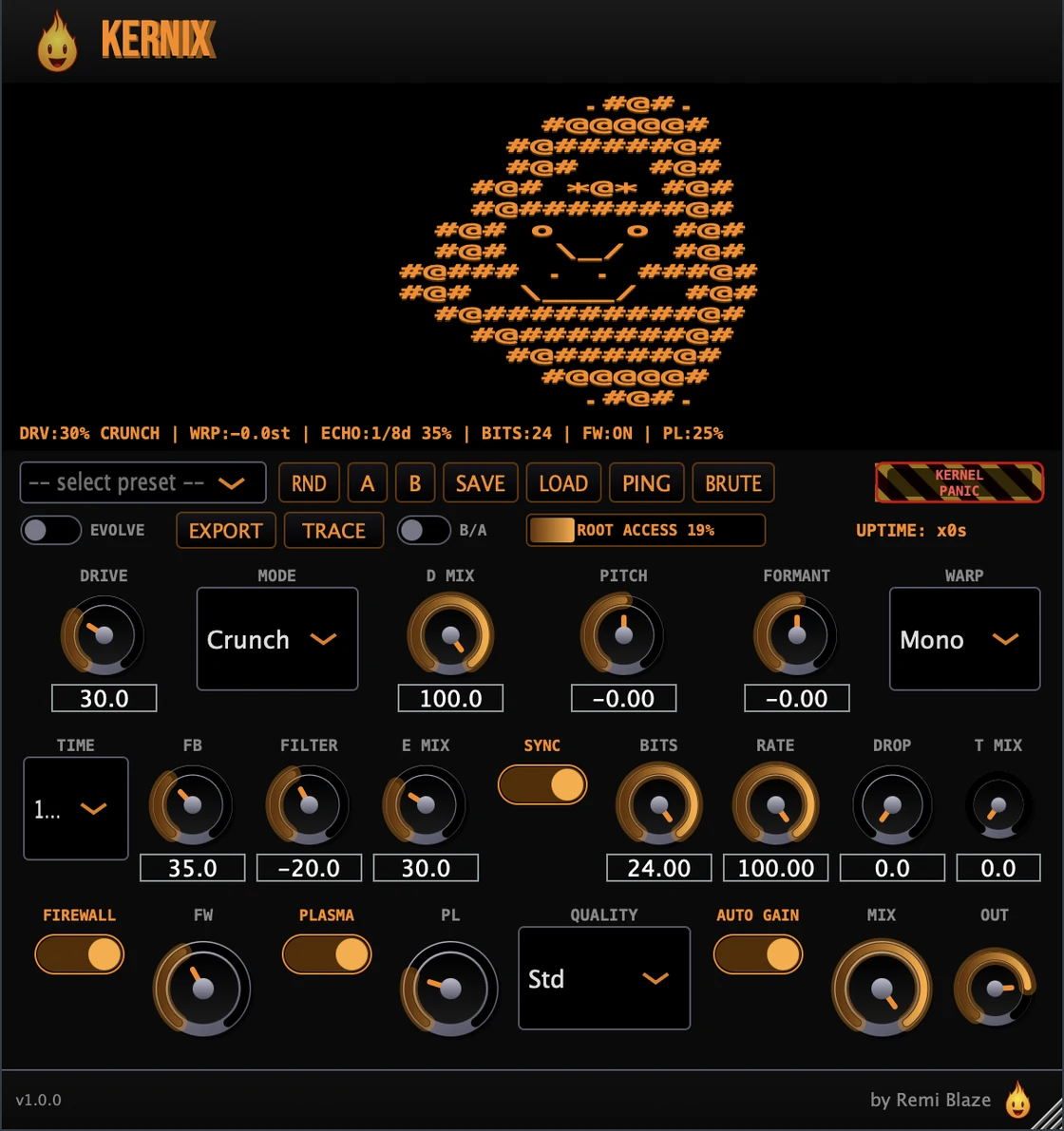
Kernix takes a dry vocal or synth from clean warmth to controlled chaos in one fixed chain of six modules: saturation, pitch and formant warp, a feedback echo that re-saturates on every repeat, a bit-crusher, a dynamic harshness suppressor, and a high-end exciter: all behind a glowing orange-on-black terminal UI. Built for tech house, it stays musical when you push it hard: the Firewall tightens harshness only when needed and Auto-Gain keeps your levels honest, so you can drive it into destruction and still land a mix-ready sound.
macOS: AU · VST3 · CLAP · AAX · Standalone
Windows: VST3 · CLAP · Standalone
Also in the Producer Bundle: the paid Pro plugins in one purchase, for less than buying them separately.
INSTALLATION
3 steps.
RUN THE INSTALLER
On macOS, double-click Kernix_Installer.pkg and choose AU, VST3, CLAP, AAX or Standalone. On Windows, run the .exe installer and choose VST3, CLAP or Standalone.
CHOOSE YOUR FORMATS
On macOS you can install AU, VST3, CLAP, AAX and the Standalone app. On Windows: VST3, CLAP and the Standalone app. Pick the formats you want and that your DAWs support.
OPEN YOUR DAW
Restart your DAW and rescan plugins if needed. Find Kernix under Remi Blaze in your plugin list.
- Ableton: Plugins › Audio Effects › VST3
- Logic Pro: Audio Effects › Remi Blaze › Kernix
- Reaper: FX › VST3 › Kernix
FEATURES
Everything the one-knob MANGLE macro hides: unlocked and independently controllable. Signal chain: Drive → Warp → Echo → Texture → Firewall → Plasma.
Drive: Saturation Engine
Warp & Echo
Texture, Firewall & Plasma
Oversampling & Auto-Gain
Presets & Platform
FACTORY PRESETS
SYSTEM REQUIREMENTS
- OS macOS 15.0 (Sequoia) or later · Windows 10 or 11 (64-bit)
- Architecture Apple Silicon + Intel (Universal Binary) · x64 on Windows
- Formats macOS: AU, VST3, CLAP, AAX, Standalone. Windows: VST3, CLAP, Standalone
- DAW Any AU, VST3, CLAP or AAX compatible host
FREQUENTLY ASKED QUESTIONS
No. Kernix is a paid plugin: a one-time purchase with no subscription. Want to try the engine first? Kernix Raw gives you the core mangler behind one MANGLE knob, free.
Yes. The Kernix manual walks through the controls with a numbered screenshot of the interface, plus a how-to and answers to common questions.
Kernix is a multi-FX processor that chains six modules in a fixed signal path: Drive (saturation), Warp (pitch and formant), Echo (feedback delay), Texture (bit-crush), Firewall (harshness suppression), and Plasma (high-end exciter). It takes a dry vocal or synth from clean warmth to controlled chaos.
Five: Warm (smooth tube tanh), Crunch (asymmetric transistor clip with a touch of fold), Tape (magnetic hysteresis), Broken (bit-aliased waveshaping), and Hell (cascaded tanh → wavefold → hard clip for total destruction). Each has its own amount and dry/wet mix.
The Echo feedback path routes back through the Drive engine, so every repeat is re-saturated. Stack high feedback with high drive and you get rising, increasingly distorted echoes that evolve rather than simply decay. It's tempo-synced from 1/32 up to 1/2.
Firewall is a dynamic notch in the 2–5 kHz band that tracks the harshness saturation creates, tightening only when needed so it stays transparent on clean material. Plasma is a high-end exciter that high-passes above 8 kHz, saturates in parallel, and sums back to restore the air that saturation and bit-crushing strip away. Both have independent on/off and amount controls.
Yes. Kernix is a Universal Binary that runs natively on Apple Silicon (M1/M2/M3/M4) and Intel Macs, signed and notarized on macOS 15.0 or later, code-signed for Windows 10 and 11.
Yes. KERNIX is in the Producer Bundle, which has the paid Pro plugins in one purchase for less than buying them separately.
Inside the plugin. Click the Fire Head, the flame logo in the top bar, to open the About panel. It shows what the plugin is, who made it and its version, plus the trademark notices and a field worth exploring. Click anywhere in the panel to close it.
Installation guide is above. Need more help? Visit the support page.
TRY IT FREE FIRST
Kernix Raw gives you the core mangler engine behind one MANGLE knob: free, so you can hear the sound before you buy the full six-module chain.
Get Kernix Raw: FreeMORE PLUGINS
Kernix is part of a growing collection of tools designed by a producer, for producers. Explore the full suite.
Licensed under the Commercial License.