What is Misomidix Raw?
One knob. Five parts. Misomidix Raw generates a complete four-bar loop, drums, chords, bass, melody and stabs, all at once. The agreement between them is the point: the drums publish their kick onsets, the chords publish the harmonic grid, the bass locks to both and the melody follows the harmony.
It generates MIDI and makes no sound on its own: put it on a MIDI track ahead of an instrument, or drag its output straight into your timeline. Nothing is sampled; every note is generated from music theory against a genre profile, so the output never repeats.
How does one-knob MIDI generation work?
Misomidix Raw generates a complete four-bar loop, drums, chords, bass, melody and stabs, all at once. The agreement between the parts is the point: the drums publish their kick onsets and the other parts are written against them, so the bass locks to the kick and the melody resolves against the chords.
The BUILD knob takes the loop from a stripped intro to a peak-time groove. NEW draws a different loop in a different genre and key. Unlike the full Misomidix, there are no macros, no genre menu and no lock buttons: the one knob is the entire interface.
The interface
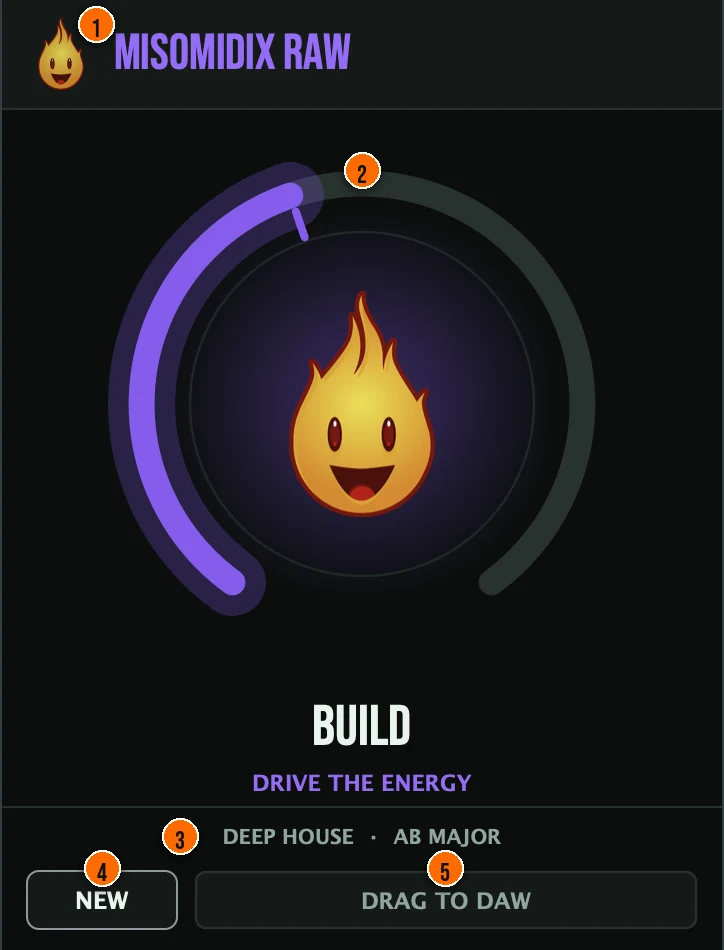
Controls
Header
- 1Fire Head: click the flame logo to open the About panel: what the plugin is, who made it and the trademark notices. Click anywhere in the panel to close it.
The knob
- 2BUILD: takes the loop from a stripped intro to a peak-time arrangement. At 0% you get a kick, a hat and one chord; at 50% the full groove; at 100% ratchets and percussion with everything moving. Every drum lane carries the density at which it should appear, so one knob reshapes the arrangement rather than piling on notes.Tip Turn BUILD slowly from 0% to hear the loop fill in: a kick and a hat at the bottom, all five parts at the top. Each position gives you a different arrangement density.
Loop
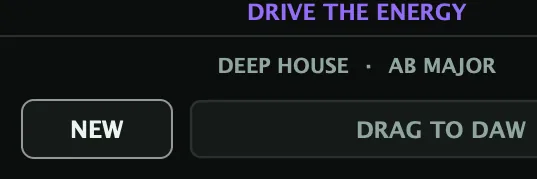
- 4NEW: draws a different loop entirely, in a different genre and key. Turning BUILD reshapes the loop you have instead.Tip NEW draws a completely different loop in a different genre and key. Turning BUILD afterward reshapes that new loop, it does not go back to the old one.
- 5DRAG TO DAW: writes a multi-track MIDI file, one track per part, so drums, chords, bass, melody and stabs arrive separable. Drag it onto your timeline.
Meters and displays
- 3Genre and key: the genre, key and scale of the current loop. In Raw they are drawn from the seed rather than chosen, and the same seed always gives the same loop back.
Key specs*
| Parts | Drums, chords, bass, melody and stabs, generated together |
|---|---|
| Loop | Four bars |
| Controls | One knob (BUILD) and NEW |
| MIDI out | Live MIDI while the host plays: drums on channel 10, the melodic parts on channel 1 |
| Export | DRAG TO DAW: one multi-track MIDI file, one track per part |
| Formats | macOS: AU, VST3, CLAP, AAX, Standalone. Windows: VST3, CLAP, Standalone |
* Key specs from the plugin page. Some specs may not be listed.
How do I go from an intro to a full drop with one knob?
- Put it on a MIDI track. Misomidix Raw generates MIDI: place it ahead of an instrument, or use DRAG TO DAW to drop the parts straight onto your timeline.
- Press NEW. Draw loops until you find one you like. Each NEW is a different loop in a different genre and key.
- Automate BUILD. At 0% a kick, a hat and one chord, at 50% the full groove, at 100% ratchets and percussion with everything moving.
- Drag it out. DRAG TO DAW writes a multi-track MIDI file with one track per part, so you can give each part its own instrument.
What about the full Misomidix?
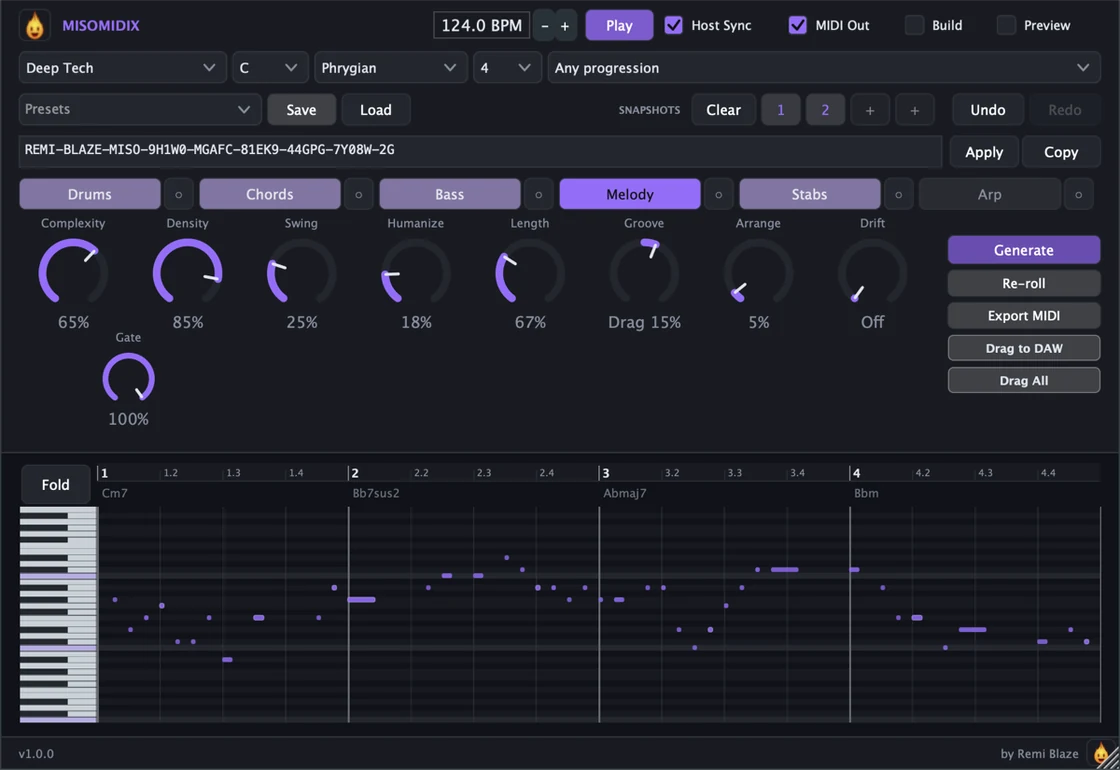
Raw generates all five parts from one knob and one button, with nothing to choose. The full Misomidix adds the control: pick the genre, key, scale and length, keep the result with presets and snapshots, share pattern codes, and edit in the piano roll. Every control is explained in the Misomidix manual.
Keyboard and mouse shortcuts
These work in every Misomidix Raw format (AU, VST3, CLAP, AAX, Standalone).
| Reset a control to its default | Double-click the knob or slider |
|---|---|
| Scroll to change a value | Hover over a knob and scroll the mouse wheel |
Frequently Asked Questions
How much does Misomidix Raw cost?
Misomidix Raw is a paid plugin, a one-time purchase with no subscription. On macOS it is signed and notarized by Apple, so it installs cleanly with no security warnings. On Windows the installer is Authenticode signed.
Does Misomidix Raw make any sound on its own?
No. Misomidix Raw generates MIDI. Put it on a MIDI track ahead of an instrument, or drag its output straight into your timeline.
Which formats and systems does Misomidix Raw support?
AU, VST3, CLAP, AAX and a Standalone app on macOS 15.0 or later, as a Universal Binary for Apple Silicon and Intel Macs. VST3, CLAP and a Standalone app on Windows 10 and 11, 64-bit. AAX ships on macOS only.
What does the BUILD knob do?
BUILD takes the loop from a stripped intro to a peak-time arrangement. At 0% you get a kick, a hat and one chord; at 50% the full groove; at 100% ratchets and percussion with everything moving. Every drum lane carries the density at which it should appear, so one knob reshapes the arrangement rather than just piling on notes.
Can I choose the genre, key or length?
No. In Raw the genre, key and scale are drawn from the seed rather than chosen, which is what keeps it to one knob and one button. Choosing them is what the full Misomidix adds.
Does the output ever repeat?
No. Nothing is sampled and nothing is played back from a library. Every note is generated from music theory, so the output never repeats. The same seed always returns the same loop.
What is the difference between Misomidix Raw and the full Misomidix?
Raw generates all five parts from one knob and one button, with nothing to choose. The full Misomidix adds the control: pick the genre, key, scale and length, keep the result with presets and snapshots, share pattern codes, and edit in the piano roll.
Is Misomidix Raw part of a bundle?
Yes. The MIDI Bundle has Misomidix, Misomidix Raw, Ghostix and Vortix in one purchase, for less than buying them separately.
Where can I find more about Misomidix Raw?
On the Misomidix Raw page: its features, system requirements and how to get it.
How do I buy and install Misomidix Raw?
- Buy it. Misomidix Raw is a one-time purchase. Buy it from the Misomidix Raw page, and the store emails you the download link.
- Run the installer. On macOS, double-click the .pkg file and choose AU, VST3, CLAP, AAX or Standalone. On Windows, run the .exe installer and choose VST3, CLAP or Standalone.
- Open your DAW. Restart your DAW and rescan plugins if needed, then find Misomidix Raw under Remi Blaze in your plugin list.
More about Misomidix Raw, including its features and system requirements, is on the Misomidix Raw page.
Where are the plugin files?
If you need to find Misomidix Raw on disk, for example to troubleshoot or to uninstall it manually, these are the standard locations.
| macOS AU | ~/Library/Audio/Plug-Ins/Components/ |
|---|---|
| macOS VST3 | ~/Library/Audio/Plug-Ins/VST3/ |
| macOS CLAP | ~/Library/Audio/Plug-Ins/CLAP/ |
| macOS AAX | /Library/Application Support/Avid/Audio/Plug-Ins/ |
| Windows VST3 | C:\Program Files\Common Files\VST3\ |
| Windows CLAP | C:\Program Files\Common Files\CLAP\ |
To uninstall, quit your DAW and delete the Misomidix Raw file from the relevant folder. Your DAW will stop listing it on its next rescan.
Need help with Misomidix Raw?
If something isn't covered here, or Misomidix Raw doesn't behave as described, contact support or email support@remiblaze.com. To get an answer faster, include:
- your operating system and version (for example macOS 15.6 or Windows 11)
- your DAW and its version
- the format you're using (AU, VST3, CLAP, AAX or Standalone)
- the version you installed (shown in the installer and in your download), since the About panel of every Raw shows v1.0.0
- what you did, what you expected, and what happened instead
This manual is for Misomidix Raw 1.0.0. Controls and settings can change between versions, so if something here doesn't match what you see, check the version shown in your installer or download. Spotted a mistake or have a question? Let us know.