What is Reactix?
Reactix is a transition and riser engine for Mac and Windows. It puts reverb, delay, saturation, a resonant high-pass sweep and a noise wash behind one Master Reactor knob. Automate it from 0% to 100% and you get a full tech-house build, breakdown or drop from a single move.
At 0% the output is completely clean. As the Master Reactor climbs, the effects come in and the noise wash blooms in above 40%. The Reactor mode sets the saturation character, Stability sets whether the tails stay steady or wobble, and Ghost-Fill ducks the wet effects under your kicks and snares so they keep punching through.
How does transition effects work?
A transition effect builds tension before a drop or a new section. It layers reverb, delay, filtering and noise together and ramps them up over time, creating a wash that rises in intensity. When the transition ends, cutting the effect to zero gives the drop its impact. Automating a single control that drives all these layers at once makes the build smooth and repeatable.
Quick start
Get a result with Reactix in under a minute.
- Insert it. Put Reactix on the track or bus you want to process.
- Pick a preset. Open the Presets menu and choose one close to what you want.
- Shape it. Work through the numbered controls below until it sounds right to your ear.
- Compare. Bypass the plugin in your DAW to hear before and after.
The interface
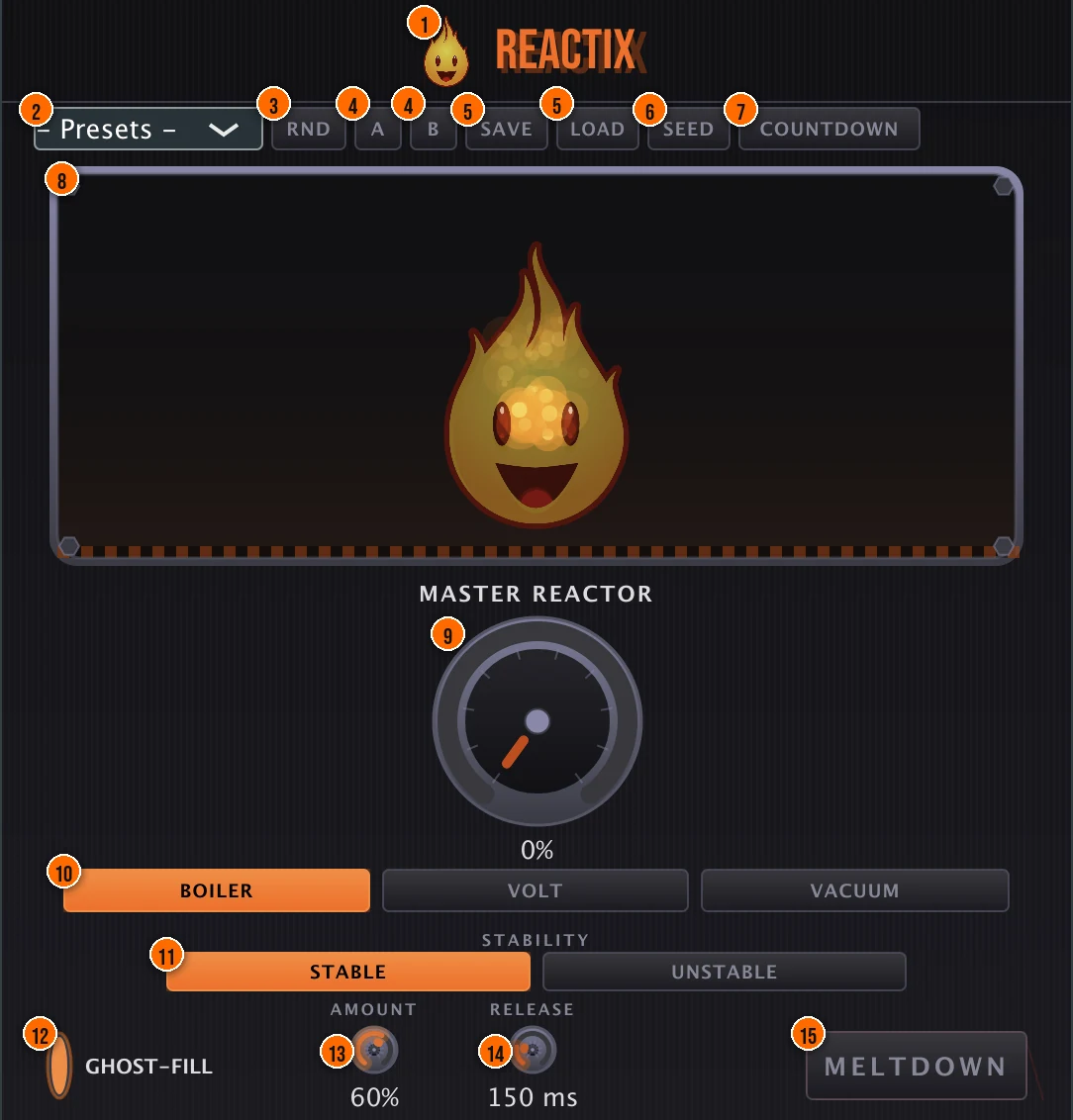
Controls
Top bar
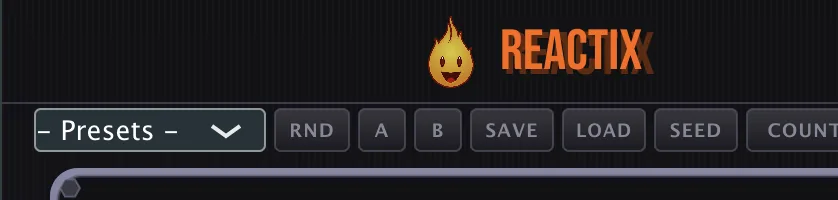
- 1Fire Head: click the flame logo to open the About panel: what the plugin is, who made it, its version and the trademark notices. Click anywhere in the panel to close it.
- 2Presets: 12 factory presets, from Tech House Riser and Eerie Breakdown to Massive Drop, Vocal Transition and Maximum Chaos.
- 3RND (Randomize): randomizes the Reactor mode, Stability, Ghost-Fill and the Master Reactor. Mix and Output keep their settings.
- 4A / B: two slots for comparing two versions of your settings. Click A or B to switch; the settings you leave are kept in their slot.
- 5Save / Load: save your own transition settings as a preset, or load one back.
- 6Seed (Reactor Seed): opens the seed box, which shows the current settings as a shareable RX1- string. COPY puts it on your clipboard. Paste someone else's seed into the box and press APPLY to load their recipe.
- 7Countdown: ramps the Master Reactor from 0% to 100% on its own, with a smooth S-curve. It follows your DAW's transport and pauses when playback stops. During a countdown the button reads CANCEL: press it to reset the Master Reactor to 0% mid-build.4, 8 or 16 bars
The reactor
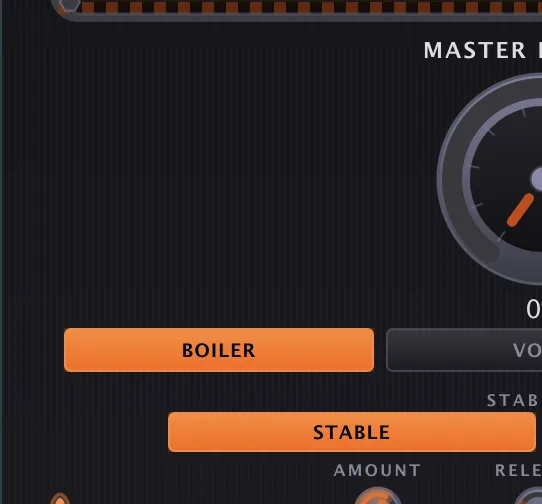
- 9Master Reactor: the one macro that drives the whole transition: reverb, a tempo-synced ping-pong delay, saturation, a resonant high-pass sweep and a noise wash. At 0% the output is completely clean; at 100% it is a full wall of wash.0 to 100%Tip Automate Master Reactor from 0% to 100% over 4, 8 or 16 bars for a full build into a drop.
- 10Boiler / Volt / Vacuum (Reactor Mode): the saturation character. Boiler is warm, tube-style grit. Volt is bright bitcrushing with sample-rate reduction. Vacuum is dark and muffled, with heavy low-pass tension.Tip Boiler is warm and smooth. Volt is bright and digital. Vacuum is dark and heavy.
- 11Stable / Unstable (Stability): Stable keeps the build locked to the tempo. Unstable modulates the delay and reverb tails for an analog-degradation wobble.Tip Stable builds predictably. Unstable adds randomized movement for a more organic feel.
Ghost-Fill
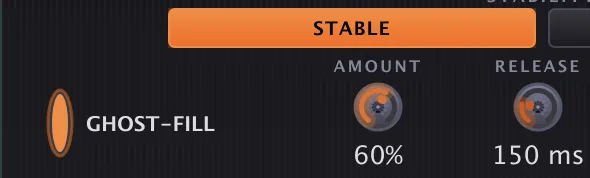
- 12Ghost-Fill: automatic ducking triggered by your transients. It sidechains the wet effects to your input, so kicks and snares stay present under the wash.Tip Switch on Ghost-Fill so kicks and snares punch through the wash instead of getting buried.
- 13Amount (Ghost Amount): how deep the Ghost-Fill duck goes.Tip Higher Ghost Amount ducks the wet signal harder on each transient, keeping the groove clear.
- 14Release (Ghost Release): how long the duck takes to let the wash back in.50 to 500 ms
Performance
- 15Meltdown: hold it for a red-alert moment: every module is forced to 100%, the delay self-oscillates and a resonant low-pass sweeps over one bar. When you let go, the sound returns to your settings.Tip Meltdown overloads the reactor for a dramatic effect. Use it at the peak of a build or as a one-shot impact.
Meters and displays
- 8Plasma Reactor visualizer: the Plasma Reactor chamber at the top of the panel: a real-time animated display of particles, glow and color driven by the output energy. The Fire Head in the chamber reacts to the Master Reactor level, from cold through warming and hot to critical, and flashes when the reactor reaches 100%.
- Master Reactor readout: the percentage under the Master Reactor knob.
Key specs*
| Effect chain | Reverb, delay, saturation, resonant high-pass sweep, noise wash |
|---|---|
| Master Reactor | 0 to 100%; completely clean at 0% |
| Noise wash | Bandpass 1 kHz to 8 kHz, follows the input envelope, blooms in above 40% |
| Saturation | 4x linear-phase FIR oversampling |
| Transient Preserve | Linkwitz-Riley crossovers protect the input transients |
| Ghost Release | 50 to 500 ms |
| Countdown | 4, 8 or 16 bars, S-curve, transport-aware |
| Latency | Reported to your DAW |
| DC blocker | 20 Hz high-pass after the saturation |
| Factory presets | 12 |
* Key specs from the plugin page. Some specs may not be listed.
How does the sound flow through Reactix?
A simplified view of the main path.
Transient Preserve protects the input attacks with a Linkwitz-Riley crossover. Meltdown forces every module to 100 % for a one-bar sweep.
How do I build a transition into the drop with Reactix?
- Load it. Put Reactix on the loop, bus or breakdown you want to build, and start from the Tech House Riser preset.
- Pick a character. Choose Boiler for warm grit, Volt for bright bitcrush, or Vacuum for dark tension.
- Choose the movement. Leave Stability on Stable for a tempo-locked build, or switch to Unstable for a wobbling tail.
- Keep the kick. Switch on Ghost-Fill, then set Amount for the depth of the duck and Release for how fast the wash returns.
- Draw the build. Automate the Master Reactor from 0% to 100% over the build, or use Countdown to ramp it over 4, 8 or 16 bars.
- Drop. Bring the Master Reactor back to 0% at the drop. At 0% the output is completely clean.
How do I create a breakdown wash with Reactix?
- Insert it. Put Reactix on the track or bus you want to wash out.
- Pick Vacuum. Choose the Vacuum reactor mode for a dark, heavy tension feel.
- Set it to Unstable. Switch to Unstable for organic, shifting movement in the wash.
- Automate the reactor. Draw Master Reactor from 0% to about 60% over the breakdown, then hold it steady.
- Cut to zero. At the drop, snap Master Reactor to 0% so the dry signal hits clean.
What about Reactix Raw?
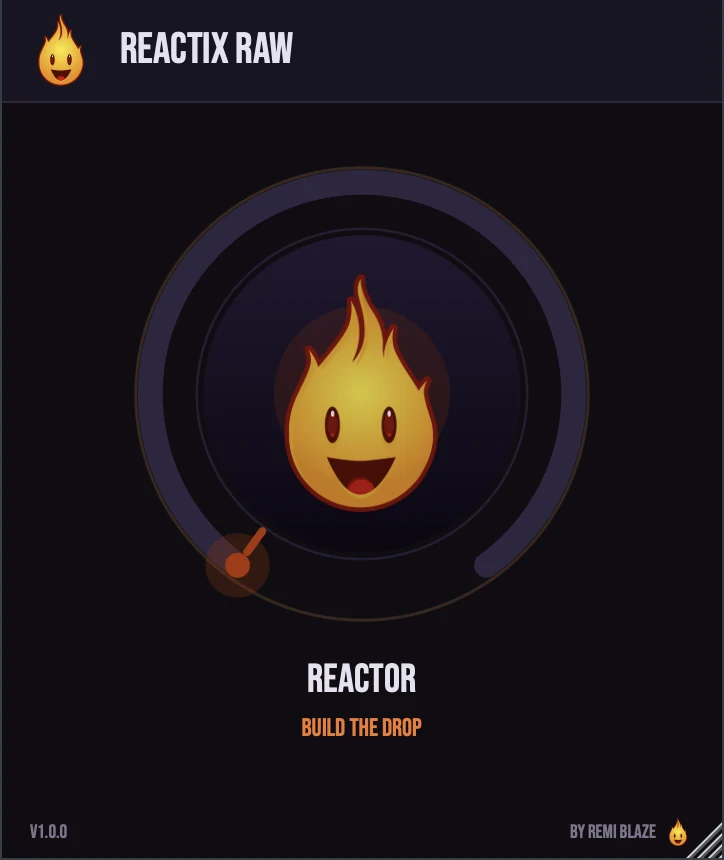
Reactix Raw is the free one-knob version. Its REACTOR knob brings in reverb first, then grit and ping-pong delay, and near the top a high-pass sweep and a noise wash. Pull it back to 0% for an instant clean reset. The build is auto-leveled, so it grows in energy without jumping in volume. Its own manual: Reactix Raw manual.
Reactix vs. Reactix Raw
A side-by-side look at what each version includes.
| Feature | Reactix | Reactix Raw |
|---|---|---|
| Presets | Included | Not included |
| Randomize | Included | Not included |
| Auto-gain | Not included | Included |
Keyboard and mouse shortcuts
These work in every Reactix format (AU, VST3, CLAP, AAX, Standalone).
| Reset a control to its default | Double-click the knob or slider |
|---|---|
| Scroll to change a value | Hover over a knob and scroll the mouse wheel |
| Type an exact value | Click the value below a knob and type a number |
Frequently Asked Questions
Does Reactix change my sound at 0%?
No. At 0% Master Reactor the output is completely clean, so you can leave Reactix on the track and only hear it when you push the knob.
What is the difference between Stable and Unstable?
Stable keeps the build locked to the tempo. Unstable modulates the delay and reverb tails, for a wobble like a degrading analog machine.
When does the noise wash come in?
It blooms in once the Master Reactor passes 40%. It is a bandpass-filtered noise layer between 1 kHz and 8 kHz that follows your input, adding air and energy as the build climbs.
Will my drums lose their punch under heavy settings?
Transient Preserve uses Linkwitz-Riley crossovers to protect the input transients, and Ghost-Fill ducks the wet effects under your hits. Raise Amount if the kick still gets buried.
Where can I find more about Reactix?
On the Reactix page: its features, system requirements and how to get it.
How do I buy and install Reactix?
- Buy it. Reactix is a one-time purchase. Buy it from the Reactix page, and the store emails you the download link.
- Run the installer. On macOS, double-click the .pkg file and choose AU, VST3, CLAP, AAX or Standalone. On Windows, run the .exe installer and choose VST3, CLAP or Standalone.
- Open your DAW. Restart your DAW and rescan plugins if needed, then find Reactix under Remi Blaze in your plugin list.
More about Reactix, including its features and system requirements, is on the Reactix page.
Where are the plugin files?
If you need to find Reactix on disk, for example to troubleshoot or to uninstall it manually, these are the standard locations.
| macOS AU | ~/Library/Audio/Plug-Ins/Components/ |
|---|---|
| macOS VST3 | ~/Library/Audio/Plug-Ins/VST3/ |
| macOS CLAP | ~/Library/Audio/Plug-Ins/CLAP/ |
| macOS AAX | /Library/Application Support/Avid/Audio/Plug-Ins/ |
| Windows VST3 | C:\Program Files\Common Files\VST3\ |
| Windows CLAP | C:\Program Files\Common Files\CLAP\ |
To uninstall, quit your DAW and delete the Reactix file from the relevant folder. Your DAW will stop listing it on its next rescan.
Need help with Reactix?
If something isn't covered here, or Reactix doesn't behave as described, contact support or email support@remiblaze.com. To get an answer faster, include:
- your operating system and version (for example macOS 15.6 or Windows 11)
- your DAW and its version
- the format you're using (AU, VST3, CLAP, AAX or Standalone)
- the Reactix version, shown in the About panel (click the Fire Head)
- what you did, what you expected, and what happened instead
This manual is for Reactix 1.1.0. Controls and settings can change between versions, so if something here doesn't match what you see, check which version you have: click the Fire Head to open Reactix's About panel. Spotted a mistake or have a question? Let us know.