What is Blazeit Raw?
Blazeit Raw makes your track bigger in one move. Turn the single BLAZE knob and saturation and clip-heat ramp up together: your track gets louder and hotter, adding warmth and grit to flat loops, weak drums, and quiet mixes. Automatic gain compensation holds the level, so you only hear it get bolder: never a volume jump. Drop it on drums, bass, synths, or the whole mix.
Quick start
Get a result with Blazeit Raw in under a minute.
- Insert it. Put Blazeit Raw on the track or bus you want to change.
- Turn BLAZE up. Raise BLAZE until it sounds right. Auto-gain keeps the level matched.
- Compare. Bypass the plugin in your DAW to hear the difference.
The interface
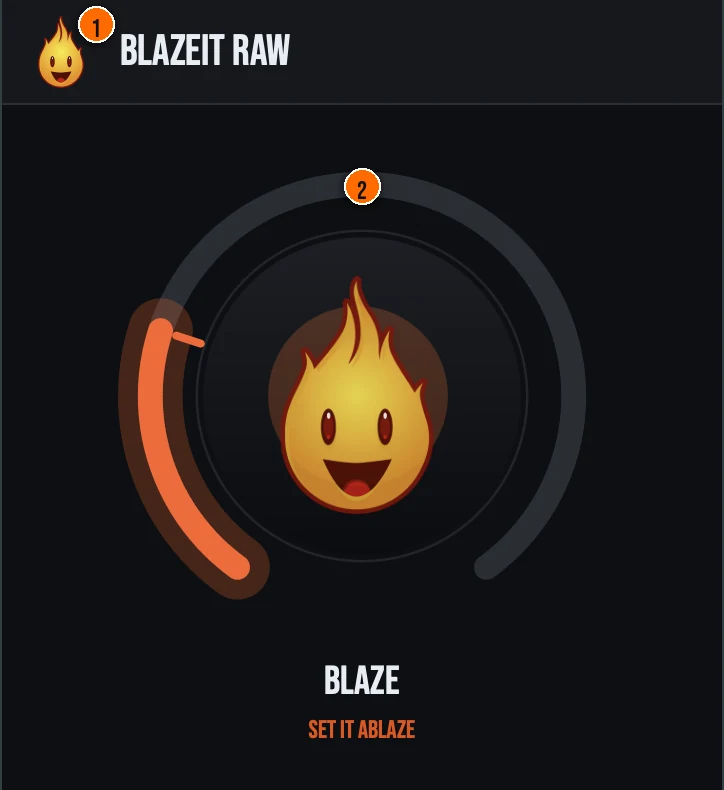
Controls
Header
- 1Fire Head: click the flame logo to open the About panel: what the plugin is, who made it and the trademark notices. Click anywhere in the panel to close it.
The knob
- 2BLAZE: a single macro that adds saturation and clip-heat in one move. At low settings you get gentle warmth and a touch more level. Push it further and the saturation and clipping bite harder: louder and hotter. Auto-gain keeps every position level-matched for an honest A/B, so you only hear it get bolder, never a volume jump.
Key specs*
| Oversampled saturation and clipping | Both the pre-clip saturation and the clipper run inside an HQ 8x oversampler to suppress aliasing for a clean, anti-aliased result. |
|---|---|
| K-weighted auto-gain | An ITU-R BS.1770-style filter measures dry versus wet loudness and applies a smoothed correction, so pushing BLAZE never changes the perceived level. |
| Output safety chain | A snap-to-ceiling tanh soft-limiter, a 5 Hz DC blocker to remove asymmetric-clipping bias, and a final NaN/Inf sweep keep the output clean, with denormals guarded. |
| Static latency | The oversampler latency is padded to a fixed value and reported once, and the HQ mode is pinned, so the host's plugin-delay compensation never shifts mid-stream. |
| One knob, hidden targets | Only BLAZE appears in the host automation list; every pinned Pro parameter is wrapped as non-automatable but still saved and restored with the plugin state. |
| Controls | One knob, BLAZE |
| Formats | macOS: AU, VST3, CLAP, AAX, Standalone. Windows: VST3, CLAP, Standalone |
* Key specs from the plugin page. Some specs may not be listed.
How do I use Blazeit Raw on a track?
- Insert it. Put Blazeit Raw on the track or bus you want to change.
- Turn BLAZE up. Raise BLAZE until it sounds right. At low settings you get gentle warmth and a touch more level. Push it further and the saturation and clipping bite harder: louder and hotter.
What about the full Blazeit?
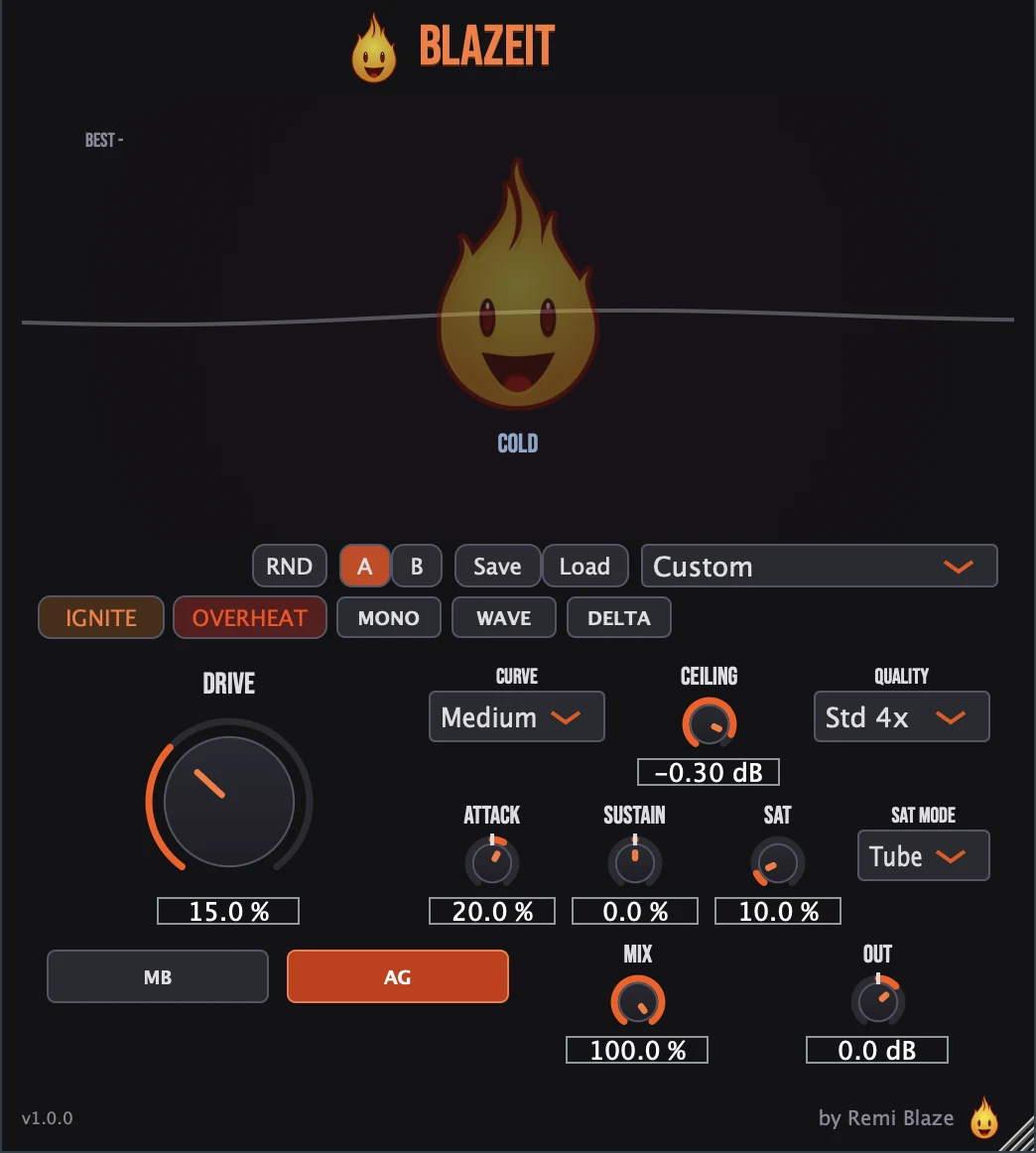
Love the heat? The full Blazeit goes deeper. The full Blazeit unlocks the complete saturation and clip loudness engine with hands-on control: independent drive, saturation and clip shaping, and the full output stage, instead of a single macro knob. Every control is explained in the Blazeit manual.
Keyboard and mouse shortcuts
These work in every Blazeit Raw format (AU, VST3, CLAP, AAX, Standalone).
| Reset a control to its default | Double-click the knob or slider |
|---|---|
| Scroll to change a value | Hover over a knob and scroll the mouse wheel |
Frequently Asked Questions
Is Blazeit Raw free?
Yes. Blazeit Raw is completely free: freeware, no trial, no nag screens, no expiration.
What does the BLAZE knob do?
BLAZE is a single macro that adds saturation and clip-heat together. Turn it up and your track gets louder and hotter, and automatic gain compensation keeps the output level-matched so you only hear it get bolder, never a volume jump.
How is Blazeit Raw different from Blazeit (Pro)?
Blazeit Raw gives you the Blazeit loudness engine behind a single BLAZE knob with auto gain. The full Blazeit unlocks the complete saturation and clip loudness engine with full control.
Does Blazeit Raw run on Apple Silicon and Windows?
Yes. Blazeit Raw is a Universal Binary that runs natively on Apple Silicon (M1/M2/M3/M4) and Intel Macs, and ships as a 64-bit build for Windows 10 and 11.
Will Blazeit Raw change my levels?
No. Auto-Gain is forced on and uses a K-weighted (ITU-R BS.1770-style) measurement of dry versus wet loudness to hold the perceived level steady across the whole BLAZE sweep, so you only ever hear it get bolder, never a volume jump.
Does Blazeit Raw add latency?
Blazeit Raw runs its saturation and clipping in an 8x oversampler, and the oversampler latency is padded to a fixed value and reported once. Because the quality mode is pinned, the reported latency never shifts mid-stream, so your host's plugin-delay compensation stays stable.
Where can I find more about Blazeit Raw?
On the Blazeit Raw page: its features, system requirements and how to get it.
How do I get and install Blazeit Raw?
- Get it. Blazeit Raw is free. Get it from the Blazeit Raw page.
- Run the installer. On macOS, double-click the .pkg file and choose AU, VST3, CLAP, AAX or Standalone. On Windows, run the .exe installer and choose VST3, CLAP or Standalone.
- Open your DAW. Restart your DAW and rescan plugins if needed, then find Blazeit Raw under Remi Blaze in your plugin list.
More about Blazeit Raw, including its features and system requirements, is on the Blazeit Raw page.
Where are the plugin files?
If you need to find Blazeit Raw on disk, for example to troubleshoot or to uninstall it manually, these are the standard locations.
| macOS AU | ~/Library/Audio/Plug-Ins/Components/ |
|---|---|
| macOS VST3 | ~/Library/Audio/Plug-Ins/VST3/ |
| macOS CLAP | ~/Library/Audio/Plug-Ins/CLAP/ |
| macOS AAX | /Library/Application Support/Avid/Audio/Plug-Ins/ |
| Windows VST3 | C:\Program Files\Common Files\VST3\ |
| Windows CLAP | C:\Program Files\Common Files\CLAP\ |
To uninstall, quit your DAW and delete the Blazeit Raw file from the relevant folder. Your DAW will stop listing it on its next rescan.
Need help with Blazeit Raw?
If something isn't covered here, or Blazeit Raw doesn't behave as described, contact support or email support@remiblaze.com. To get an answer faster, include:
- your operating system and version (for example macOS 15.6 or Windows 11)
- your DAW and its version
- the format you're using (AU, VST3, CLAP, AAX or Standalone)
- the version you installed (shown in the installer and in your download), since the About panel of every Raw shows v1.0.0
- what you did, what you expected, and what happened instead
This manual is for Blazeit Raw 1.0.1. Controls and settings can change between versions, so if something here doesn't match what you see, check the version shown in your installer or download. Spotted a mistake or have a question? Let us know.