What is Carvix Raw?
Carvix Raw is a MIDI-triggered sample mangler. It ships with a bundled default sample so it makes sound on the first key you press: no setup. Drop your own sample in the drop zone, play notes to trigger it pitched by key, and twist MANGLE for instant creative resampling. It's a real instrument: it renders voices from MIDI and ignores the input signal.
The interface
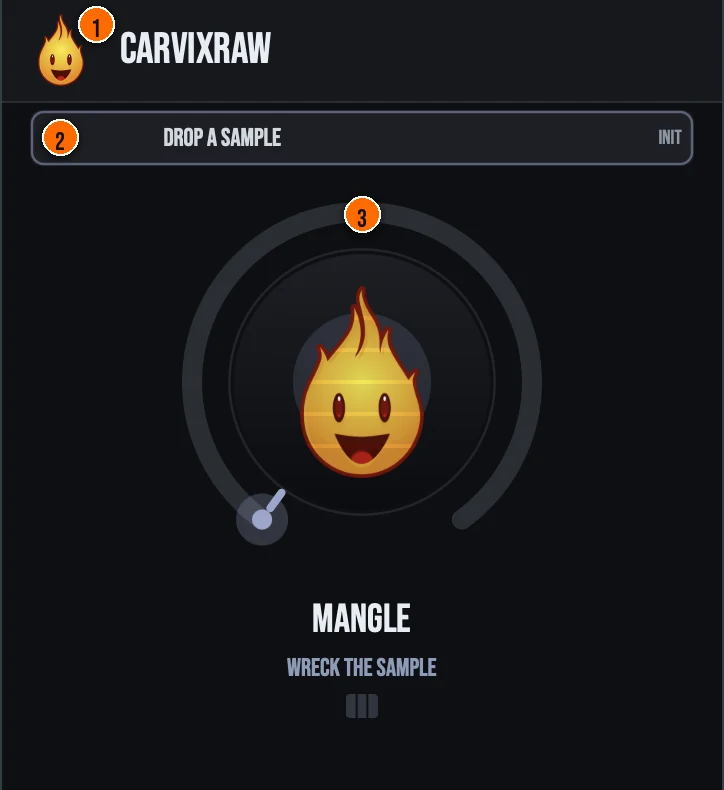
Controls
Header
- 1Fire Head: click the flame logo to open the About panel: what the plugin is, who made it and the trademark notices. Click anywhere in the panel to close it.
Sample
- 2Drop zone: drag an audio file here to replace the bundled sample at any time. Files up to 30 seconds load, folded to mono and resampled to the host rate. The loaded sample’s name shows at the right: INIT is the bundled one-shot. The sample is saved with your project.
The knob
- 3MANGLE: a single macro that progressively destroys the sound. As you open it, the sample pitches down, flips to reverse near the top, splits into rhythmic stutter, and crushes into lo-fi grime. The curve is front-loaded and level-ridden, so it gets more wrecked without running away: 100% is strong but still musical.
Key specs*
| 4-voice polyphonic sampler | MIDI note-ons trigger voices with oldest-voice stealing, each reading the sample with linear interpolation and pitched by note relative to a C4 root, with a short attack/sustain/release envelope. |
|---|---|
| Baked default one-shot | On first load, with no sample present, Carvix Raw synthesizes a short decaying mallet/pluck one-shot at C4 so the instrument makes sound the moment you press a key. |
| One knob, zero latency | MANGLE is the only host-automatable parameter and reported latency is zero, while the hidden VINYL unlock amount stays saved and restored with the session. |
| Controls | One knob (MANGLE) and a drop zone for your own sample |
| Formats | macOS: AU, VST3, CLAP, AAX, Standalone. Windows: VST3, CLAP, Standalone |
* Key specs from the plugin page. Some specs may not be listed.
How do I play and mangle a sample with Carvix Raw?
- Load it as an instrument. Carvix Raw is an instrument, not an audio insert: put it on a MIDI or instrument track.
- Press a key. It ships with a bundled one-shot, so it makes sound the moment you press a key. Notes play the sample pitched by key, relative to C4.
- Drop in your own sample. Drag an audio file onto the drop zone to replace the bundled sample.
- Turn MANGLE up. As you open it, the sample pitches down, flips to reverse near the top, splits into rhythmic stutter and crushes into lo-fi grime.
What about the full Carvix?
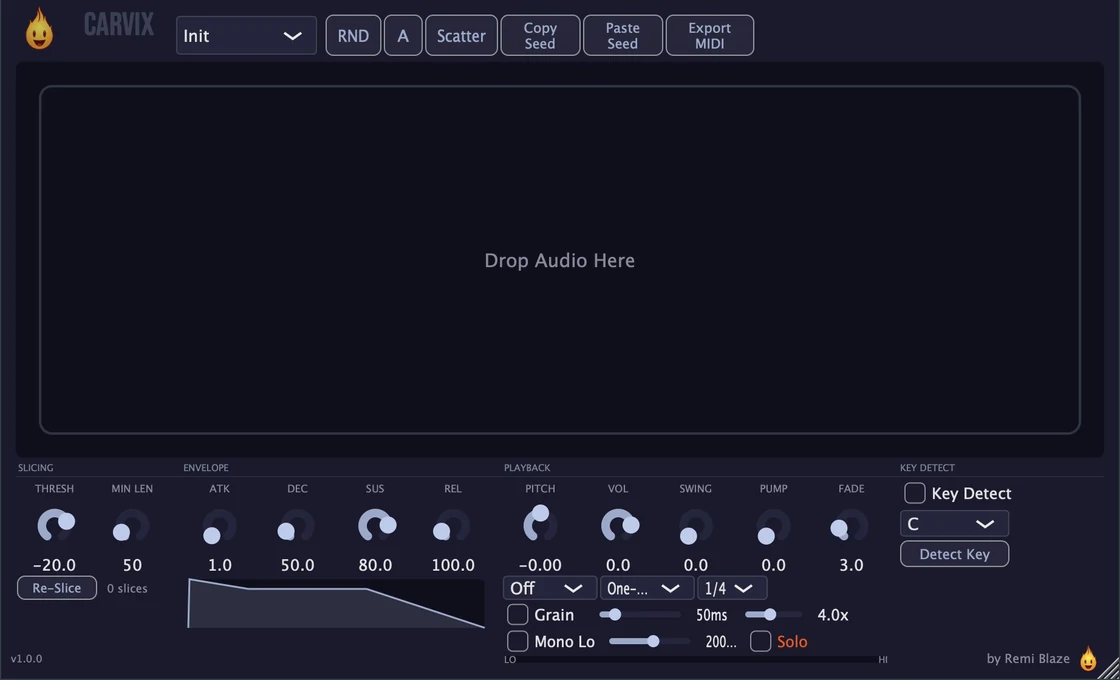
Want your whole crate? Carvix Pro goes deeper. The Pro version is a full sample slicer and MIDI-triggered sampler: transient auto-slicing, each slice mapped to a MIDI note, 4-voice polyphony, ADSR, ±24 semitone pitch, granular, and automatic key detection. Every control is explained in the Carvix manual.
Keyboard and mouse shortcuts
These work in every Carvix Raw format (AU, VST3, CLAP, AAX, Standalone).
| Reset a control to its default | Double-click the knob or slider |
|---|---|
| Scroll to change a value | Hover over a knob and scroll the mouse wheel |
Frequently Asked Questions
Is Carvix Raw free?
Yes. Carvix Raw is completely free: freeware, no trial, no nag screens, no expiration.
What does the MANGLE knob do?
MANGLE is a single macro that progressively wrecks the played sample: pitch-down, then a reverse flip near the top, rhythmic stutter, and lo-fi bitcrush grime. It's front-loaded and level-ridden so 100% is strong but still musical.
Do I have to load a sample?
No: Carvix Raw ships with a bundled default sample so it makes sound the moment you press a key. A drop zone lets you replace it with your own sample at any time. It's a MIDI-triggered instrument: notes play the sample, pitched by the key.
How is Carvix Raw different from Carvix (Pro)?
Carvix Raw is a single-slot mangler with one character knob: drop a sample and destroy it. The full Carvix is a sample slicer and MIDI-triggered sampler: transient auto-slicing, each slice mapped to a MIDI note, 4-voice polyphony, ADSR, ±24 semitone pitch, granular, and automatic key detection.
Does Carvix Raw run on Apple Silicon and Windows?
Yes. Carvix Raw is a Universal Binary that runs natively on Apple Silicon (M1/M2/M3/M4) and Intel Macs, and ships as a 64-bit build for Windows 10 and 11.
Can I automate Carvix Raw?
Yes: MANGLE is the only host-automatable parameter, so you can automate the whole staged destruction chain from a single lane. The hidden VINYL unlock amount is wrapped as non-automatable but still saves and restores with the session.
Does Carvix Raw add latency?
No. Reported latency is zero. Carvix Raw is a MIDI-triggered instrument that renders 4-voice polyphonic sampler voices, and its stutter, reverse, and bitcrush stages add no reported delay.
Where can I find more about Carvix Raw?
On the Carvix Raw page: its features, system requirements and how to get it.
How do I get and install Carvix Raw?
- Get it. Carvix Raw is free. Get it from the Carvix Raw page.
- Run the installer. On macOS, double-click the .pkg file and choose AU, VST3, CLAP, AAX or Standalone. On Windows, run the .exe installer and choose VST3, CLAP or Standalone.
- Open your DAW. Restart your DAW and rescan plugins if needed, then find Carvix Raw under Remi Blaze in your plugin list.
More about Carvix Raw, including its features and system requirements, is on the Carvix Raw page.
Where are the plugin files?
If you need to find Carvix Raw on disk, for example to troubleshoot or to uninstall it manually, these are the standard locations.
| macOS AU | ~/Library/Audio/Plug-Ins/Components/ |
|---|---|
| macOS VST3 | ~/Library/Audio/Plug-Ins/VST3/ |
| macOS CLAP | ~/Library/Audio/Plug-Ins/CLAP/ |
| macOS AAX | /Library/Application Support/Avid/Audio/Plug-Ins/ |
| Windows VST3 | C:\Program Files\Common Files\VST3\ |
| Windows CLAP | C:\Program Files\Common Files\CLAP\ |
To uninstall, quit your DAW and delete the Carvix Raw file from the relevant folder. Your DAW will stop listing it on its next rescan.
Need help with Carvix Raw?
If something isn't covered here, or Carvix Raw doesn't behave as described, contact support or email support@remiblaze.com. To get an answer faster, include:
- your operating system and version (for example macOS 15.6 or Windows 11)
- your DAW and its version
- the format you're using (AU, VST3, CLAP, AAX or Standalone)
- the version you installed (shown in the installer and in your download), since the About panel of every Raw shows v1.0.0
- what you did, what you expected, and what happened instead
This manual is for Carvix Raw 1.0.1. Controls and settings can change between versions, so if something here doesn't match what you see, check the version shown in your installer or download. Spotted a mistake or have a question? Let us know.