What is Cleansix Raw?
Cleansix Raw is the free, one-knob cleanup tool that makes anything sound clearer in seconds: no EQ hunting, no plugin chains. Turn the single CLEAN knob and a dynamic notch engine detects harsh resonances, boxiness, and ringing frame by frame and pulls them down in real time, so vocals, drums, synths, and the full mix open up. The output is auto-leveled, so your track just gets cleaner, never quieter.
Quick start
Get a result with Cleansix Raw in under a minute.
- Insert it. Put Cleansix Raw on the track or bus you want to change.
- Turn CLEAN up. Raise CLEAN until it sounds right.
- Compare. Bypass the plugin in your DAW to hear the difference.
The interface
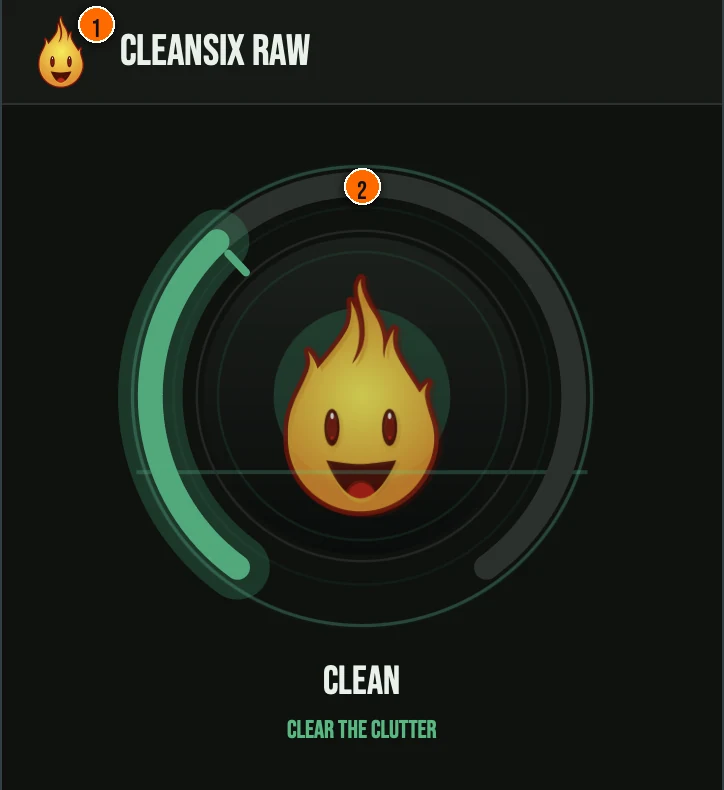
Controls
Header
- 1Fire Head: click the flame logo to open the About panel: what the plugin is, who made it and the trademark notices. Click anywhere in the panel to close it.
The knob
- 2CLEAN: a single macro that scales the suppression. At low settings it gently catches the worst offenders. Push it and the detector gets more sensitive and the notches dig deeper, scrubbing harshness and ring out of the signal. Automatic gain compensation holds the level at every position, so your A/B comparison is honest.
Key specs*
| STFT resonance detection | A windowed FFT flags bins that stand well above both their spectral neighbours and their recent history within a 200 Hz to 12 kHz range; detection is analysis only, with no resynthesis. |
|---|---|
| Dynamic IIR notch bank | Detected peaks are matched to notch slots by frequency and pulled down with peaking/notch biquads, using fast-attack, slow-release smoothing and a hysteresis gate so only persistent resonances engage. |
| Transient protection | A per-sample transient detector gates the notches off on attacks, so percussive hits stay sharp, and total suppression is soft-capped so the engine never guts the signal. |
| Constant, reported latency | A short constant 2 ms lookahead protects transients and is reported to the DAW for delay compensation, and nothing the macro touches changes the FFT size or lookahead, so the reported latency never moves mid-stream. |
| One knob, hidden targets | CLEAN is the only host-automatable parameter; every Pro parameter is present internally but wrapped as non-automatable, still saved and restored with the session. |
| Controls | One knob, CLEAN |
| Formats | macOS: AU, VST3, CLAP, AAX, Standalone. Windows: VST3, CLAP, Standalone |
* Key specs from the plugin page. Some specs may not be listed.
How do I use Cleansix Raw on a track?
- Insert it. Put Cleansix Raw on the track or bus you want to change.
- Turn CLEAN up. Raise CLEAN until it sounds right. At low settings it gently catches the worst offenders. Push it and the detector gets more sensitive and the notches dig deeper, scrubbing harshness and ring out of the signal.
- Automate it. CLEAN is the only control your DAW can automate, so one automation lane covers it.
What about the full Cleansix?
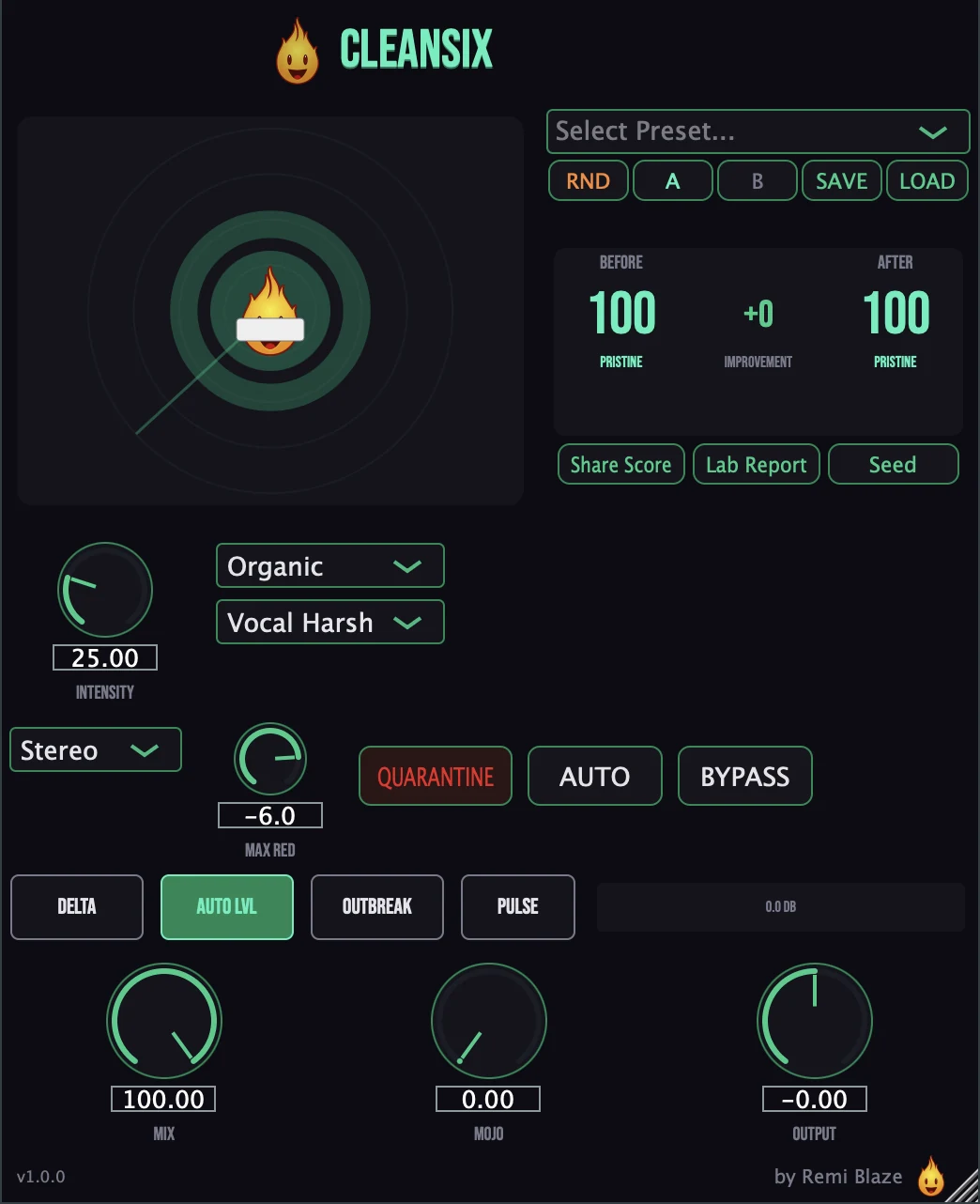
Love the cleanup? The full Cleansix gives you surgical control. The Pro version adds focus bands (target specific frequency regions), custom notch depth, mid/side processing, Delta monitoring, a health-score system with auto-threshold calibration, the Mojo harmonic enhancer, and a full set of factory presets. Every control is explained in the Cleansix manual.
Keyboard and mouse shortcuts
These work in every Cleansix Raw format (AU, VST3, CLAP, AAX, Standalone).
| Reset a control to its default | Double-click the knob or slider |
|---|---|
| Scroll to change a value | Hover over a knob and scroll the mouse wheel |
Frequently Asked Questions
Is Cleansix Raw free?
Yes. Cleansix Raw is completely free: freeware, no trial, no nag screens, no expiration.
What does the CLEAN knob do?
CLEAN is a macro that drives a dynamic STFT notch engine. It detects harsh resonances, boxiness, and ringing in real time and scrubs them out, tracking the harsh peaks frame by frame. Automatic gain compensation holds the level, so the track just gets clearer, never quieter.
How is Cleansix Raw different from Cleansix (Pro)?
Cleansix Raw gives you the resonance-suppression engine behind a single CLEAN knob with auto-level. The full Cleansix adds focus bands, custom notch depth, mid/side processing, Delta monitoring, health scoring, auto-threshold calibration, the Mojo harmonic enhancer, and factory presets.
Does Cleansix Raw run on Apple Silicon and Windows?
Yes. Cleansix Raw is a Universal Binary that runs natively on Apple Silicon (M1/M2/M3/M4) and Intel Macs, and ships as a 64-bit build for Windows 10 and 11.
Does Cleansix Raw add latency?
Yes: a short constant 2 ms lookahead protects transients and is reported to your DAW for automatic delay compensation. Nothing the CLEAN macro touches changes the FFT size or lookahead, so the reported latency never moves mid-stream. It is best used while mixing rather than for live monitoring.
Can I automate Cleansix Raw?
Yes: CLEAN is the only host-automatable parameter, so you can automate the whole suppression engine from a single lane. Every Pro parameter is present internally but wrapped as non-automatable, so the host's automation list shows exactly one control while the hidden values still save and restore with the session.
Where can I find more about Cleansix Raw?
On the Cleansix Raw page: its features, system requirements and how to get it.
How do I get and install Cleansix Raw?
- Get it. Cleansix Raw is free. Get it from the Cleansix Raw page.
- Run the installer. On macOS, double-click the .pkg file and choose AU, VST3, CLAP, AAX or Standalone. On Windows, run the .exe installer and choose VST3, CLAP or Standalone.
- Open your DAW. Restart your DAW and rescan plugins if needed, then find Cleansix Raw under Remi Blaze in your plugin list.
More about Cleansix Raw, including its features and system requirements, is on the Cleansix Raw page.
Where are the plugin files?
If you need to find Cleansix Raw on disk, for example to troubleshoot or to uninstall it manually, these are the standard locations.
| macOS AU | ~/Library/Audio/Plug-Ins/Components/ |
|---|---|
| macOS VST3 | ~/Library/Audio/Plug-Ins/VST3/ |
| macOS CLAP | ~/Library/Audio/Plug-Ins/CLAP/ |
| macOS AAX | /Library/Application Support/Avid/Audio/Plug-Ins/ |
| Windows VST3 | C:\Program Files\Common Files\VST3\ |
| Windows CLAP | C:\Program Files\Common Files\CLAP\ |
To uninstall, quit your DAW and delete the Cleansix Raw file from the relevant folder. Your DAW will stop listing it on its next rescan.
Need help with Cleansix Raw?
If something isn't covered here, or Cleansix Raw doesn't behave as described, contact support or email support@remiblaze.com. To get an answer faster, include:
- your operating system and version (for example macOS 15.6 or Windows 11)
- your DAW and its version
- the format you're using (AU, VST3, CLAP, AAX or Standalone)
- the version you installed (shown in the installer and in your download), since the About panel of every Raw shows v1.0.0
- what you did, what you expected, and what happened instead
This manual is for Cleansix Raw 1.0.1. Controls and settings can change between versions, so if something here doesn't match what you see, check the version shown in your installer or download. Spotted a mistake or have a question? Let us know.