What is Dropix Raw?
One knob drags any vocal into the abyss. Dropix Raw is the paid one-knob edition of Dropix Pro: a deep vocal pitcher distilled to a single ABYSS macro that sinks your vocal into a deep, monstrous drop and auto-levels it so it stays loud instead of disappearing. Turn it up and linked pitch and formant fall together toward a full octave (−12 semitones) for a true deep-voice drop, while internal tube drive rises inversely to hold the loudness steady and keep consonants crisp. A phase-vocoder engine handles the shift and smooth portamento glides the drop without zipper clicks or pitch-snap artifacts.
Quick start
Get a result with Dropix Raw in under a minute.
- Insert it. Put Dropix Raw on the track or bus you want to change.
- Turn ABYSS up. Raise ABYSS until it sounds right. Auto-gain keeps the level matched.
- Compare. Bypass the plugin in your DAW to hear the difference.
The interface
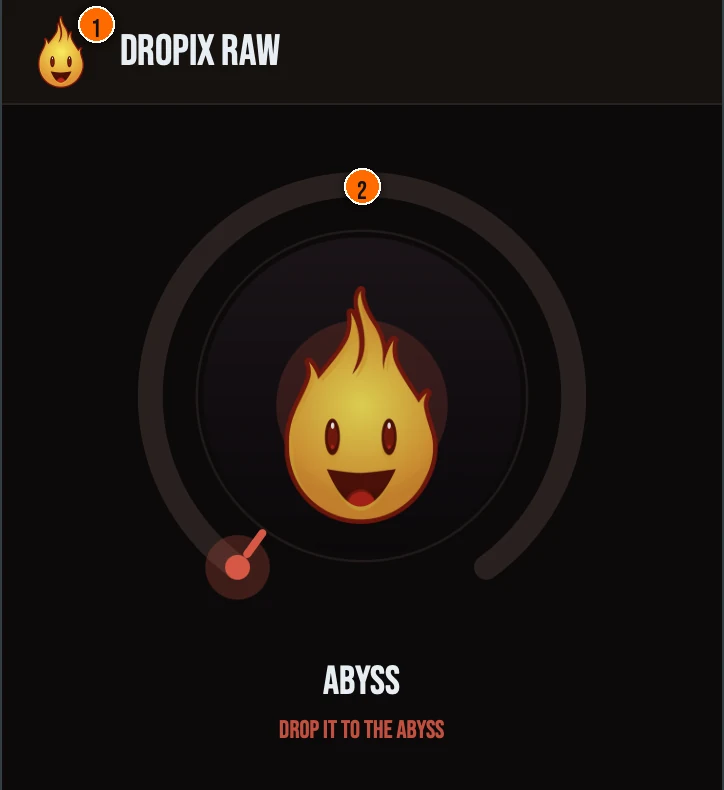
Controls
Header
- 1Fire Head: click the flame logo to open the About panel: what the plugin is, who made it and the trademark notices. Click anywhere in the panel to close it.
The knob
- 2ABYSS: a single macro that controls the whole drop. As you turn it up, pitch and formant fall together toward −12 semitones for a true deep-voice octave drop, and inverse tube drive comes up to restore the loudness the drop kills and re-sharpen the consonants. Smooth portamento glides the move so there are no zipper clicks or pitch-snap artifacts, and automatic makeup keeps the output level-matched the whole way so your A/B is honest.
Key specs*
| Phase-vocoder pitch + formant engine | A 2048-point FFT phase vocoder shifts pitch with formant preservation driven by a cepstral spectral-envelope extractor, and a spectral-flux transient detector keeps consonants and attacks phase-coherent. Ported verbatim from Dropix Pro. |
|---|---|
| Smooth portamento | A 50 ms pitch-ratio glide slides the drop without zipper clicks or pitch-snap artifacts. |
| Anti-aliased tube drive | The inverse-makeup tube drive is a tanh waveshaper run through zero-latency 2× oversampling, so it adds harmonic weight without adding aliasing or reported latency. |
| Auto-gain (RMS match) | Inverse makeup measures input vs. output RMS per block and holds perceived loudness steady across the drop. |
| Pure audio insert + safety ceiling | Dropix Raw drops MIDI and runs as a 100% wet audio insert, ending in a 0 dBFS true-peak soft-clipper with a NaN/Inf sweep, so it can never emit a sample at or above 0 dBFS. |
| Controls | One knob, ABYSS |
| Formats | macOS: AU, VST3, CLAP, AAX, Standalone. Windows: VST3, CLAP, Standalone |
* Key specs from the plugin page. Some specs may not be listed.
How do I use Dropix Raw on a track?
- Insert it. Put Dropix Raw on the track or bus you want to change.
- Turn ABYSS up. Raise ABYSS until it sounds right. As you turn it up, pitch and formant fall together toward −12 semitones for a true deep-voice octave drop, and inverse tube drive comes up to restore the loudness the drop kills and re-sharpen the consonants. Smooth portamento glides the move so there are no zipper clicks or pitch-snap artifacts, and automatic makeup keeps the output level-matched the whole way so your A/B is honest.
What about the full Dropix?
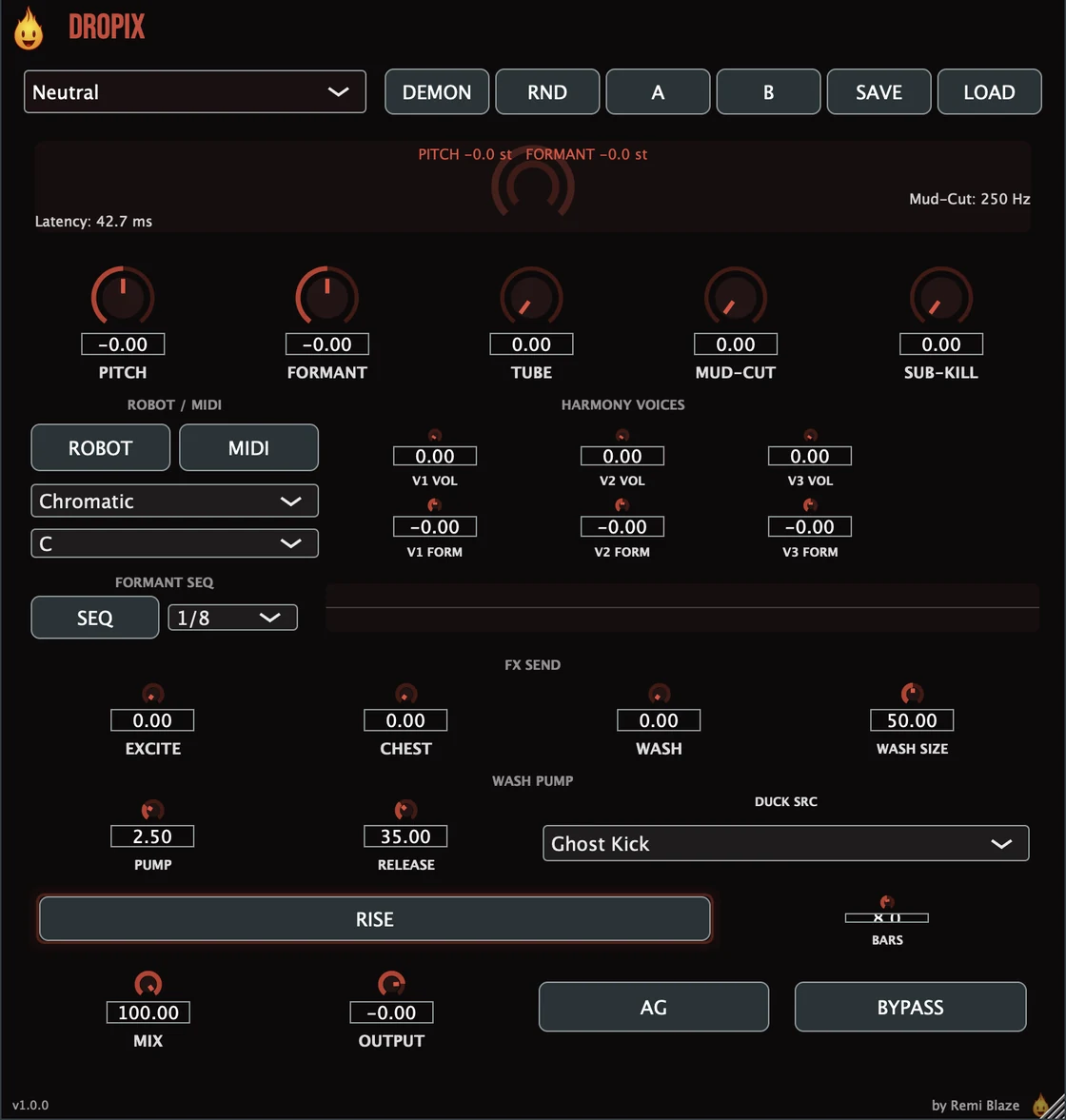
Love the drop? The full Dropix goes deeper. Dropix Raw is Dropix Pro distilled to a single ABYSS macro. If you want to go deeper than one knob, the full Dropix: the complete Deep Vocal Pitcher: opens up the engine with hands-on control over the drop. Every control is explained in the Dropix manual.
Keyboard and mouse shortcuts
These work in every Dropix Raw format (AU, VST3, CLAP, AAX, Standalone).
| Reset a control to its default | Double-click the knob or slider |
|---|---|
| Scroll to change a value | Hover over a knob and scroll the mouse wheel |
Frequently Asked Questions
What does the ABYSS knob do?
ABYSS is a single macro that links pitch and formant down toward a full octave (−12 st) for a true deep-voice drop, while inverse tube drive comes up to hold the perceived loudness and keep consonants crisp. Front-loaded, level-matched, with constant pinned FFT latency.
How much is Dropix Raw?
Dropix Raw is a paid plugin: a one-time purchase. It is a fan-support release, and every purchase directly supports the next plugin and the next track.
How is Dropix Raw different from Dropix (Pro)?
Dropix Raw gives you the deep vocal drop behind a single ABYSS knob with auto loudness makeup. The full Dropix: the complete Deep Vocal Pitcher: opens up the same engine with hands-on control over the drop.
Does Dropix Raw run on Apple Silicon and Windows?
Yes. Dropix Raw is a Universal Binary that runs natively on Apple Silicon (M1/M2/M3/M4) and Intel Macs, and ships as a 64-bit build for Windows 10 and 11.
Will Dropix Raw change my levels?
No. An RMS-matching auto-gain holds perceived loudness constant across the whole knob range, and inverse tube-drive makeup rises as the pitch drops so a full drop stays present instead of collapsing, so A/B is honest and the sound never jumps in volume.
Does Dropix Raw add latency?
It reports a constant latency. The FFT size (2048) is pinned, so the reported latency never changes mid-stream and the host always gets a stable PDC value; the anti-aliased tube drive runs at zero added latency.
Is Dropix Raw part of a bundle?
Yes. Dropix Raw is in the Vocal Bundle, which has the vocal Pros and their one-knob Raws in one purchase for less than buying them separately.
Where can I find more about Dropix Raw?
On the Dropix Raw page: its features, system requirements and how to get it.
How do I buy and install Dropix Raw?
- Buy it. Dropix Raw is a one-time purchase. Buy it from the Dropix Raw page, and the store emails you the download link.
- Run the installer. On macOS, double-click the .pkg file and choose AU, VST3, CLAP, AAX or Standalone. On Windows, run the .exe installer and choose VST3, CLAP or Standalone.
- Open your DAW. Restart your DAW and rescan plugins if needed, then find Dropix Raw under Remi Blaze in your plugin list.
More about Dropix Raw, including its features and system requirements, is on the Dropix Raw page.
Where are the plugin files?
If you need to find Dropix Raw on disk, for example to troubleshoot or to uninstall it manually, these are the standard locations.
| macOS AU | ~/Library/Audio/Plug-Ins/Components/ |
|---|---|
| macOS VST3 | ~/Library/Audio/Plug-Ins/VST3/ |
| macOS CLAP | ~/Library/Audio/Plug-Ins/CLAP/ |
| macOS AAX | /Library/Application Support/Avid/Audio/Plug-Ins/ |
| Windows VST3 | C:\Program Files\Common Files\VST3\ |
| Windows CLAP | C:\Program Files\Common Files\CLAP\ |
To uninstall, quit your DAW and delete the Dropix Raw file from the relevant folder. Your DAW will stop listing it on its next rescan.
Need help with Dropix Raw?
If something isn't covered here, or Dropix Raw doesn't behave as described, contact support or email support@remiblaze.com. To get an answer faster, include:
- your operating system and version (for example macOS 15.6 or Windows 11)
- your DAW and its version
- the format you're using (AU, VST3, CLAP, AAX or Standalone)
- the version you installed (shown in the installer and in your download), since the About panel of every Raw shows v1.0.0
- what you did, what you expected, and what happened instead
This manual is for Dropix Raw 1.0.1. Controls and settings can change between versions, so if something here doesn't match what you see, check the version shown in your installer or download. Spotted a mistake or have a question? Let us know.