What is Dropix?
Dropix is a deep vocal pitcher for Mac and Windows. It moves pitch and formant separately, so an octave-down vocal stays a deep, dark voice: not a chipmunk, and not a hollow, throaty boom.
A phase-vocoder engine shifts the pitch, the formant (the vocal-tract character) moves on its own knob, and transients are preserved so consonants stay crisp. Tube, Mud-Cut, Sub-Kill and Excite shape the tone. MIDI can play the pitch, snap it to a scale or add three harmony voices, and the ducking Wash adds space that blooms in the gaps.
How does pitch and formant shifting work?
A phase vocoder splits audio into short, overlapping frames and analyzes the frequency content of each frame. Shifting the frequencies of every frame by the same factor changes the pitch. Because the analysis works in the frequency domain, the shift does not change the speed of the sound.
The formant, the spectral shape that gives a voice its character, normally moves with the pitch. An independent formant control separates the two: you can drop the pitch a full octave while keeping the vocal-tract shape where it was, so the voice sounds deep instead of hollow or boomy.
Quick start
Get a result with Dropix in under a minute.
- Insert it. Put Dropix on the track or bus you want to process.
- Pick a preset. Open the Presets menu and choose one close to what you want.
- Shape it. Work through the numbered controls below until it sounds right to your ear.
- Blend to taste. Pull Mix back from 100% if you want a subtler result.
- Compare. Bypass the plugin in your DAW to hear before and after.
The interface
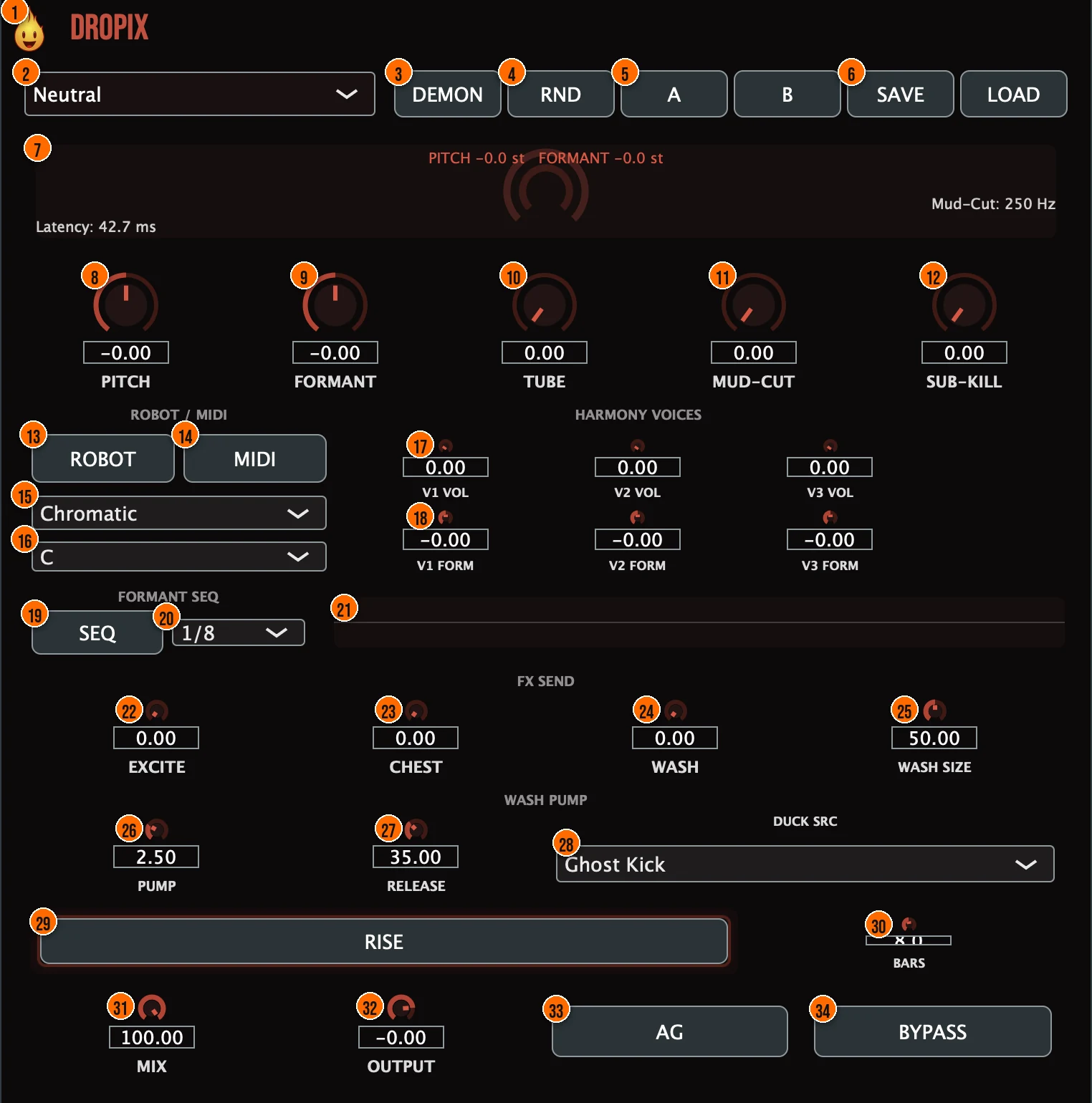
Controls
Top bar

- 1Fire Head: click the flame logo to open the About panel: what the plugin is, who made it, its version and the trademark notices. Click anywhere in the panel to close it.
- 2Presets: factory presets, from Neutral and Deep to Demon, Robot Snap, Choir Triad and Throat Wobble.
- 3Demon: a one-shot that snaps to the signature Remi Blaze demon character in one click, built for video.
- 4RND (Randomize): new settings at random.
- 5A / B: the A/B snapshot toggle: flip between two versions of your settings.
- 6Save / Load: save your settings as a preset file, or load one back.
Pitch and tone

- 8Pitch: shifts the pitch: down for dark leads, up for gremlin chants. With MIDI on, it greys out with a MIDI badge and your keyboard sets the pitch.−24 to +24 semitonesTip Small shifts of 1 to 5 semitones thicken a vocal or create a character. For a full octave drop, pair it with a formant correction.
- 9Formant: moves the vocal-tract character on its own, so a pitched-down vocal stays a deep voice instead of a hollow boom.−24 to +24 semitonesTip After a large pitch drop, adjust Formant until the voice sounds natural. A few semitones in the opposite direction of the pitch shift often helps.
- 10Tube (Tube Drive): a waveshaper on the wet signal only, 2x oversampled with zero added latency. It restores harmonics lost in extreme pitching.Tip Tube restores harmonics that extreme pitching strips away. Add a small amount after a deep drop to keep the vocal present.
- 11Mud-Cut (Mud-Cutter): a high-pass whose cutoff follows the pitch, so dropped-down energy doesn't pile up into mud.Tip Mud-Cut follows the pitch, so it cleans up the low end automatically as you pitch further down. Raise it if the dropped vocal sounds congested.
- 12Sub-Kill: a fixed 40 Hz high-pass (Linkwitz-Riley, 4th order) that strips inaudible generated sub-bass to free headroom. The knob sets the amount; the 40 Hz corner stays fixed.0 to 100%, default 0%Tip On any vocal pitched more than an octave down, raise Sub-Kill to strip the inaudible sub-bass the shift creates. It frees headroom without changing what you hear.
Robot and MIDI
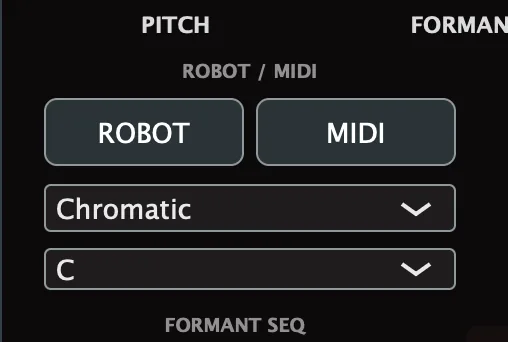
- 13Robot (Robot Mode): a scale quantizer: it follows the lowest held MIDI note and snaps to the nearest note in the scale.
- 14MIDI (MIDI Catch): play the vocal from your keyboard. The Pitch knob greys out with a MIDI badge.
- 15Scale: the scale Robot Mode snaps to.7 scales
- 16Key: the key of the scale.12 keys
Harmony voices
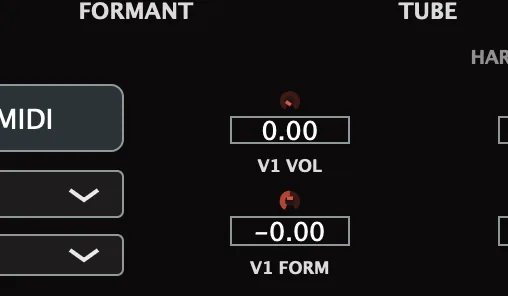
- 17V1 Vol to V3 Vol: the level of each of the 3 harmony voices. Each voice is pitched by a held MIDI note, with its formants locked to the original vocal.
- 18V1 Form to V3 Form: the formant of each harmony voice.
Formant sequencer
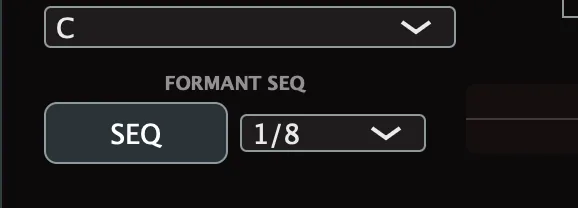
- 19Seq (Formant Sequencer): an 8-step pattern of formant offsets. Its free-running clock keeps it wobbling even when the transport is stopped.
- 20Sequencer rate: how fast the sequencer steps.1/8 or 1/16
- 21Step bars: the 8 bars beside SEQ: drag each one to set that step's formant offset.−12 to +12 semitones per step
Effects
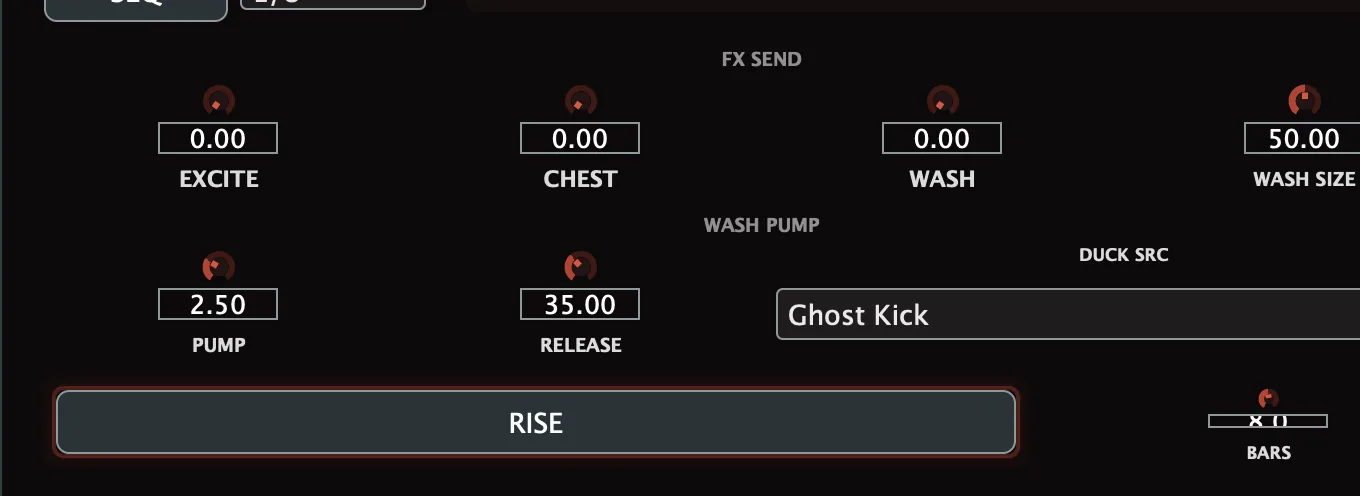
- 22Excite (Post-Shift Exciter): a parallel harmonic exciter on the wet path that regenerates a 3 to 8 kHz harmonic series, so a deep vocal still cuts through the mix.0 to 100%, default 0%Tip Excite regenerates the 3 to 8 kHz presence that a deep drop loses. Start around 20 to 30% and raise it until the vocal cuts through.
- 23Chest: sub-harmonic saturation on the wet signal: it isolates the lows, drives them through a diode and tube style waveshaper, and blends that back in parallel, for physical weight on club subs.0 to 100%, default 0%Tip Chest adds physical weight on playback systems with subs. A little goes a long way; keep it below 40% to avoid muddying the low end.
- 24Wash (Ducking Wash): a parallel reverb and delay space fed from the dry input. It is ducked internally, by the source picked in Duck Src, so it moves out of the way and blooms back in the gaps. No host sidechain is needed.0 to 100%, default 0%
- 25Wash Size: the size of the reverb space and the delay time of the wash.0 to 100%, default 50%
- 26Pump (Wash Pump): the shape of the per-beat duck carved into the wash: higher gives a sharper, more aggressive kick-style dip.0.25 to 8, default 2.5
- 27Release (Pump Release): how fast the wash recovers between kicks: higher gives a quicker bounce-back and a more rhythmic pump.0 to 100%, default 35%
- 28Duck Src (Duck Source): what ducks the wash: Ghost Kick, a tempo-locked 4/4 pump that ducks in time even when the vocal is silent, or Vocal, which ducks under the dry vocal's envelope.Ghost Kick, Vocal; default Ghost Kick
- 29Rise: a latching build-up: it ramps the wash to a wall of sound, climbs the delay feedback, sweeps a high-pass up from 20 Hz to 2 kHz and switches off the duck. Release it to slam back to dry.
- 30Bars: how long the Rise takes.1 to 16 bars, default 8
Output

- 31Mix: an equal-power parallel blend of the dry and processed vocal. The dry path is delay-aligned, so Mix never comb-filters.0 to 100%, default 100%Tip The dry path is delay-aligned, so pulling Mix back never comb-filters. Use 70 to 80% for a blended dark character instead of a full replacement.
- 32Output: the level leaving Dropix.−24 to +6 dB, default 0 dB
- 33AG (Automatic Gain): removes the louder-is-better bias when you compare.
- 34Bypass: a click-free gated bypass, for comparing against the dry signal.
Meters and displays
- 7Display: shows the current pitch and formant shift in semitones, the Mud-Cut frequency and the latency. The arc in the middle shows the pitch shift (outer) and formant shift (inner), and flashes on consonants.
Key specs*
| Engine | Phase vocoder, 2048-point FFT, 75% overlap |
|---|---|
| Pitch and formant | −24 to +24 semitones each, independent |
| Latency | Constant, 2048 samples |
| Tube Drive | 2x oversampled, zero added latency |
| Sub-Kill | 40 Hz, Linkwitz-Riley 4th order |
| Exciter | 3 to 8 kHz harmonic series |
| Robot Mode | 7 scales, 12 keys |
| Harmony | 3 voices, pitched by MIDI |
| Formant Sequencer | 8 steps, 1/8 or 1/16 |
| Rise | 1 to 16 bars |
| Output | −24 to +6 dB, 0 dBFS true-peak ceiling |
* Key specs from the plugin page. Some specs may not be listed.
How does the sound flow through Dropix?
A simplified view of the main path.
Robot locks the pitch to one note or a MIDI key. The harmony voices and formant sequencer run in parallel with the main shift.
How do I make a deep, dark vocal with Dropix?
- Load it. Put Dropix on the vocal and start from the Neutral preset.
- Drop it. Turn Pitch down, for example to −12 for an octave.
- Fix the character. Adjust Formant so the voice sounds deep, not hollow or boomy.
- Clean the low end. Raise Mud-Cut, and use Sub-Kill to strip sub-bass you can't hear.
- Make it cut. Add Tube for harmonics and Excite for presence.
- Blend. Add Wash for space, set Mix, and switch on AG to compare at matched loudness.
How do I play a robotic harmony from a keyboard with Dropix?
- Load it. Put Dropix on the vocal and switch on MIDI.
- Set Robot Mode. Switch on Robot, pick a scale and key that match your song.
- Play a chord. Hold MIDI notes and Dropix snaps the vocal to the nearest note in the scale. The Pitch knob greys out with a MIDI badge.
- Add harmony voices. Turn up V1 Vol and V2 Vol, and set their formants with V1 Form and V2 Form. Each voice follows its own held note.
- Shape the tone. Add Tube for warmth and Excite for presence, and use Mud-Cut to keep the low end clean.
- Blend. Set Mix, switch on AG, and adjust Output.
What about Dropix Raw?
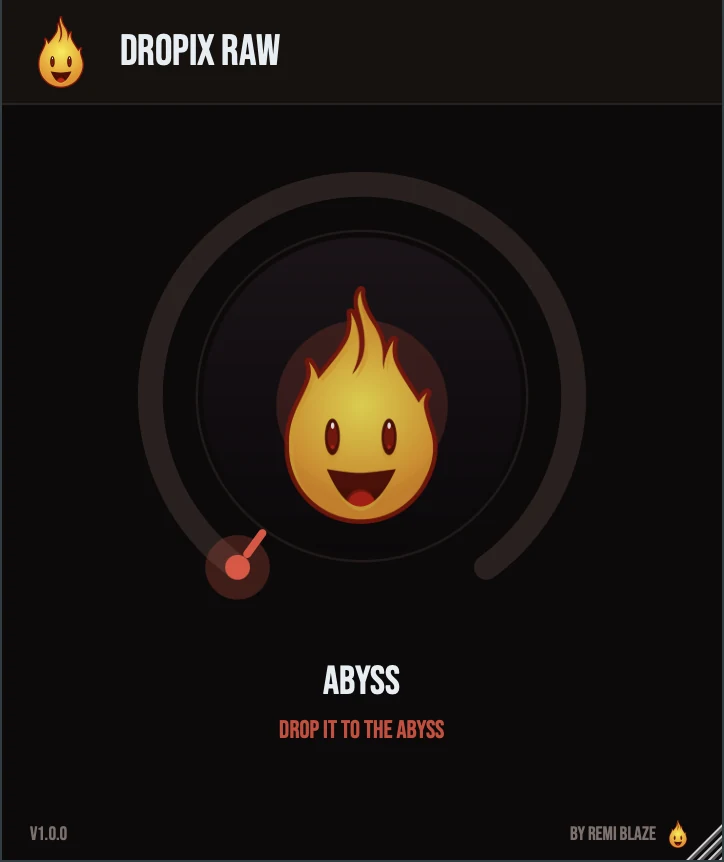
Dropix Raw is the one-knob version, on the same phase-vocoder engine. Its ABYSS knob moves pitch and formant down together toward a full octave (−12 semitones), while tube drive rises to hold the loudness and keep consonants crisp. It stays level-matched, and its latency is constant. Its own manual: Dropix Raw manual.
Dropix vs. Dropix Raw
A side-by-side look at what each version includes.
| Feature | Dropix | Dropix Raw |
|---|---|---|
| Presets | Included | Not included |
| Randomize | Included | Not included |
| Mix (dry/wet) | Included | Not included |
| Output level | Included | Not included |
| Auto-gain | Not included | Included |
Keyboard and mouse shortcuts
These work in every Dropix format (AU, VST3, CLAP, AAX, Standalone).
| Reset a control to its default | Double-click the knob or slider |
|---|---|
| Scroll to change a value | Hover over a knob and scroll the mouse wheel |
| Type an exact value | Click the value below a knob and type a number |
Frequently Asked Questions
Why does Dropix add latency?
Its phase-vocoder engine works on 2048-point FFT frames, so its latency is a constant 2048 samples. The dry path is delay-aligned, so Mix never comb-filters.
What is the difference between Pitch and Formant?
Pitch sets the note. Formant moves the vocal-tract character on its own. Moving them separately keeps a pitched-down vocal sounding like a deep voice.
How do I play the vocal from a keyboard?
Switch on MIDI and send Dropix MIDI notes. The Pitch knob greys out with a MIDI badge, and every voice glides with a 50 ms portamento.
How do the harmony voices work?
Up to 3 harmony voices are pitched by held MIDI notes, with their formants locked to the original vocal. Set each one's level with V1 Vol to V3 Vol and its formant with V1 Form to V3 Form.
Where can I find more about Dropix?
On the Dropix page: its features, system requirements and how to get it.
How do I buy and install Dropix?
- Buy it. Dropix is a one-time purchase. Buy it from the Dropix page, and the store emails you the download link.
- Run the installer. On macOS, double-click the .pkg file and choose AU, VST3, CLAP, AAX or Standalone. On Windows, run the .exe installer and choose VST3, CLAP or Standalone.
- Open your DAW. Restart your DAW and rescan plugins if needed, then find Dropix under Remi Blaze in your plugin list.
More about Dropix, including its features and system requirements, is on the Dropix page.
Where are the plugin files?
If you need to find Dropix on disk, for example to troubleshoot or to uninstall it manually, these are the standard locations.
| macOS AU | ~/Library/Audio/Plug-Ins/Components/ |
|---|---|
| macOS VST3 | ~/Library/Audio/Plug-Ins/VST3/ |
| macOS CLAP | ~/Library/Audio/Plug-Ins/CLAP/ |
| macOS AAX | /Library/Application Support/Avid/Audio/Plug-Ins/ |
| Windows VST3 | C:\Program Files\Common Files\VST3\ |
| Windows CLAP | C:\Program Files\Common Files\CLAP\ |
To uninstall, quit your DAW and delete the Dropix file from the relevant folder. Your DAW will stop listing it on its next rescan.
Need help with Dropix?
If something isn't covered here, or Dropix doesn't behave as described, contact support or email support@remiblaze.com. To get an answer faster, include:
- your operating system and version (for example macOS 15.6 or Windows 11)
- your DAW and its version
- the format you're using (AU, VST3, CLAP, AAX or Standalone)
- the Dropix version, shown in the About panel (click the Fire Head)
- what you did, what you expected, and what happened instead
This manual is for Dropix 1.0.0. Controls and settings can change between versions, so if something here doesn't match what you see, check which version you have: click the Fire Head to open Dropix's About panel. Spotted a mistake or have a question? Let us know.