What is Fracturix?
Fracturix is a rhythmic step gate and sample trigger for Mac and Windows. A 16-step sequencer locked to your host tempo either gates your live audio or triggers a loaded sample on each active step.
A Chaos engine adds random Reverse, Double Speed, Pitch Up and Bit Corrupt effects to the steps, from clean rhythmic chops to full glitch, and can keep the pitch in a scale. Store two patterns, blend between them with Morph, and let Auto-Morph sweep them for grooves that keep changing.
How does rhythmic gating and glitch effects work?
A rhythmic gate opens and closes in a repeating pattern synced to the tempo, turning a sustained sound into a stuttering rhythm. Each step in the sequence can fire or stay silent, and per-step probability means some hits only happen part of the time, so the pattern evolves on each pass.
Fracturix adds a chaos engine on top of the gate: random effects like reverse, double speed, pitch shift and bit corruption fire on individual steps, weighted by four bias knobs. Locking the chaos seed makes the random pattern repeatable. Pattern morphing blends between two stored sequences, so the rhythm can evolve smoothly over time.
Quick start
Get a result with Fracturix in under a minute.
- Insert it. Put Fracturix on the track or bus you want to process.
- Pick a preset. Open the Presets menu and choose one close to what you want.
- Shape it. Work through the numbered controls below until it sounds right to your ear.
- Blend to taste. Pull Mix back from 100% if you want a subtler result.
- Compare. Bypass the plugin in your DAW to hear before and after.
The interface
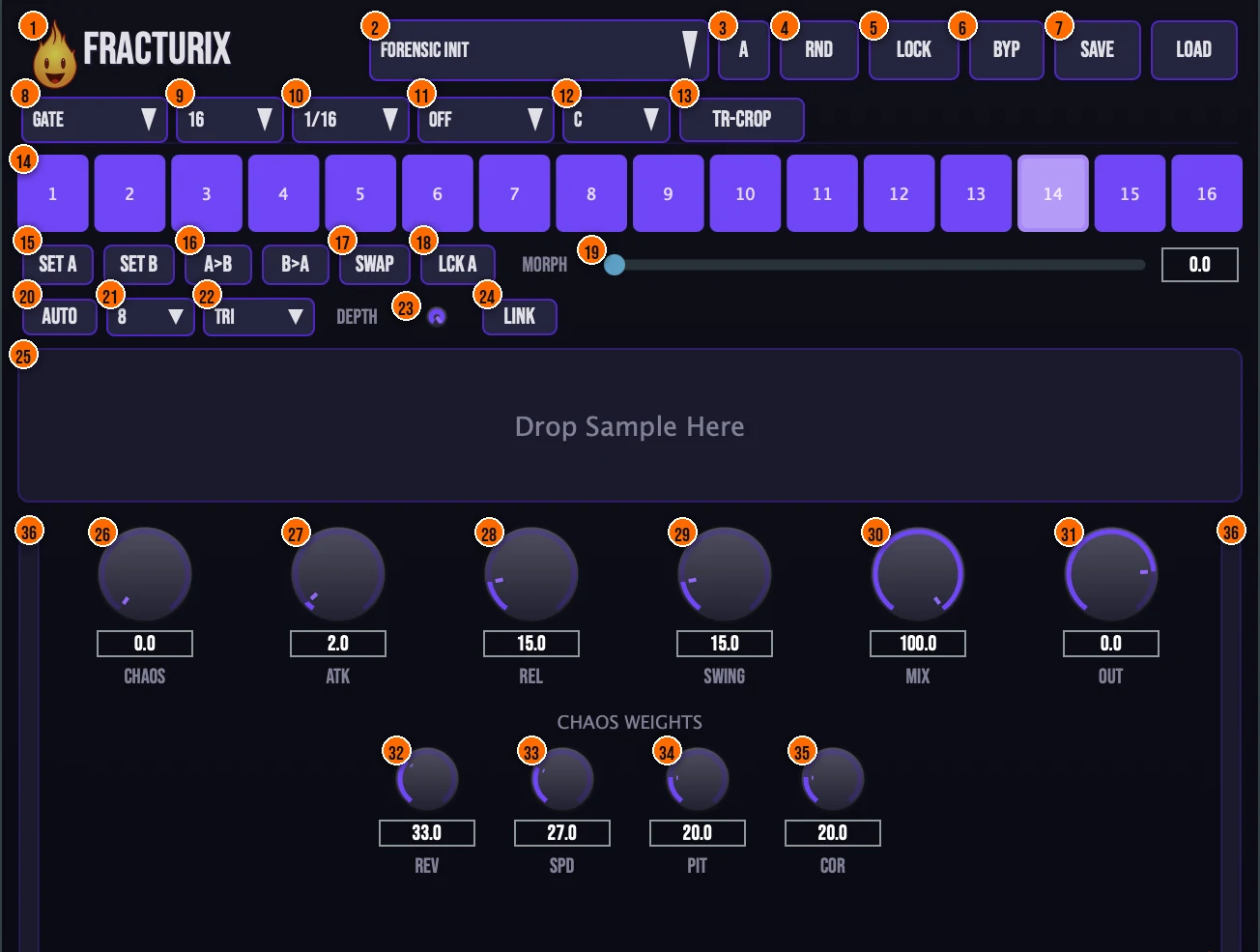
Controls
Top bar

- 1Fire Head: click the flame logo to open the About panel: what the plugin is, who made it, its version and the trademark notices. Click anywhere in the panel to close it.
- 2Presets: 15 factory presets, from Four on Floor and Offbeat Chop to Trance Gate, Glitch Heavy and Sub-Breaker.
- 3A: the A/B comparison slots: flip between two versions of your settings.
- 4RND (Randomize): new settings at random.
- 5Lock (Chaos Lock): freezes the random seed, so a chaos pattern repeats the same way.Tip Lock the chaos seed before bouncing a stem. The random effects become repeatable, so every render matches.
- 6BYP (Bypass): true bypass, for comparing against the dry signal.
- 7Save / Load: save your own presets, or load them back.
Sequencer setup

- 8Mode: Gate gates your live audio through the sequencer. Sample plays a loaded sample on each active step.Gate, Sample
- 9Step count: how many steps the pattern uses.4, 8 or 16
- 10Rate: the note length of each step, locked to your host tempo.1/4, 1/8, 1/16, 1/32
- 11Scale: quantizes the pitch chaos to a scale, so repitched steps stay in key.Off, Major, Minor, Pentatonic, Phrygian, DorianTip Set a scale and root note so that pitch chaos lands on musical intervals instead of random semitones.
- 12Root: the root note of the scale.
- 13TR-Crop (Transient Crop): starts the sample's playback from its detected transient onset, for a tighter feel.Tip Turn on Transient Crop in Sample mode so playback starts from the detected transient, giving each step a tighter attack.
Steps
- 14Steps 1 to 16: click a step to switch it on or off. Alt+Click a step to cycle its chance of a chaos effect through 100, 75, 50, 30 and 10%, scaled overall by the Chaos knob.
Pattern morph
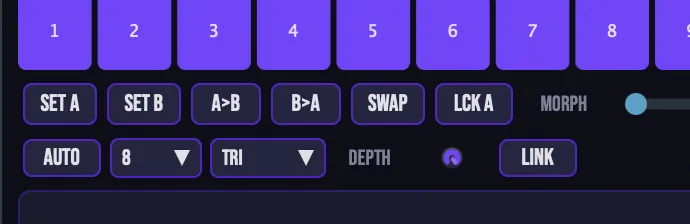
- 15Set A / Set B: store a pattern as pattern A or pattern B.
- 16A>B / B>A: copy one pattern onto the other.
- 17Swap: swaps patterns A and B.
- 18LCK A: locks pattern A.
- 19Morph: blends smoothly between pattern A and pattern B.Tip Set up two complementary patterns in A and B, then use Morph to blend between them. At 50% you hear elements of both.
- 20Auto (Auto-Morph): a beat-synced LFO that sweeps Morph for you, for evolving grooves.Tip Turn on Auto-Morph and set the length to 8 bars for a pattern that shifts gradually over a phrase without automation.
- 21Auto-Morph length: how many bars one Auto-Morph cycle takes.2 to 32 bars
- 22Auto-Morph shape: the shape of the Auto-Morph LFO.Sine or Triangle
- 23Depth: how far Auto-Morph sweeps.
- 24Link (Chaos Link): links the chaos amount to the current morph position, for evolving patterns.
Sample
- 25Sample drop zone: drag and drop a sample here for Sample mode. It shows the waveform and the playback position. A sample is resampled to your session's sample rate when you load it.
Chaos, gate and output

- 26Chaos: the probability of a random effect on each step: Reverse, Double Speed, Pitch Up or Bit Corrupt.0 to 100%Tip Start with Chaos around 20–30% for subtle variation. Higher values make the pattern unpredictable, which works on risers but can overwhelm a groove.
- 27Atk (Attack): the attack of the gate envelope. Gate transitions are zero-crossing aware, so the chops stay click-free.0 to 50 ms
- 28Rel (Release): the release of the gate envelope.0 to 100 ms
- 29Swing: shifts the off-beat steps, for shuffle and groove.Tip Add swing to shift off-beat steps late. It works the same as swing on a drum machine: the pattern shuffles without changing which steps are active.
- 30Mix: blends the processed sound with the dry signal, with smoothed transitions.0 to 100%
- 31Out (Output): the level leaving Fracturix.−24 to +6 dB
Chaos weights
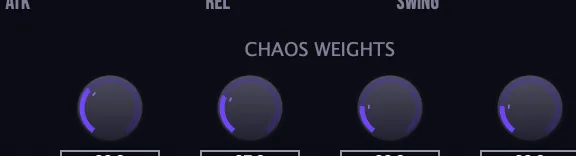
- 32Rev: biases how often Chaos picks Reverse.Tip Raise Rev and lower the other chaos weights to make reverse the dominant glitch effect for a tape-reel stutter.
- 33Spd: biases how often Chaos picks Double Speed.
- 34Pit: biases how often Chaos picks Pitch Up.
- 35Cor: biases how often Chaos picks Bit Corrupt.
Meters and displays
- 36Level meters: stereo input and output levels: input down the left edge, output down the right.
Key specs*
| Modes | Gate (live audio) or Sample |
|---|---|
| Steps | 4, 8 or 16 |
| Rate | 1/4, 1/8, 1/16 or 1/32, host-synced |
| Gate envelope | Attack 0 to 50 ms, Release 0 to 100 ms; zero-crossing aware |
| Chaos | 0 to 100%; Reverse, Double Speed, Pitch Up, Bit Corrupt |
| Step probability | 100, 75, 50, 30 or 10% |
| Scales | Off, Major, Minor, Pentatonic, Phrygian, Dorian |
| Auto-Morph | 2 to 32 bars per cycle, Sine or Triangle |
| Output | Mix 0 to 100%, Output −24 to +6 dB |
| Factory presets | 15 |
* Key specs from the plugin page. Some specs may not be listed.
How does the sound flow through Fracturix?
A simplified view of the main path.
TR-Crop trims transients that cross a step boundary. Auto-Morph sweeps between the two patterns over time.
Swing grid
Swing delays every off-beat step in each pair, the same way a drum machine shuffles its pattern.
At 0% the grid is straight. At 100% the off-beat shifts to three-quarters of the way through each pair.
How do I glitch up a drum loop with Fracturix?
- Load it. Put Fracturix on a drum loop, set the mode to Gate, and press play.
- Set the grid. Choose 16 steps and a rate of 1/16.
- Make the pattern. Click steps on or off, or start from the Glitch Light preset.
- Add chaos. Raise Chaos, and use Rev, Spd, Pit and Cor to choose which effects come up most.
- Keep it in key. Choose a scale and root so the Pitch Up effects stay in key with your track.
- Shape and blend. Adjust Atk and Rel for tighter or softer chops, add Swing, then set Mix.
How do I morph between two patterns over a phrase with Fracturix?
- Build pattern A. Click steps on and off to make your first rhythm, then press Set A to store it.
- Build pattern B. Change some steps to make a second, contrasting rhythm, then press Set B to store it.
- Check the blend. Move the Morph slider by hand to hear how A blends into B.
- Turn on Auto-Morph. Press Auto to enable the morph LFO. Set the length to 8 bars and the shape to Sine for a smooth cycle.
- Set the depth. Raise Depth so the morph sweeps the full range from A to B and back.
- Play and adjust. Listen through a phrase. The pattern shifts from A toward B at the midpoint and returns. Lower the depth or lengthen the cycle if the change is too fast.
What about Fracturix Raw?
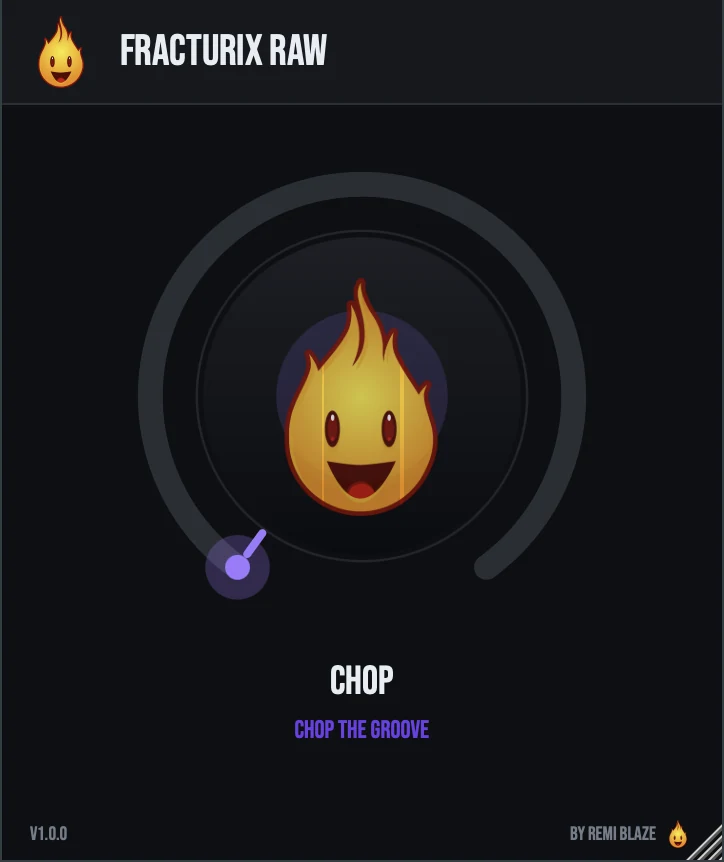
Fracturix Raw is the free one-knob version, on the same tempo-synced chop gate. Its CHOP knob makes the gate deeper and faster as you turn it up, clean and open at 0. It stays level-matched, keeps chopping in time when the transport stops, and reports no latency. Its own manual: Fracturix Raw manual.
Fracturix vs. Fracturix Raw
A side-by-side look at what each version includes.
| Feature | Fracturix | Fracturix Raw |
|---|---|---|
| Presets | Included | Not included |
| A/B compare | Included | Not included |
| Randomize | Included | Not included |
| Mix (dry/wet) | Included | Not included |
| Output level | Included | Not included |
Keyboard and mouse shortcuts
These work in every Fracturix format (AU, VST3, CLAP, AAX, Standalone).
| Reset a control to its default | Double-click the knob or slider |
|---|---|
| Scroll to change a value | Hover over a knob and scroll the mouse wheel |
| Type an exact value | Click the value below a knob and type a number |
| Alt-click (Option-click) a step | Cycle its probability: 100%, 75%, 50%, 30%, 10% |
Frequently Asked Questions
How do I give one step a lower chance of a chaos effect?
Alt+Click the step. Each click cycles its chance through 100, 75, 50, 30 and 10%, and the Chaos knob scales them all.
How do I make Chaos favor one effect?
Use the chaos weights: Rev, Spd, Pit and Cor bias how often Chaos picks Reverse, Double Speed, Pitch Up and Bit Corrupt.
How do I make a sample start tighter?
Switch on TR-Crop. Playback then starts from the sample's detected transient onset.
Can I make the pattern shorter than 16 steps?
Yes. Set the step count to 4, 8 or 16.
Where can I find more about Fracturix?
On the Fracturix page: its features, system requirements and how to get it.
How do I buy and install Fracturix?
- Buy it. Fracturix is a one-time purchase. Buy it from the Fracturix page, and the store emails you the download link.
- Run the installer. On macOS, double-click the .pkg file and choose AU, VST3, CLAP, AAX or Standalone. On Windows, run the .exe installer and choose VST3, CLAP or Standalone.
- Open your DAW. Restart your DAW and rescan plugins if needed, then find Fracturix under Remi Blaze in your plugin list.
More about Fracturix, including its features and system requirements, is on the Fracturix page.
Where are the plugin files?
If you need to find Fracturix on disk, for example to troubleshoot or to uninstall it manually, these are the standard locations.
| macOS AU | ~/Library/Audio/Plug-Ins/Components/ |
|---|---|
| macOS VST3 | ~/Library/Audio/Plug-Ins/VST3/ |
| macOS CLAP | ~/Library/Audio/Plug-Ins/CLAP/ |
| macOS AAX | /Library/Application Support/Avid/Audio/Plug-Ins/ |
| Windows VST3 | C:\Program Files\Common Files\VST3\ |
| Windows CLAP | C:\Program Files\Common Files\CLAP\ |
To uninstall, quit your DAW and delete the Fracturix file from the relevant folder. Your DAW will stop listing it on its next rescan.
Need help with Fracturix?
If something isn't covered here, or Fracturix doesn't behave as described, contact support or email support@remiblaze.com. To get an answer faster, include:
- your operating system and version (for example macOS 15.6 or Windows 11)
- your DAW and its version
- the format you're using (AU, VST3, CLAP, AAX or Standalone)
- the Fracturix version, shown in the About panel (click the Fire Head)
- what you did, what you expected, and what happened instead
This manual is for Fracturix 1.1.0. Controls and settings can change between versions, so if something here doesn't match what you see, check which version you have: click the Fire Head to open Fracturix's About panel. Spotted a mistake or have a question? Let us know.