What is Infernix Raw?
One knob. Turn it up and your track starts remixing itself. Infernix Raw is the free one-knob remix engine behind Infernix Pro: it listens to what you just played and, as you open the REMIX knob, fires syncopated fills that chop and rearrange your last bars. From the occasional tasteful flourish to a full glitched breakbeat, it's an instant live remix in a single move.
Infernix Raw quietly records your last couple of bars into a circular buffer. As you open the REMIX knob it self-arms and fires syncopated remix fills: two ghost playheads rearrange your audio into stutter-chopped patterns while the spectrum morphs, then it crossfades back to dry. From the occasional tasteful flip to relentless rolling fills, all in one move. The output is auto-leveled, so the result is always bigger and never just louder.
Quick start
Get a result with Infernix Raw in under a minute.
- Insert it. Put Infernix Raw on the track or bus you want to change.
- Turn REMIX up. Raise REMIX until it sounds right.
- Compare. Bypass the plugin in your DAW to hear the difference.
The interface
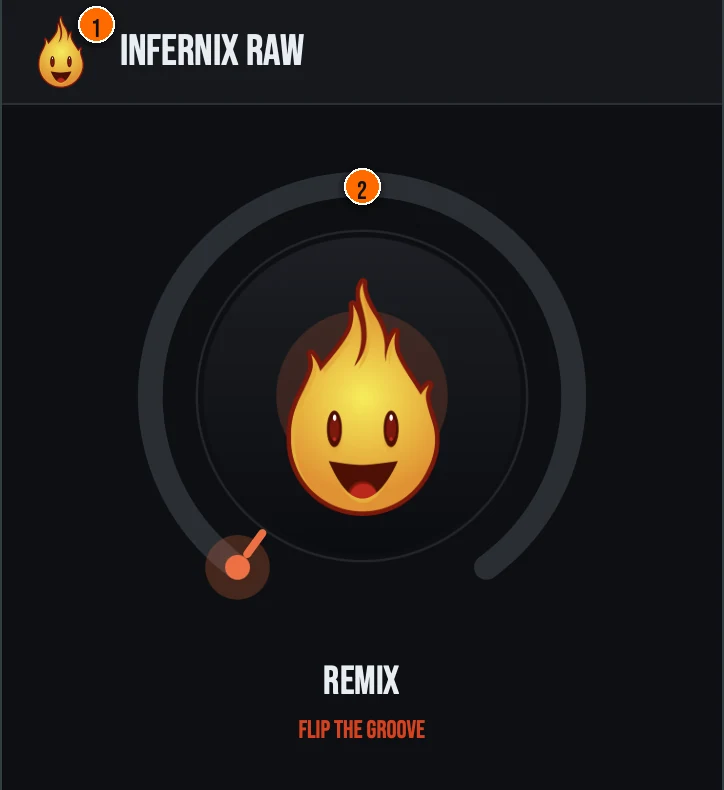
Controls
Header
- 1Fire Head: click the flame logo to open the About panel: what the plugin is, who made it and the trademark notices. Click anywhere in the panel to close it.
The knob
- 2REMIX: a single macro that drives the full Infernix engine: fill density, spectral morph, motion, and cross-depth all move together. At low settings you get the occasional tasteful flip; push it further and fills fire harder and more often. A front-loaded output trim and equal-power crossfade keep the output level-matched, and the engine free-runs from an internal clock (120 BPM fallback) so fills fire even when the host transport is stopped.
Key specs*
| Two ghost playheads | Each fill slices the buffered audio with a forward eighth-note and a reverse sixteenth mixed 50/50, with zero-crossing-snapped slice starts and short slice crossfades for clean seams. |
|---|---|
| Free-running clock | The beat clock free-runs from the host tempo (falling back to 120 BPM) and keeps ticking whether or not the transport is rolling, including in standalone and offline render, so fills still fire offline. |
| Constant latency | The Profile FFT always runs, so the plugin reports a fixed latency to the host that never changes as you move the macro, keeping the host's delay compensation stable. |
| Audio safety | Denormal protection, a real-time guard, per-sample NaN/Inf sanitizing, and a 0 dBFS soft-clip ceiling keep the output clean and bounded across the full macro sweep. |
| Controls | One knob, REMIX |
| Formats | macOS: AU, VST3, CLAP, AAX, Standalone. Windows: VST3, CLAP, Standalone |
* Key specs from the plugin page. Some specs may not be listed.
How do I use Infernix Raw on a track?
- Insert it. Put Infernix Raw on the track or bus you want to change.
- Turn REMIX up. Raise REMIX until it sounds right. At low settings you get the occasional tasteful flip; push it further and fills fire harder and more often. A front-loaded output trim and equal-power crossfade keep the output level-matched, and the engine free-runs from an internal clock (120 BPM fallback) so fills fire even when the host transport is stopped.
What about the full Infernix?
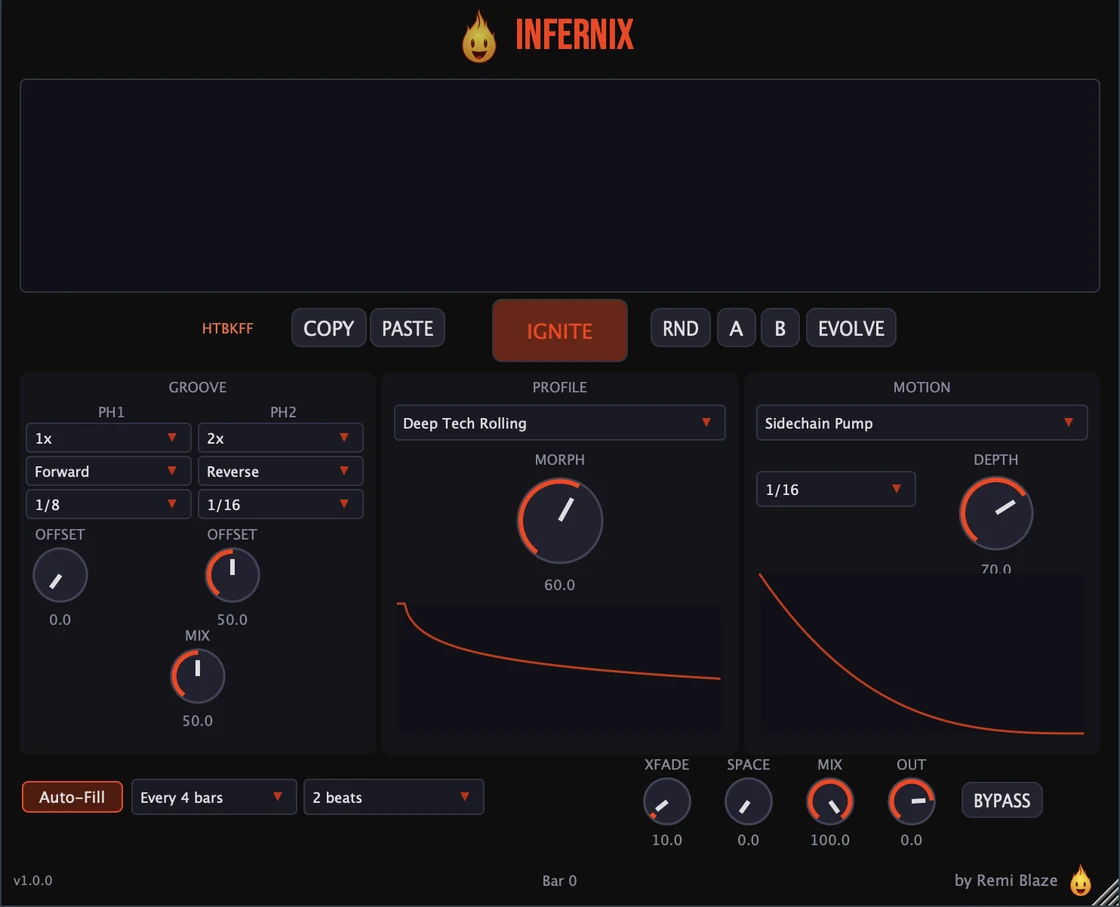
Love the fills? The full Infernix puts you in control. The Pro version lets you arm fills manually, drive two ghost playheads with independent speed and direction, choose from 16 spectral DNA profiles, pick from 20 motion shapes, share pattern seeds, and sculpt every remix flip by hand, with 11 factory presets. Every control is explained in the Infernix manual.
Keyboard and mouse shortcuts
These work in every Infernix Raw format (AU, VST3, CLAP, AAX, Standalone).
| Reset a control to its default | Double-click the knob or slider |
|---|---|
| Scroll to change a value | Hover over a knob and scroll the mouse wheel |
Frequently Asked Questions
Is Infernix Raw free?
Yes. Infernix Raw is completely free: freeware, no trial, no nag screens, no expiration.
What does the REMIX knob do?
REMIX is a single macro that drives the full Infernix remix engine: fill density, spectral morph, rhythmic motion, and cross-depth all move together. As you open it, the plugin self-arms and fires syncopated remix fills: two ghost playheads stutter-chop your buffered audio while the spectrum morphs, then it slips back to dry. A front-loaded output trim and equal-power crossfade keep the output level-matched.
Does Infernix Raw need the host playing?
No. The engine free-runs from an internal clock with a 120 BPM fallback, so fills fire even when the host transport is stopped.
How is Infernix Raw different from Infernix Pro?
Infernix Raw gives you the remix engine behind a single level-matched REMIX knob. The full Infernix lets you arm fills manually, choose patterns, pick spectral profiles, control two ghost playheads, motion shapes, and sculpt each remix flip by hand.
Does Infernix Raw run on Apple Silicon and Windows?
Yes. Infernix Raw is a Universal Binary that runs natively on Apple Silicon (M1/M2/M3/M4) and Intel Macs, and ships as a 64-bit build for Windows 10 and 11.
What formats does Infernix Raw come in?
Infernix Raw ships as AU, VST3, CLAP, AAX and a Standalone app on macOS, as a Universal Binary for Apple Silicon and Intel, plus VST3, CLAP and Standalone on Windows 10 and 11. AAX ships on macOS only. It runs in any AU, VST3, CLAP or AAX host: Ableton Live, Logic Pro, FL Studio, Cubase, Reaper, Bitwig and more.
Can I automate Infernix Raw?
Yes: REMIX is the only parameter exposed to host automation, so mapping it stays simple. The underlying engine parameters are wrapped as non-automatable so they never clutter the list, yet still save and restore with plugin state.
Where can I find more about Infernix Raw?
On the Infernix Raw page: its features, system requirements and how to get it.
How do I get and install Infernix Raw?
- Get it. Infernix Raw is free. Get it from the Infernix Raw page.
- Run the installer. On macOS, double-click the .pkg file and choose AU, VST3, CLAP, AAX or Standalone. On Windows, run the .exe installer and choose VST3, CLAP or Standalone.
- Open your DAW. Restart your DAW and rescan plugins if needed, then find Infernix Raw under Remi Blaze in your plugin list.
More about Infernix Raw, including its features and system requirements, is on the Infernix Raw page.
Where are the plugin files?
If you need to find Infernix Raw on disk, for example to troubleshoot or to uninstall it manually, these are the standard locations.
| macOS AU | ~/Library/Audio/Plug-Ins/Components/ |
|---|---|
| macOS VST3 | ~/Library/Audio/Plug-Ins/VST3/ |
| macOS CLAP | ~/Library/Audio/Plug-Ins/CLAP/ |
| macOS AAX | /Library/Application Support/Avid/Audio/Plug-Ins/ |
| Windows VST3 | C:\Program Files\Common Files\VST3\ |
| Windows CLAP | C:\Program Files\Common Files\CLAP\ |
To uninstall, quit your DAW and delete the Infernix Raw file from the relevant folder. Your DAW will stop listing it on its next rescan.
Need help with Infernix Raw?
If something isn't covered here, or Infernix Raw doesn't behave as described, contact support or email support@remiblaze.com. To get an answer faster, include:
- your operating system and version (for example macOS 15.6 or Windows 11)
- your DAW and its version
- the format you're using (AU, VST3, CLAP, AAX or Standalone)
- the version you installed (shown in the installer and in your download), since the About panel of every Raw shows v1.0.0
- what you did, what you expected, and what happened instead
This manual is for Infernix Raw 1.0.1. Controls and settings can change between versions, so if something here doesn't match what you see, check the version shown in your installer or download. Spotted a mistake or have a question? Let us know.