What is Oxidex Raw?
One knob. Turn it up for instant analog tape: warmth, saturation, and gentle wow/flutter that auto-levels as you push it. Oxidex Raw is the free, one-knob version of Oxidex: a single macro takes you from a pristine studio reel to a worn, warm tape sound with no menus and no tweaking. As you turn it up the tape ages: warmth builds into heavier saturation, the low end gets a growing head-bump, the highs roll off gently, and a touch of tape hiss eases in, all auto-leveled so you hear character, not just more volume.
Quick start
Get a result with Oxidex Raw in under a minute.
- Insert it. Put Oxidex Raw on the track or bus you want to change.
- Turn AGE up. Raise AGE until it sounds right. Auto-gain keeps the level matched.
- Compare. Bypass the plugin in your DAW to hear the difference.
The interface
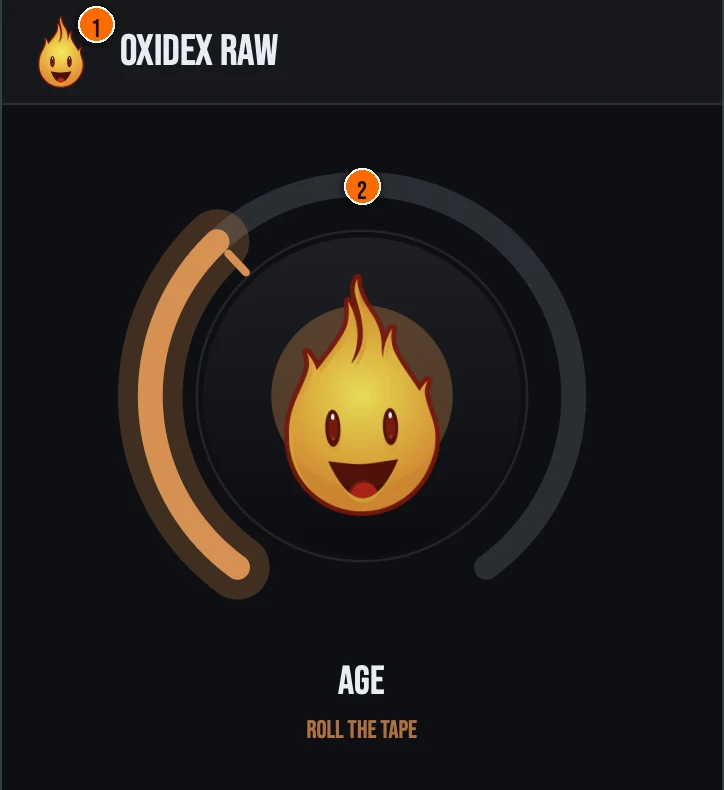
Controls
Header
- 1Fire Head: click the flame logo to open the About panel: what the plugin is, who made it and the trademark notices. Click anywhere in the panel to close it.
The knob
- 2AGE: the one knob. Turn it up and the tape ages: warmth builds into heavier saturation, the low end gets a growing head-bump, the highs roll off gently, and a touch of tape hiss eases in. At low settings you get subtle rounding and warmth: the sound of a well-maintained studio reel. Push it further and the signal takes on worn, vintage character that makes digital recordings feel analog. The output is auto-leveled, so you hear character, not just more volume.
Key specs*
| Oversampled tape saturation | The engine runs at HQ (8×) through a half-band polyphase IIR oversampler, combining frequency-dependent magnetic hysteresis with an asymmetric tanh S-curve for warm, dense harmonics. |
|---|---|
| Head bump and wow & flutter | A TPT low shelf around 80 Hz lifts the low end, while dual randomized LFOs modulate a fractional delay line for authentic pitch warble, both tracking the AGE macro. |
| Analog realism | A wear-dependent low-pass and a 15 IPS head-response rolloff darken the top as the tape ages, with band-limited Brownian tape hiss (gated on silence), inter-channel crosstalk, and subtle all-pass phase dispersion. |
| Level-matched, constant latency | Auto-gain is forced on so pushing AGE adds character, not just volume, and oversampling and lookahead are pinned so the reported latency never changes mid-stream. |
| Output safety | A 5 Hz DC blocker preserves headroom after the asymmetric saturation, an anti-aliased soft-clipper plus hard ceiling holds 0 dBFS, and NaN/Inf samples are sanitized throughout, with denormal protection. |
| Controls | One knob, AGE |
| Formats | macOS: AU, VST3, CLAP, AAX, Standalone. Windows: VST3, CLAP, Standalone |
* Key specs from the plugin page. Some specs may not be listed.
How do I use Oxidex Raw on a track?
- Insert it. Put Oxidex Raw on the track or bus you want to change.
- Turn AGE up. Raise AGE until it sounds right. Turn it up and the tape ages: warmth builds into heavier saturation, the low end gets a growing head-bump, the highs roll off gently, and a touch of tape hiss eases in. At low settings you get subtle rounding and warmth: the sound of a well-maintained studio reel.
What about the full Oxidex?
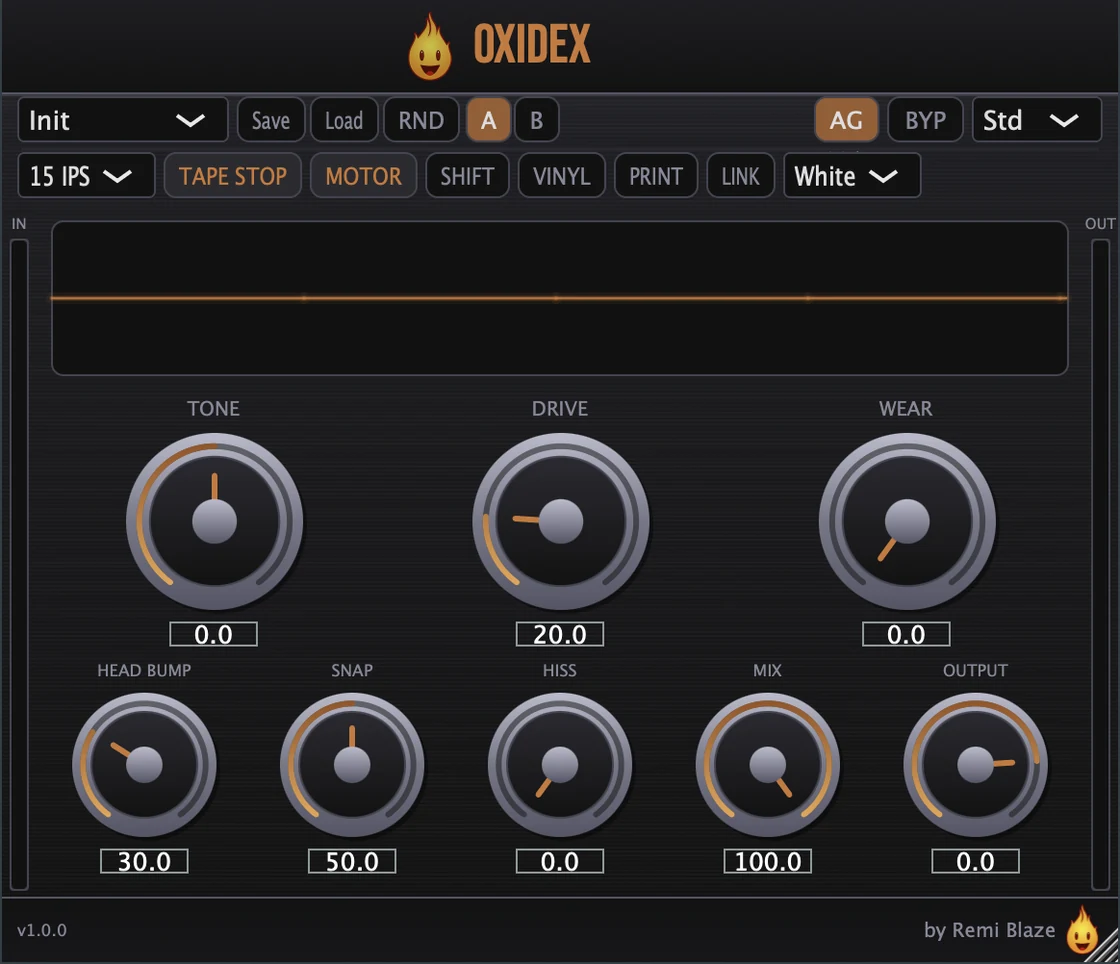
Love the tape? The full Oxidex goes deeper. The Pro version adds Drive, Tone, Head Bump, Wear, Hiss, and Transient Snap controls, three IPS tape speeds (7.5/15/30), tape stop performance effects, motor pressure, crosstalk, and 22 factory presets. Every control is explained in the Oxidex manual.
Keyboard and mouse shortcuts
These work in every Oxidex Raw format (AU, VST3, CLAP, AAX, Standalone).
| Reset a control to its default | Double-click the knob or slider |
|---|---|
| Scroll to change a value | Hover over a knob and scroll the mouse wheel |
Frequently Asked Questions
Is Oxidex Raw free?
Yes. Oxidex Raw is completely free: freeware, no trial, no nag screens, no expiration.
What does the AGE knob do?
AGE blends in tape saturation, head bump, high-frequency rolloff, gentle wow/flutter, and a touch of tape hiss from the Oxidex engine. At low settings you get subtle warmth. Push it and the signal takes on worn reel-to-reel character with harmonic density. Automatic gain compensation keeps the output level-matched.
How is Oxidex Raw different from Oxidex (Pro)?
Oxidex Raw gives you the tape saturation engine behind a single AGE knob with auto gain. The full Oxidex adds Drive, Tone, Head Bump, Wear, Hiss, and Transient Snap controls, three IPS tape speeds, tape stop performance effects, and 22 factory presets.
Does Oxidex Raw run on Apple Silicon and Windows?
Yes. Oxidex Raw is a Universal Binary that runs natively on Apple Silicon (M1/M2/M3/M4) and Intel Macs, and ships as a 64-bit build for Windows 10 and 11.
What formats does Oxidex Raw come in?
Oxidex Raw ships as AU, VST3, CLAP, AAX and a Standalone app on macOS, as a Universal Binary for Apple Silicon and Intel, plus VST3, CLAP and Standalone on Windows 10 and 11. AAX ships on macOS only. It runs in any AU, VST3, CLAP or AAX host: Ableton Live, Logic Pro, FL Studio, Cubase, Reaper, Bitwig, and more.
Does Oxidex Raw add latency?
Yes, a small, constant amount. Oversampling is pinned to HQ (8×) and lookahead is fixed at 1.5 ms, and the plugin reports that latency statically, so the host's plugin delay compensation value never changes mid-stream.
Where can I find more about Oxidex Raw?
On the Oxidex Raw page: its features, system requirements and how to get it.
How do I get and install Oxidex Raw?
- Get it. Oxidex Raw is free. Get it from the Oxidex Raw page.
- Run the installer. On macOS, double-click the .pkg file and choose AU, VST3, CLAP, AAX or Standalone. On Windows, run the .exe installer and choose VST3, CLAP or Standalone.
- Open your DAW. Restart your DAW and rescan plugins if needed, then find Oxidex Raw under Remi Blaze in your plugin list.
More about Oxidex Raw, including its features and system requirements, is on the Oxidex Raw page.
Where are the plugin files?
If you need to find Oxidex Raw on disk, for example to troubleshoot or to uninstall it manually, these are the standard locations.
| macOS AU | ~/Library/Audio/Plug-Ins/Components/ |
|---|---|
| macOS VST3 | ~/Library/Audio/Plug-Ins/VST3/ |
| macOS CLAP | ~/Library/Audio/Plug-Ins/CLAP/ |
| macOS AAX | /Library/Application Support/Avid/Audio/Plug-Ins/ |
| Windows VST3 | C:\Program Files\Common Files\VST3\ |
| Windows CLAP | C:\Program Files\Common Files\CLAP\ |
To uninstall, quit your DAW and delete the Oxidex Raw file from the relevant folder. Your DAW will stop listing it on its next rescan.
Need help with Oxidex Raw?
If something isn't covered here, or Oxidex Raw doesn't behave as described, contact support or email support@remiblaze.com. To get an answer faster, include:
- your operating system and version (for example macOS 15.6 or Windows 11)
- your DAW and its version
- the format you're using (AU, VST3, CLAP, AAX or Standalone)
- the version you installed (shown in the installer and in your download), since the About panel of every Raw shows v1.0.0
- what you did, what you expected, and what happened instead
This manual is for Oxidex Raw 1.0.1. Controls and settings can change between versions, so if something here doesn't match what you see, check the version shown in your installer or download. Spotted a mistake or have a question? Let us know.