What is Sassix Raw?
Sassix Raw is the one-knob junior of Sassix Pro: the Sassy Vocal Maximizer. Turn the big ATTITUDE knob and the vocal sits up front, bright, and finished: upward compression lifts the quiet syllables forward, a 3-5 kHz presence band cuts through the mix, a 10 kHz air shelf opens the top, and a bright exciter adds the hype. Auto-gain keeps it level-matched, so it gets bigger, never just louder.
Quick start
Get a result with Sassix Raw in under a minute.
- Insert it. Put Sassix Raw on the track or bus you want to change.
- Turn ATTITUDE up. Raise ATTITUDE until it sounds right. Auto-gain keeps the level matched.
- Compare. Bypass the plugin in your DAW to hear the difference.
The interface
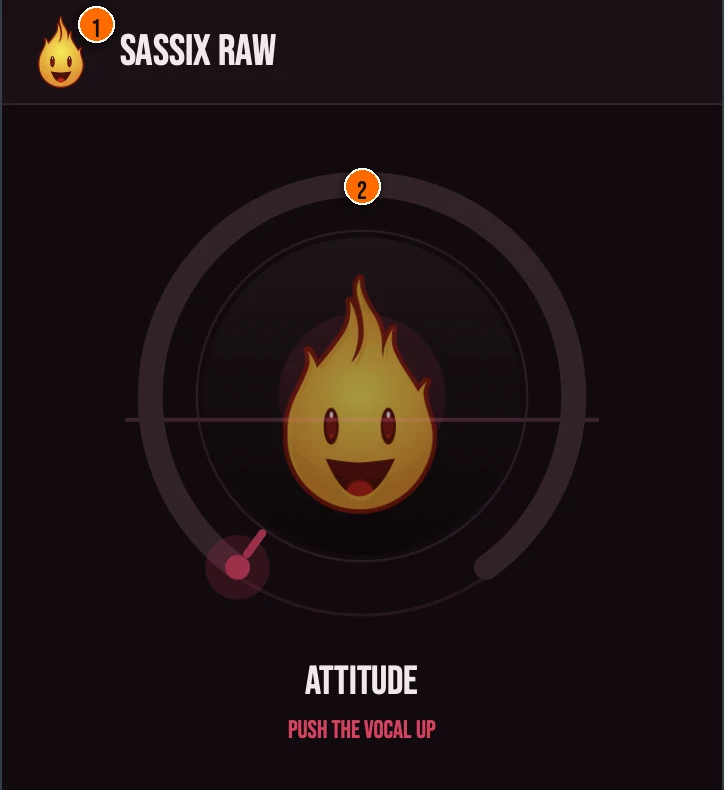
Controls
Header
- 1Fire Head: click the flame logo to open the About panel: what the plugin is, who made it and the trademark notices. Click anywhere in the panel to close it.
The knob
- 2ATTITUDE: a single macro that drives the entire vocal-forward chain at once. The clever bit is hidden: as you add brightness, a Silk servo automatically scales up behind the scenes, taming the harsh resonances the exciter creates so you can push hard without ever hitting an ice-pick. You never see or set it: you just turn one knob, and the vocal mixes itself forward.
Key specs*
| Pre-compression AGC rider | A 50 ms RMS rider with a fixed −18 dB target level-matches the input before the engine touches it. |
|---|---|
| Upward compression + Spit presence | An opening threshold and up-ratio (up to 2.5:1) lift the quiet syllables forward, while a 3–5 kHz band-pass transient designer adds sustained presence and bite so the vocal cuts through. |
| Silk spectral de-harsh | A phase-preserving STFT (WOLA) de-harsher over roughly 2–8 kHz pulls down only the bins that spike above a running average, applying the same linear-phase cut to real and imaginary parts, and always runs so latency stays constant. |
| Air shelf + anti-aliased exciter | A 10 kHz high shelf opens the top end, and an asymmetric tanh exciter on a ~7 kHz-and-up band runs at 2× with a zero-latency polyphase anti-alias scheme so its harmonics don't fold back as aliasing. |
| Auto-gain + 0 dBFS ceiling | An always-on output auto-gain matches output RMS back to input RMS (clamped ±18 dB), and a NaN/Inf guard plus a strictly-bounded 0 dBFS true-peak soft clipper as the last step means the maximizer can never emit an over. |
| Controls | One knob, ATTITUDE |
| Formats | macOS: AU, VST3, CLAP, AAX, Standalone. Windows: VST3, CLAP, Standalone |
* Key specs from the plugin page. Some specs may not be listed.
How do I use Sassix Raw on a track?
- Insert it. Put Sassix Raw on the track or bus you want to change.
- Turn ATTITUDE up. Raise ATTITUDE until it sounds right. The clever bit is hidden: as you add brightness, a Silk servo automatically scales up behind the scenes, taming the harsh resonances the exciter creates so you can push hard without ever hitting an ice-pick. You never see or set it: you just turn one knob, and the vocal mixes itself forward.
What about the full Sassix?
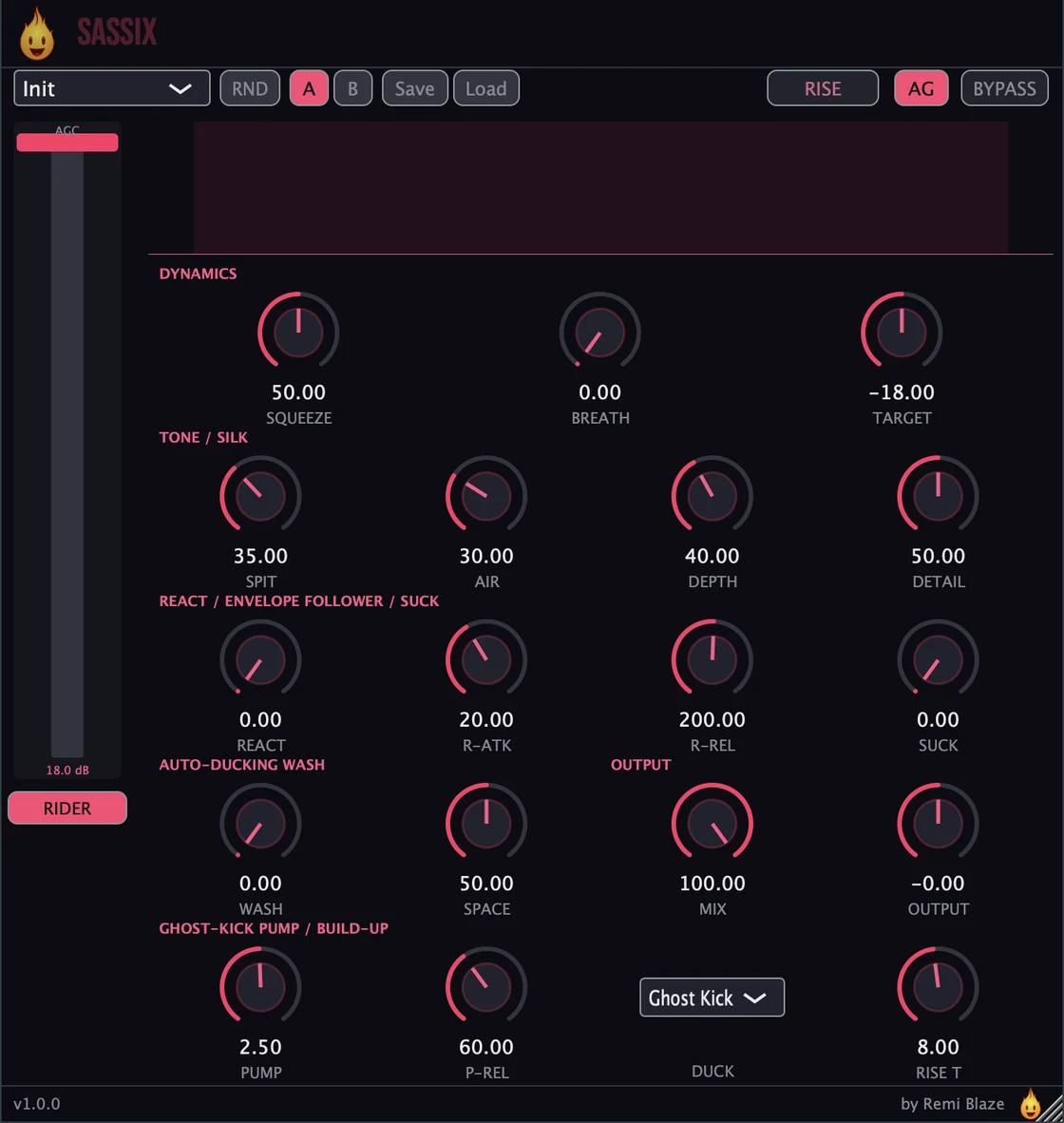
Want hands on every stage? The full Sassix goes deeper. The Pro version adds separate Squeeze upward compression, Smart Breath-Duck, the React self-mixing envelope follower, the Spit transient designer, the Silk de-harsher as a hands-on tool, an auto-ducking Wash, metering, and 11 factory presets. Every control is explained in the Sassix manual.
Keyboard and mouse shortcuts
These work in every Sassix Raw format (AU, VST3, CLAP, AAX, Standalone).
| Reset a control to its default | Double-click the knob or slider |
|---|---|
| Scroll to change a value | Hover over a knob and scroll the mouse wheel |
Frequently Asked Questions
How much is Sassix Raw?
Sassix Raw is a paid plugin: a one-time purchase. It's a fan-support plugin: back the sound and get the vocal-forward chain behind one knob.
What does the ATTITUDE knob do?
ATTITUDE is a single macro that drives the whole vocal-forward chain at once: upward compression, a 3-5 kHz presence band, a 10 kHz air shelf, and a bright exciter. A hidden Silk servo automatically tames the harshness the brightness creates, and auto-gain keeps it level-matched, so the vocal gets bigger, never just louder.
How is Sassix Raw different from Sassix (Pro)?
Sassix Raw gives you the vocal-forward chain behind one ATTITUDE knob with automatic Silk protection and AGC level-matching. The full Sassix adds separate Squeeze upward compression, Smart Breath-Duck, the React self-mixing envelope follower, the Spit transient designer, the Silk de-harsher as a hands-on tool, an auto-ducking Wash, metering, and 11 factory presets.
Does Sassix Raw run on Apple Silicon and Windows?
Yes. Sassix Raw is a Universal Binary that runs natively on Apple Silicon (M1/M2/M3/M4) and Intel Macs, and ships as a 64-bit build for Windows 10 and 11.
Will Sassix Raw change my levels?
No: it is level-matched the whole way. A pre-compression RMS rider plus an always-on output auto-gain that matches output RMS back to input RMS (clamped ±18 dB) hold perceived loudness steady, so the vocal gets bigger, not just louder, and A/B stays honest.
Does Sassix Raw add latency?
Yes, a small constant amount: a fixed 2 ms lookahead plus the Silk STFT frame (1536 samples) gives a constant reported latency (about 1624 samples at 44.1 kHz) that is fully compensated by the host. Because Silk always runs, the reported latency never changes with the knob, so use it while mixing rather than for live monitoring.
Is Sassix Raw part of a bundle?
Yes. Sassix Raw is in the Vocal Bundle, which has the vocal Pros and their one-knob Raws in one purchase for less than buying them separately.
Where can I find more about Sassix Raw?
On the Sassix Raw page: its features, system requirements and how to get it.
How do I buy and install Sassix Raw?
- Buy it. Sassix Raw is a one-time purchase. Buy it from the Sassix Raw page, and the store emails you the download link.
- Run the installer. On macOS, double-click the .pkg file and choose AU, VST3, CLAP, AAX or Standalone. On Windows, run the .exe installer and choose VST3, CLAP or Standalone.
- Open your DAW. Restart your DAW and rescan plugins if needed, then find Sassix Raw under Remi Blaze in your plugin list.
More about Sassix Raw, including its features and system requirements, is on the Sassix Raw page.
Where are the plugin files?
If you need to find Sassix Raw on disk, for example to troubleshoot or to uninstall it manually, these are the standard locations.
| macOS AU | ~/Library/Audio/Plug-Ins/Components/ |
|---|---|
| macOS VST3 | ~/Library/Audio/Plug-Ins/VST3/ |
| macOS CLAP | ~/Library/Audio/Plug-Ins/CLAP/ |
| macOS AAX | /Library/Application Support/Avid/Audio/Plug-Ins/ |
| Windows VST3 | C:\Program Files\Common Files\VST3\ |
| Windows CLAP | C:\Program Files\Common Files\CLAP\ |
To uninstall, quit your DAW and delete the Sassix Raw file from the relevant folder. Your DAW will stop listing it on its next rescan.
Need help with Sassix Raw?
If something isn't covered here, or Sassix Raw doesn't behave as described, contact support or email support@remiblaze.com. To get an answer faster, include:
- your operating system and version (for example macOS 15.6 or Windows 11)
- your DAW and its version
- the format you're using (AU, VST3, CLAP, AAX or Standalone)
- the version you installed (shown in the installer and in your download), since the About panel of every Raw shows v1.0.0
- what you did, what you expected, and what happened instead
This manual is for Sassix Raw 1.0.1. Controls and settings can change between versions, so if something here doesn't match what you see, check the version shown in your installer or download. Spotted a mistake or have a question? Let us know.