What is Sparkit Raw?
Sparkit Raw is the fastest way to turn a static chord into movement. Hold notes, turn one knob, and instantly get a tempo-synced arpeggio: no step programming, no menus, no learning curve. It's a MIDI effect: place it before an instrument and it consumes your held chord as MIDI in, then emits a timed arpeggio as MIDI out, leaving the audio untouched. The arp walks your chord across octaves in perfect lock with your host tempo, and when there's no transport it free-runs at 120 BPM so it works even standalone. Best of all, it's completely free.
The interface
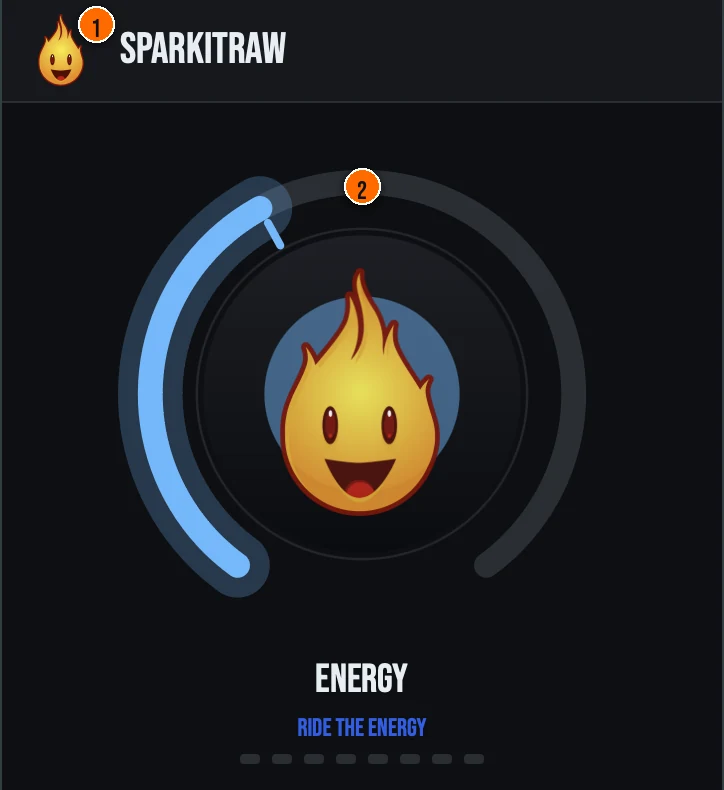
Controls
Header
- 1Fire Head: click the flame logo to open the About panel: what the plugin is, who made it and the trademark notices. Click anywhere in the panel to close it.
The knob
- 2ENERGY: a single macro that takes the arp from lazy to relentless. As you turn it up, the rate ramps 1/4 → 1/8 → 1/16 → 1/32, the octave range grows up to 4 octaves, and the pattern opens from a simple upward run into an up-and-down motion while the notes tighten. Low ENERGY is a slow, sparse pulse; max is a fast, octave-spanning run. One knob, one clean story: more energy.
Key specs*
| True MIDI-FX contract | Sparkit Raw reports itself as a MIDI effect (accepts and produces MIDI) with no audio buses, and clears the audio buffer every block, so it never produces sound on its own. |
|---|---|
| Held-chord arpeggiator | Note-ons and note-offs maintain a sorted set of held notes, from which the engine builds an Up / Down / Up-Down sequence across the active octave range and steps through it on a sample-accurate internal clock. |
| Host-synced with free-run fallback | Step timing follows the host tempo from the play-head, and when no transport or BPM is available it free-runs at 120 BPM so it still plays standalone or offline. |
| Clean note handling | Each new step sends a note-off for the previous note before the next note-on, releasing the chord flushes any sounding note, and non-note MIDI (pitch bend, CC, etc.) passes straight through: no stuck notes. |
| Zero latency | The plugin reports zero latency to the host, and changes are applied at the next cycle boundary so they never glitch mid-pattern. |
| Controls | One knob, ENERGY |
| Formats | macOS: AU, VST3, CLAP, AAX, Standalone. Windows: VST3, CLAP, Standalone |
* Key specs from the plugin page. Some specs may not be listed.
How do I arpeggiate a chord with Sparkit Raw?
- Put it before an instrument. Sparkit Raw is a MIDI effect: place it on a MIDI track ahead of an instrument. It leaves the audio untouched.
- Hold a chord. It takes your held chord as MIDI in and plays it back as a timed arpeggio, locked to your host tempo (120 BPM when there is no transport).
- Turn ENERGY up. Turn it up for a faster, bigger arpeggio that climbs across more octaves.
What about the full Sparkit?
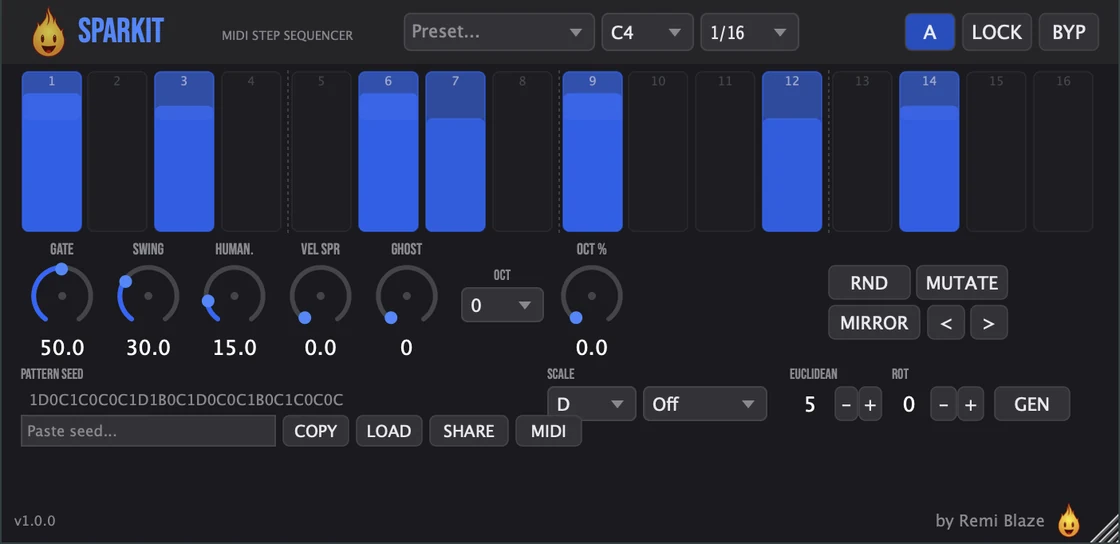
Heard the arp? Now sequence it. Sparkit Pro goes deeper. The Pro version is a full 16-step MIDI sequencer with per-step velocity and probability, swing and humanize, scales, Euclidean rhythms, pattern seeds and sharing, and factory presets. Every control is explained in the Sparkit manual.
Keyboard and mouse shortcuts
These work in every Sparkit Raw format (AU, VST3, CLAP, AAX, Standalone).
| Reset a control to its default | Double-click the knob or slider |
|---|---|
| Scroll to change a value | Hover over a knob and scroll the mouse wheel |
Frequently Asked Questions
Is Sparkit Raw free?
Yes. Sparkit Raw is completely free: freeware, no trial, no nag screens, no expiration.
What does the ENERGY knob do?
ENERGY is a single macro. Turn it up and the arpeggiator ramps its rate from 1/4 to 1/8 to 1/16 to 1/32, grows the octave range up to 4 octaves, and opens the pattern from a simple upward run into an up-and-down motion: a smooth "more energy" sweep from a slow, sparse pulse to a fast, busy run.
Is Sparkit Raw a MIDI plugin?
Yes. Sparkit Raw is a MIDI effect: it takes your held chord as MIDI in and emits an arpeggiated MIDI stream out. In Logic it loads as a MIDI FX above the instrument; in Ableton drop it on a MIDI track before the instrument. It passes audio through untouched.
How is Sparkit Raw different from Sparkit (Pro)?
Sparkit Raw gives you programmed-rhythm MIDI without programming: hold notes, turn one knob. The full Sparkit is a 16-step MIDI sequencer with per-step velocity and probability, swing, humanize, scales, Euclidean rhythms, pattern seeds, and presets.
Does Sparkit Raw run on Apple Silicon and Windows?
Yes. Sparkit Raw is a Universal Binary that runs natively on Apple Silicon (M1/M2/M3/M4) and Intel Macs, and ships as a 64-bit build for Windows 10 and 11.
What formats does Sparkit Raw come in?
Sparkit Raw ships as an AU, VST3, CLAP and AAX plugin plus a Standalone app on macOS and Windows, as a Universal Binary that runs natively on Apple Silicon and Intel. It's a MIDI effect, so load it in any AU, VST3, CLAP or AAX host that supports MIDI FX (Logic Pro, GarageBand, Ableton Live, Reaper, Bitwig, FL Studio).
Can I automate Sparkit Raw?
Yes: the single ENERGY macro is the only host-automatable parameter, so your automation list stays a single knob. Every hidden engine parameter (rate, octaves, direction, gate, density) is non-automatable but still saved and restored with your session.
Where can I find more about Sparkit Raw?
On the Sparkit Raw page: its features, system requirements and how to get it.
How do I get and install Sparkit Raw?
- Get it. Sparkit Raw is free. Get it from the Sparkit Raw page.
- Run the installer. On macOS, double-click the .pkg file and choose AU, VST3, CLAP, AAX or Standalone. On Windows, run the .exe installer and choose VST3, CLAP or Standalone.
- Open your DAW. Restart your DAW and rescan plugins if needed, then find Sparkit Raw under Remi Blaze in your plugin list.
More about Sparkit Raw, including its features and system requirements, is on the Sparkit Raw page.
Where are the plugin files?
If you need to find Sparkit Raw on disk, for example to troubleshoot or to uninstall it manually, these are the standard locations.
| macOS AU | ~/Library/Audio/Plug-Ins/Components/ |
|---|---|
| macOS VST3 | ~/Library/Audio/Plug-Ins/VST3/ |
| macOS CLAP | ~/Library/Audio/Plug-Ins/CLAP/ |
| macOS AAX | /Library/Application Support/Avid/Audio/Plug-Ins/ |
| Windows VST3 | C:\Program Files\Common Files\VST3\ |
| Windows CLAP | C:\Program Files\Common Files\CLAP\ |
To uninstall, quit your DAW and delete the Sparkit Raw file from the relevant folder. Your DAW will stop listing it on its next rescan.
Need help with Sparkit Raw?
If something isn't covered here, or Sparkit Raw doesn't behave as described, contact support or email support@remiblaze.com. To get an answer faster, include:
- your operating system and version (for example macOS 15.6 or Windows 11)
- your DAW and its version
- the format you're using (AU, VST3, CLAP, AAX or Standalone)
- the version you installed (shown in the installer and in your download), since the About panel of every Raw shows v1.0.0
- what you did, what you expected, and what happened instead
This manual is for Sparkit Raw 1.0.1. Controls and settings can change between versions, so if something here doesn't match what you see, check the version shown in your installer or download. Spotted a mistake or have a question? Let us know.