What is Tunix Raw?
Drop Tunix Raw on a vocal and turn one knob: that is the whole workflow. Sweep from gentle, natural pitch correction to a hard robotic snap without ever leaving the mix. No keys to set, no menus to dig through: just the sound, dialed in seconds.
Tunix Raw is the one-knob junior of the full Tunix: a pure pitch-correction insert behind a single knob. It runs the same formant-locked PSOLA pitch-correction lead, so the voice stays human (no chipmunk) and automatic gain keeps the level matched. Low constant latency means you can monitor through it live, not after a laggy FFT vocoder.
Quick start
Get a result with Tunix Raw in under a minute.
- Insert it. Put Tunix Raw on the track or bus you want to change.
- Turn TUNE up. Raise TUNE until it sounds right.
- Compare. Bypass the plugin in your DAW to hear the difference.
The interface
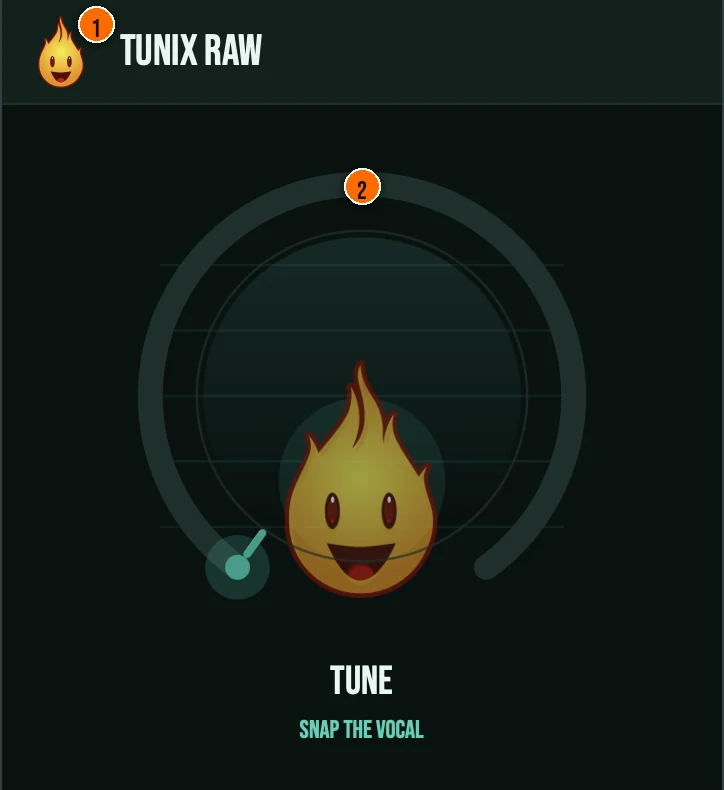
Controls
Header
- 1Fire Head: click the flame logo to open the About panel: what the plugin is, who made it and the trademark notices. Click anywhere in the panel to close it.
The knob
- 2TUNE: a single macro. Low settings give gentle, natural pitch correction that nudges flat notes in while keeping the human feel. Push it up and the retune time drives toward instant: a hard robotic snap locked to the chromatic grid. The curve is front-loaded so the first part of the sweep stays subtle; the robot only arrives at the top. Automatic gain keeps it level-matched the whole way, so it never reads as just louder.
Key specs*
| Formant-locked PSOLA | Pitch shifting is time-domain PSOLA with cepstral-liftering envelope extraction, and the source formant envelope is re-applied flat so the voice stays human (no chipmunk) rather than being warped. |
|---|---|
| MPM / NSDF pitch detection | Fundamental frequency is tracked with the McLeod Pitch Method plus clarity thresholding, an octave-jump guard, and hysteresis smoothing for robust, stable tracking on real vocals. |
| Sibilance / transient protection | Unvoiced and sibilant frames are passed through delayed-dry rather than pitch-shifted, so consonants stay crisp and un-smeared. |
| DC blocker + safety ceiling | A one-pole DC blocker strips any bias from asymmetric grain resynthesis before gain staging, and the output ends in a 0 dBFS soft-clip ceiling with NaN/Inf guarding. |
| Low, constant latency | A fixed PSOLA look-ahead (256 samples) is reported to the host and never changes mid-stream, with the bypass path delayed to match, so you can monitor through it live. |
| Controls | One knob, TUNE |
| Formats | macOS: AU, VST3, CLAP, AAX, Standalone. Windows: VST3, CLAP, Standalone |
* Key specs from the plugin page. Some specs may not be listed.
How do I use Tunix Raw on a track?
- Insert it. Put Tunix Raw on the track or bus you want to change.
- Turn TUNE up. Raise TUNE until it sounds right. Low settings give gentle, natural pitch correction that nudges flat notes in while keeping the human feel. Push it up and the retune time drives toward instant: a hard robotic snap locked to the chromatic grid.
- Automate it. TUNE is the only control your DAW can automate, so one automation lane covers it.
What about the full Tunix?
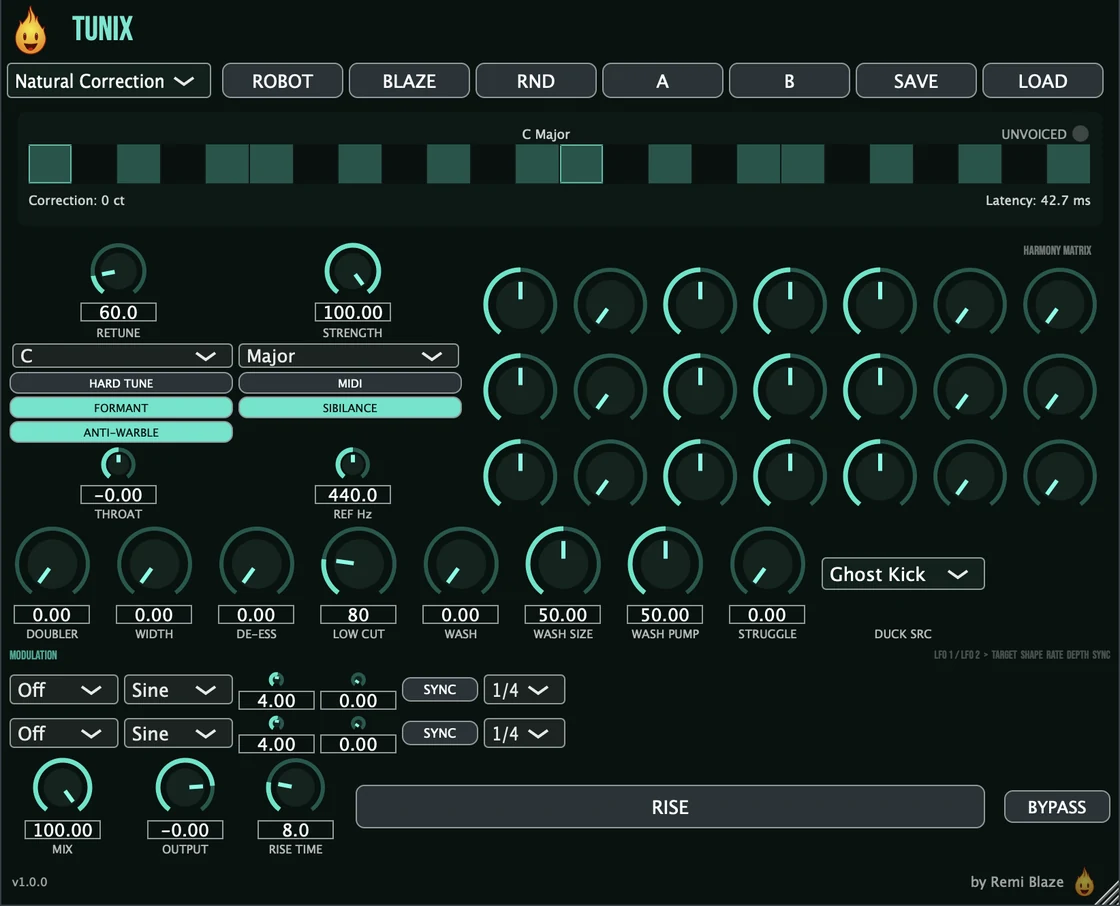
Want the full station? Tunix Pro goes far deeper. The Pro version adds automatic key detection and scale/key selection, manual retune speed and strength, vibrato and humanize, the MIDI-controlled 3-voice harmonizer, dual-LFO modulation, a doubler and dimension widener, an automatic ducking wash, a de-esser, and the full preset bank. Every control is explained in the Tunix manual.
Keyboard and mouse shortcuts
These work in every Tunix Raw format (AU, VST3, CLAP, AAX, Standalone).
| Reset a control to its default | Double-click the knob or slider |
|---|---|
| Scroll to change a value | Hover over a knob and scroll the mouse wheel |
Frequently Asked Questions
How much is Tunix Raw?
Tunix Raw is a paid plugin: a one-time purchase. It is a commercial fan-support plugin that keeps the music going.
What does the TUNE knob do?
One TUNE knob takes the vocal from gentle, natural pitch correction to a hard robotic snap. It is formant-locked so the voice stays human, automatic gain keeps the level matched, and it runs at low constant latency so you can monitor through it live.
How is Tunix Raw different from Tunix (Pro)?
Tunix Raw is the one-knob junior: chromatic pitch correction behind a single TUNE knob. The full Tunix adds automatic key detection and scale/key selection, manual retune speed and strength, vibrato and humanize, the MIDI-controlled 3-voice harmonizer, and the full preset bank.
Does Tunix Raw run on Apple Silicon and Windows?
Yes. Tunix Raw is a Universal Binary that runs natively on Apple Silicon (M1/M2/M3/M4) and Intel Macs, and ships as a 64-bit build for Windows 10 and 11.
Does Tunix Raw add latency?
Only a low, constant amount. A fixed PSOLA look-ahead (256 samples) is reported to the host and never changes mid-stream, and the bypass path is delayed to match for a transparent bypass. Because it is a formant-locked PSOLA corrector: not a laggy FFT vocoder: you can monitor through it live.
Can I automate Tunix Raw?
Yes: TUNE is the only host-automatable parameter, so it is the single knob that shows up in the host's automation list. Every ported engine control (retune speed, strength, formant lock, sibilance protect, output) is wrapped non-automatable, but still saves and restores with the plugin state.
Is Tunix Raw part of a bundle?
Yes. Tunix Raw is in the Vocal Bundle, which has the vocal Pros and their one-knob Raws in one purchase for less than buying them separately.
Where can I find more about Tunix Raw?
On the Tunix Raw page: its features, system requirements and how to get it.
How do I buy and install Tunix Raw?
- Buy it. Tunix Raw is a one-time purchase. Buy it from the Tunix Raw page, and the store emails you the download link.
- Run the installer. On macOS, double-click the .pkg file and choose AU, VST3, CLAP, AAX or Standalone. On Windows, run the .exe installer and choose VST3, CLAP or Standalone.
- Open your DAW. Restart your DAW and rescan plugins if needed, then find Tunix Raw under Remi Blaze in your plugin list.
More about Tunix Raw, including its features and system requirements, is on the Tunix Raw page.
Where are the plugin files?
If you need to find Tunix Raw on disk, for example to troubleshoot or to uninstall it manually, these are the standard locations.
| macOS AU | ~/Library/Audio/Plug-Ins/Components/ |
|---|---|
| macOS VST3 | ~/Library/Audio/Plug-Ins/VST3/ |
| macOS CLAP | ~/Library/Audio/Plug-Ins/CLAP/ |
| macOS AAX | /Library/Application Support/Avid/Audio/Plug-Ins/ |
| Windows VST3 | C:\Program Files\Common Files\VST3\ |
| Windows CLAP | C:\Program Files\Common Files\CLAP\ |
To uninstall, quit your DAW and delete the Tunix Raw file from the relevant folder. Your DAW will stop listing it on its next rescan.
Need help with Tunix Raw?
If something isn't covered here, or Tunix Raw doesn't behave as described, contact support or email support@remiblaze.com. To get an answer faster, include:
- your operating system and version (for example macOS 15.6 or Windows 11)
- your DAW and its version
- the format you're using (AU, VST3, CLAP, AAX or Standalone)
- the version you installed (shown in the installer and in your download), since the About panel of every Raw shows v1.0.0
- what you did, what you expected, and what happened instead
This manual is for Tunix Raw 1.0.1. Controls and settings can change between versions, so if something here doesn't match what you see, check the version shown in your installer or download. Spotted a mistake or have a question? Let us know.