What is Gaugex Raw?
Stop guessing whether your master is loud enough. Gaugex Raw is a dead-simple free streaming loudness meter: pick your target platform, then watch a big integrated LUFS readout and a green/amber/red on-target light tell you exactly when you've landed. Built on the ITU-R BS.1770-4 / EBU R128 standard, with small secondary readouts for momentary, short-term, and true peak, and a Fire Head needle that rides your loudness in real time.
It measures only. Your audio passes through bit-transparent with zero added latency, so you can leave it inserted anywhere in your chain without touching your sound or your timing.
The interface
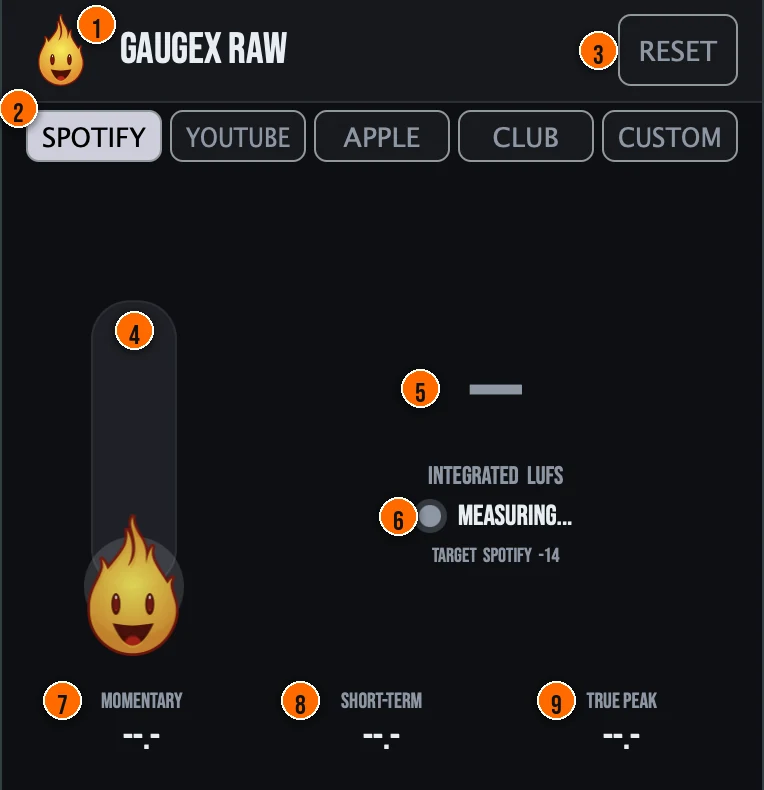
Controls
Header
- 1Fire Head: click the flame logo to open the About panel: what the plugin is, who made it and the trademark notices. Click anywhere in the panel to close it.
- 3RESET: clears the integrated measurement so you can start a fresh reading.
Target
- 2Target buttons: the one control: pick the loudness target you are mastering for. SPOTIFY is -14 LUFS, YOUTUBE -14, APPLE (Apple Music) -16 and CLUB (Club/CD) -9. CUSTOM shows a slider to set your own target, anywhere from -24 to -6 LUFS.
Meters and displays
- 4Fire Head needle: rides your loudness in real time.
- 5Integrated LUFS: the big readout: gated integrated loudness of everything played since the last Reset, measured to ITU-R BS.1770-4 / EBU R128. The target you picked is shown under it.
- 6On-target light: glows green when integrated loudness is within ±1.0 LU of the target, amber within 3 LU and red beyond that, with a live delta showing how many LU you are from the goal.
- 7Momentary: loudness over the last 400 ms.
- 8Short-term: loudness over the last 3 seconds.
- 9True peak: inter-sample peak level in dBTP, measured with 4x oversampling. It warns you visually; it never limits or clips the sound.
Key specs*
| Measure-only, bit-transparent | The audio buffer is never written, so your signal passes through completely unchanged. |
|---|---|
| Zero latency | Gaugex Raw reports zero latency to the host, so it can sit anywhere in your chain without affecting playback or timing. |
| BS.1770-4 K-weighting | A two-stage K-weighting filter feeds the LUFS integrators, with gated integrated loudness using the standard -70 LUFS absolute and -10 LU relative gates. |
| True-peak oversampling | A 4x oversampler measures inter-sample peaks read-only, so the dry signal stays bit-transparent while catching peaks a normal sample meter misses. |
| Real-time-safe | Denormals are disabled in the audio thread and no allocations happen on the audio path, with headroom pre-allocated in prepareToPlay. |
| Targets | Spotify -14, YouTube -14, Apple Music -16, Club/CD -9, Custom -24 to -6 LUFS |
| Formats | macOS: AU, VST3, CLAP, AAX, Standalone. Windows: VST3, CLAP, Standalone |
* Key specs from the plugin page. Some specs may not be listed.
How do I check my master against a streaming target?
- Insert it. Put Gaugex Raw on your master. It measures only and adds no latency, so it can sit anywhere in the chain.
- Pick a target. Click the platform you are releasing to, or CUSTOM to set your own value.
- Reset and play. Press RESET, then play the whole track from the start so the integrated reading covers all of it.
- Read the result. Integrated LUFS and the on-target light tell you where you landed: green within ±1.0 LU, amber within 3 LU, red beyond, with the delta showing how far to move.
What about the full Gaugex?
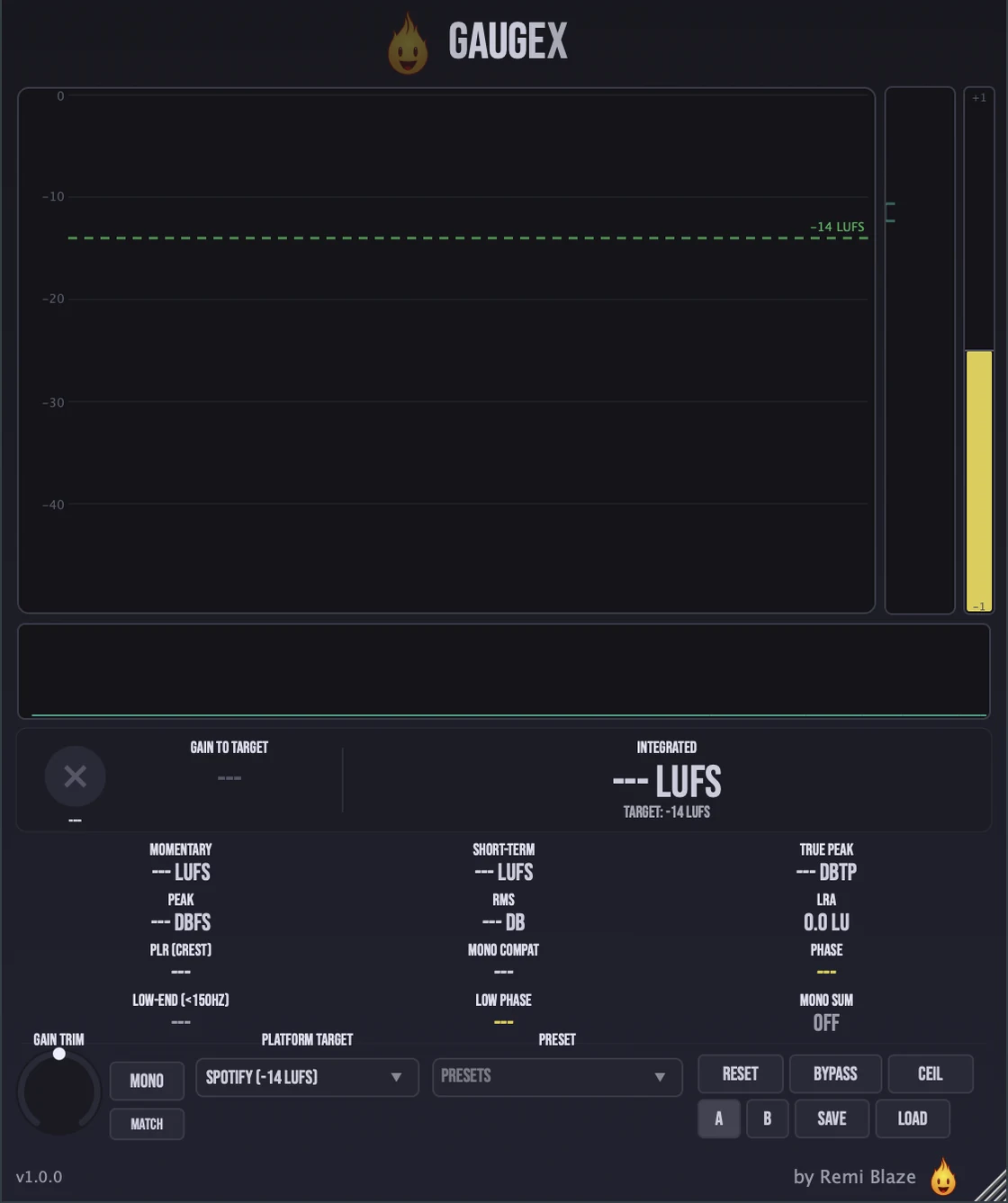
Need the full picture? Gaugex Pro goes deeper. The Pro version adds LRA and loudness range, RMS, PLR/crest factor, phase correlation and mono-compatibility, a spectrum analyzer, a 60-second history graph, gain trim with Match and A/B, and 15 factory presets. Every control is explained in the Gaugex manual.
Keyboard and mouse shortcuts
These work in every Gaugex Raw format (AU, VST3, CLAP, AAX, Standalone).
| Reset a control to its default | Double-click the knob or slider |
|---|---|
| Scroll to change a value | Hover over a knob and scroll the mouse wheel |
Frequently Asked Questions
Is Gaugex Raw free?
Yes. Gaugex Raw is completely free: freeware, no trial, no nag screens, no expiration.
What does Gaugex Raw measure?
Integrated LUFS is the hero readout, with an on-target light that turns green when you land within tolerance of your chosen streaming target. Small secondary readouts show momentary (400 ms), short-term (3 s), and true peak (dBTP, 4x oversampled).
Does Gaugex Raw change my audio?
No. Gaugex Raw is a bit-transparent, zero-latency passthrough: it measures a copy of your signal and never alters the audio. It never limits or clips; the true-peak readout warns you visually, it does not touch the sound.
How is Gaugex Raw different from Gaugex (Pro)?
Gaugex Raw gives you the single metric most people need: integrated LUFS versus a streaming target, plus three secondary readouts. The full Gaugex adds LRA, RMS, PLR/crest, phase correlation and mono-compat, a spectrum analyzer, a 60-second history graph, gain trim with Match and A/B, and 15 factory presets.
Does Gaugex Raw run on Apple Silicon and Windows?
Yes. Gaugex Raw is a Universal Binary that runs natively on Apple Silicon (M1/M2/M3/M4) and Intel Macs, and ships as a 64-bit build for Windows 10 and 11.
What formats does Gaugex Raw come in?
Gaugex Raw ships as AU, VST3, CLAP, AAX and a Standalone app on macOS, as a Universal Binary for Apple Silicon and Intel, plus VST3, CLAP and Standalone on Windows 10 and 11. AAX ships on macOS only. It runs in any AU, VST3, CLAP or AAX host: Ableton Live, Logic Pro, FL Studio, Cubase, Reaper, Bitwig and more.
Does Gaugex Raw add latency?
No. Gaugex Raw reports zero latency to the host, so it can sit anywhere in your chain without affecting playback or timing. It measures a copy of your signal and passes the audio through untouched.
Where can I find more about Gaugex Raw?
On the Gaugex Raw page: its features, system requirements and how to get it.
How do I get and install Gaugex Raw?
- Get it. Gaugex Raw is free. Get it from the Gaugex Raw page.
- Run the installer. On macOS, double-click the .pkg file and choose AU, VST3, CLAP, AAX or Standalone. On Windows, run the .exe installer and choose VST3, CLAP or Standalone.
- Open your DAW. Restart your DAW and rescan plugins if needed, then find Gaugex Raw under Remi Blaze in your plugin list.
More about Gaugex Raw, including its features and system requirements, is on the Gaugex Raw page.
Where are the plugin files?
If you need to find Gaugex Raw on disk, for example to troubleshoot or to uninstall it manually, these are the standard locations.
| macOS AU | ~/Library/Audio/Plug-Ins/Components/ |
|---|---|
| macOS VST3 | ~/Library/Audio/Plug-Ins/VST3/ |
| macOS CLAP | ~/Library/Audio/Plug-Ins/CLAP/ |
| macOS AAX | /Library/Application Support/Avid/Audio/Plug-Ins/ |
| Windows VST3 | C:\Program Files\Common Files\VST3\ |
| Windows CLAP | C:\Program Files\Common Files\CLAP\ |
To uninstall, quit your DAW and delete the Gaugex Raw file from the relevant folder. Your DAW will stop listing it on its next rescan.
Need help with Gaugex Raw?
If something isn't covered here, or Gaugex Raw doesn't behave as described, contact support or email support@remiblaze.com. To get an answer faster, include:
- your operating system and version (for example macOS 15.6 or Windows 11)
- your DAW and its version
- the format you're using (AU, VST3, CLAP, AAX or Standalone)
- the version you installed (shown in the installer and in your download), since the About panel of every Raw shows v1.0.0
- what you did, what you expected, and what happened instead
This manual is for Gaugex Raw 1.0.1. Controls and settings can change between versions, so if something here doesn't match what you see, check the version shown in your installer or download. Spotted a mistake or have a question? Let us know.
Spotify, Apple Music and YouTube are trademarks of their respective owners. Gaugex Raw is not affiliated with or endorsed by them; platform names indicate loudness targets only.