What is Subzix?
Subzix is a sub-bass enhancer and bass management plugin for Mac and Windows. It splits your signal at an adjustable crossover, sums the bass to mono for club systems, and gives you control of the low end: sub harmonics, saturation, envelope shaping and an internal sidechain pulse. The top band keeps its own stereo width and texture.
A Linkwitz-Riley crossover splits the sound at the Freeze Point. The sub harmonics, saturation, envelope shaping and the Pulse ducker work only on the bass band, so they never touch the highs; the top band has its own Width and Texture. The Ice Chamber display and the Ice Score show how well your low end will hold up on a mono club system.
How does a mono bass crossover work?
Bass that differs between the left and right channels can cancel when a club system or another mono system sums it. Subzix splits the signal at the Freeze Point with a Linkwitz-Riley crossover: below it, the bass is summed to mono; above it, the top band keeps its stereo.
The bass stages (sub harmonics, saturation, the envelope shaper and the Pulse ducker) work only on the band below the Freeze Point, so nothing you do to the bass colors the top. The top band has its own controls: Width, Texture and Top dB.
Quick start
Get a result with Subzix in under a minute.
- Insert it. Put Subzix on the track or bus you want to process.
- Pick a preset. Open the Presets menu and choose one close to what you want.
- Shape it. Work through the numbered controls below until it sounds right to your ear.
- Blend to taste. Pull Mix back from 100% if you want a subtler result.
- Compare. Bypass the plugin in your DAW to hear before and after.
The interface
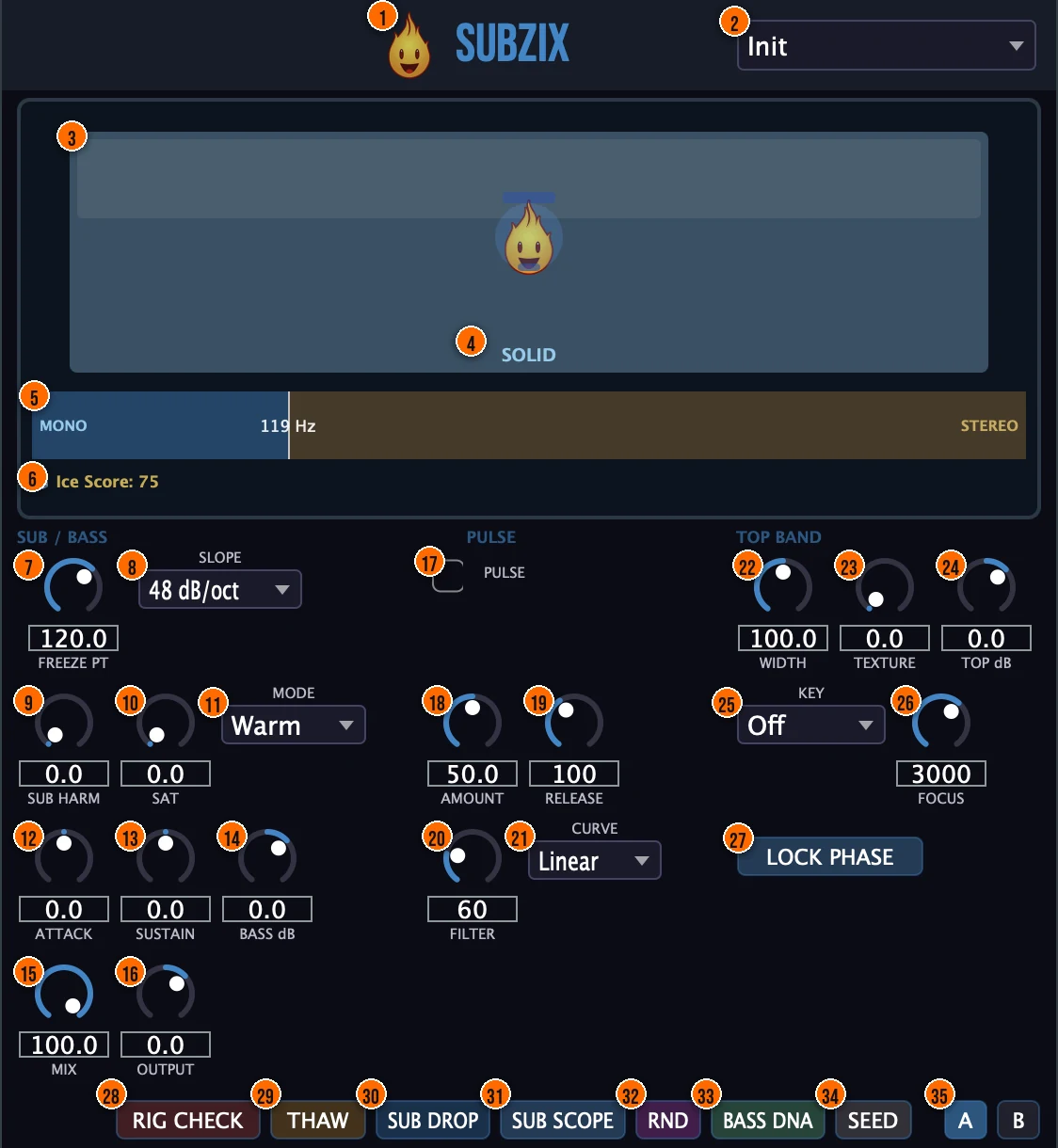
Controls
Top bar

- 1Fire Head: click the flame logo to open the About panel: what the plugin is, who made it, its version and the trademark notices. Click anywhere in the panel to close it.
- 2Presets: 12 factory presets for club, master-bus and mono-check work, from Club Ready and Floor Plan to Deep Sub, Master Bus and Mono Check.
Crossover
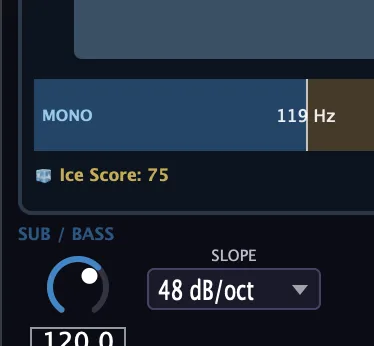
- 5Frequency bar: shows the bass band (blue, MONO) and the top band (orange, STEREO) with their level filling in, and the crossover frequency. Drag the divider to move the crossover in real time.
- 7Freeze Pt (Freeze Point): the crossover frequency: below it is the mono bass band, above it the stereo top band.20 to 250 HzTip For a tech house bass, start the Freeze Point around 80 to 150 Hz and adjust by ear while you watch the frequency bar.
- 8Slope: how steeply the crossover separates the two bands.24 or 48 dB/oct
Sub / Bass
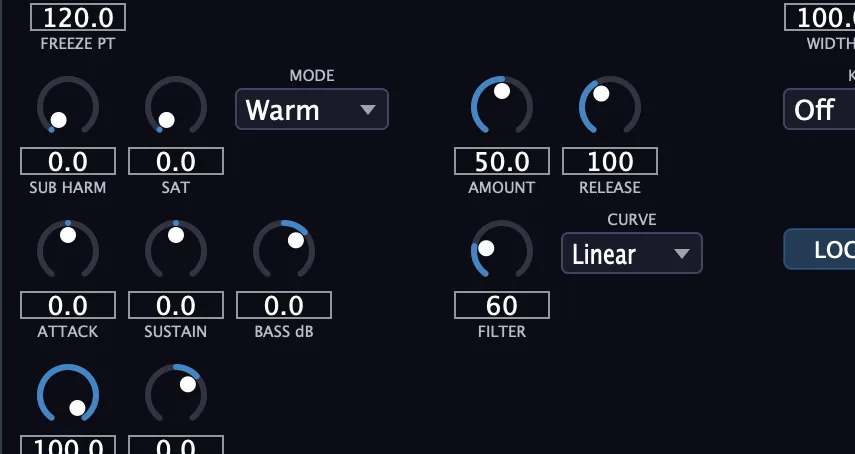
- 9Sub Harm (Sub Harmonics): adds an octave-down sine below your bass that follows its pitch. A rumble gate cuts the sub between notes, and energy capping keeps it from running away.Tip Start Sub Harm around 25 to 40% and listen for the octave-down sine under the bass. The rumble gate cuts the sub between notes, so it only sounds when the bass plays.
- 25Key (Bass Key): locks the sub harmonics to a musical note. When a note is set, a tuning indicator shows the detected note and whether it is in tune.Off, or C to B, default Off
- 10Sat (Bass Saturation): the saturation drive, on the bass band only, so the top end isn't colored. A DC blocker and a 25 Hz safety filter remove subsonic energy after it.Tip For parallel tube color, try Grind with Sat around halfway and Mix at 40 to 50%, then trim Bass dB.
- 11Mode: the saturation character. Warm is a smooth tanh soft clip. Punch is an asymmetric drive. Grind is tube saturation with a second-harmonic overlay.Warm, Punch or Grind
- 12Attack (Bass Attack): shapes the start of each bass note: positive values emphasize the attack, negative values soften it.−100% to +100%Tip Positive Attack values bring the start of each bass note forward; negative values soften it for a rounder note. Trim Bass dB after big changes so you compare at the same level.
- 13Sustain (Bass Sustain): shapes how long the body of the note holds.
- 14Bass dB (Bass Gain): the level of the bass band.
- 15Mix: blends the processed sound with the dry signal.
- 16Output: the final output level.−12 to +6 dB, default 0 dB
Pulse
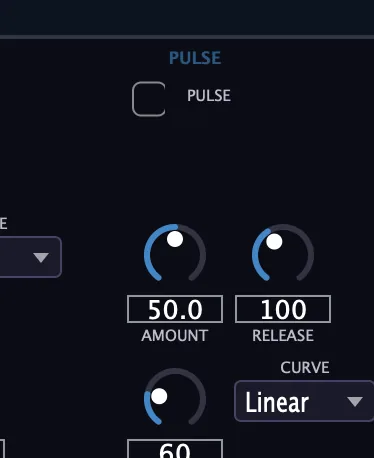
- 17Pulse: switches on the Sidechain Pulse: an internal ducker that detects kicks and ducks the sub, with no DAW sidechain routing. A 5 ms lookahead lets it react before the transient.Tip Pulse ducks the sub on each kick with no DAW sidechain routing. It has a 5 ms lookahead, so it reacts before the kick lands.
- 18Amount: how deep the sub ducks.0 to 100%, default 50%
- 19Release: how fast the sub comes back after the duck.30 to 500 ms, default 100 ms
- 20Filter: the high-pass cutoff on the signal the ducker listens to when it detects kicks.20 to 200 Hz, default 60 Hz
- 21Curve: the shape of the duck.Linear or Log
Top band
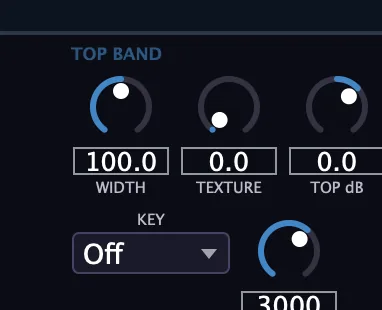
- 22Width: the stereo width of the top band.0 to 200%Tip If bass saturation makes the whole sound feel narrow, widen the top band with Width; the bass band stays mono.
- 23Texture (Top Texture): a bit-crush with random dropouts on the side (stereo) part of the top band, centered on the band you set with Focus.0 to 100%, default 0%
- 26Focus: the center of the band Texture works on, so content outside that band stays clean.500 to 8000 Hz, default 3000 Hz
- 24Top dB (Top Gain): the level of the top band.
Phase and checks
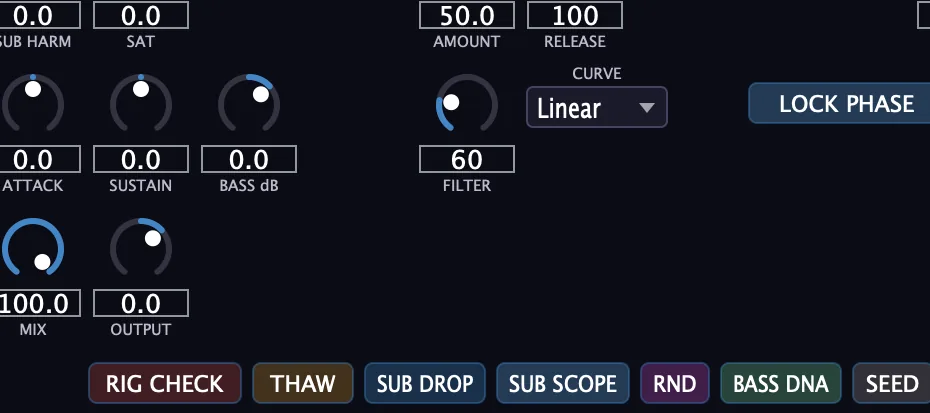
- 27Lock Phase (Phase Lock): Subzix keeps aligning the phase of the bass on its own, with a small delay it finds by scanning the correlation. Lock Phase holds the current alignment.Tip If Rig Check shows a red overlay, press Lock Phase to hold the current alignment and see whether the Ice Score improves.
- 28Rig Check: simulates a mono fold-down and shows in real time how the sub behaves on a mono system. A red overlay on the Ice Chamber shows when phase cancellation is reducing the sub.
- 29THAW: bypasses the processing, for a quick comparison against the dry signal.
- 30Sub Drop: plays a one-second sine sweep from 20 to 200 Hz, for instant impact.
- 31Sub Scope: shows or hides the Sub Scope, an oscilloscope of the bass waveform.
- 33Bass DNA (Bass DNA Report): generates a shareable text summary of the current bass analysis: phase, frequency balance and Ice Score.
- 34Seed (Frequency Seed): encodes your settings as a short string you can share or recall later. Enter a seed to restore those settings.Tip Send the seed string to a collaborator: they enter it in their own Subzix to restore your exact settings.
Compare and randomize
- 32RND (Randomize): new settings at random.
- 35A / B: compare two versions of your settings.
Meters and displays
- 3Ice Chamber: an ice block whose color, cracks and fragments follow Ice Integrity (the left and right bass correlation) in real time. The Fire Head inside shakes when integrity drops and tints blue when the bass runs cold.
- 4Status: the word under the Fire Head names the state of the Ice Chamber as it follows Ice Integrity: Solid, Stable, Cracking or Danger.
- 6Ice Score: a 0 to 100 bass health score: phase correlation counts for 50 points, the balance of bass and top energy for 25, and sub presence for 25. Club Ready is 80 or above; below that the status reads Stable, Cracking or Danger.
Key specs*
| Crossover | Linkwitz-Riley, 20 to 250 Hz, 24 or 48 dB/oct |
|---|---|
| Bass band | Summed to mono |
| Sub harmonics | Octave-down sine, pitch tracked by autocorrelation |
| Saturation modes | Warm (tanh), Punch (asymmetric), Grind (tube with 2nd harmonic) |
| Safety | DC blocker and 25 Hz safety filter after the saturation |
| Pulse | Internal ducker, Linear or Log curve, 5 ms lookahead |
| Top Width | 0 to 200% |
| Latency | 5 ms fixed lookahead, reported to your DAW |
| Frequency Seed | 22-character string |
| Factory presets | 12 |
* Key specs from the plugin page. Some specs may not be listed.
How does the sound flow through Subzix?
A simplified view of the main path.
How does Pulse duck the sub?
Pulse is an internal sidechain ducker: it listens to the full mix coming into Subzix, high-pass filters it to isolate kick transients, and ducks only the sub band. No DAW sidechain routing is needed. A 5 ms lookahead lets the duck land before the kick's transient.
Pulse works on the bass band only, so hi-hats and vocals pass through untouched. Raise Filter if the detector fires on things other than the kick.
How do I add sub weight to a bass and keep it mono-safe with Subzix?
- Split it. Put Subzix on the bass and set Freeze Pt, or drag the divider in the frequency bar, to where the bass should become mono.
- Set the key. Set Key to the root note of your track and watch the tuning indicator as the bass plays.
- Add the sub. Raise Sub Harm until the octave-down sine sits under the bass.
- Add drive. Pick Warm, Punch or Grind in Mode, raise Sat, then trim the bass band with Bass dB.
- Check in mono. Switch on Rig Check. If a red overlay appears on the Ice Chamber, the sub is cancelling in mono; press Lock Phase to hold the current alignment.
- Aim for Club Ready. Adjust until the Ice Score reads 80 or above, then switch Rig Check off.
How do I check a club mix for mono before I export it with Subzix?
- Load it. Put Subzix on the master bus, after any compression and saturation but before your limiter.
- Monitor only. Set Mix to 100% and Sat to 0%, so Subzix checks the low end without processing it.
- Fold to mono. Switch on Rig Check. A red overlay on the Ice Chamber means the sub is cancelling in mono.
- Read the score. Watch the Ice Score. If the overlay appears, press Lock Phase to hold the current alignment and see whether the score improves.
- Save a report. Click Bass DNA for a text summary of the phase, frequency balance and Ice Score at this stage of the mix.
- Export. Once the Ice Score stays at 80 or above (Club Ready) with Rig Check on, switch Rig Check off and move on to the limiter and export.
What about Subzix Raw?
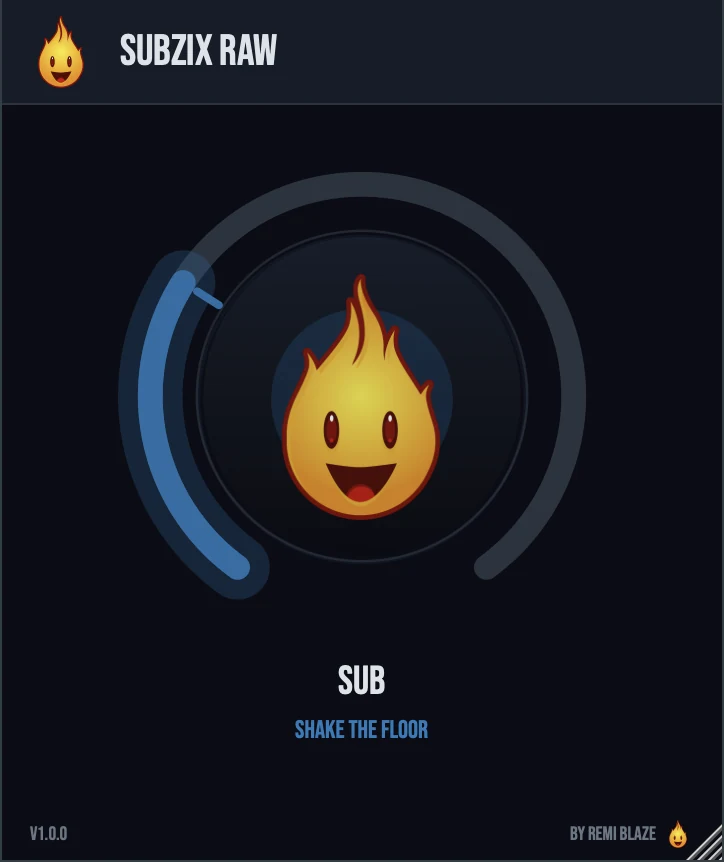
Subzix Raw is the free one-knob version, on the same sub-bass engine. Its SUB knob brings in pitch-tracked octave-down sub harmonics, low-end saturation and a touch of width on the top together. The gain is biased down as you push, so the low end gets heavier without getting louder, and at zero it is transparent. Its own manual: Subzix Raw manual.
Subzix vs. Subzix Raw
A side-by-side look at what each version includes.
| Feature | Subzix | Subzix Raw |
|---|---|---|
| Presets | Included | Not included |
| Randomize | Included | Not included |
| Mix (dry/wet) | Included | Not included |
| Output level | Included | Not included |
Keyboard and mouse shortcuts
These work in every Subzix format (AU, VST3, CLAP, AAX, Standalone).
| Reset a control to its default | Double-click the knob or slider |
|---|---|
| Scroll to change a value | Hover over a knob and scroll the mouse wheel |
| Type an exact value | Click the value below a knob and type a number |
Frequently Asked Questions
Does Subzix change my top end?
Only through the Top Band controls. The sub harmonics, saturation, envelope shaping and Pulse work on the bass band, so the highs pass through with only Width, Texture and Top dB touching them.
What does Lock Phase do?
Subzix keeps scanning for the small delay that lines up the left and right bass and moves to it smoothly. Lock Phase holds the alignment it has now, which helps while you check a mix in mono.
How do I share my settings or my bass analysis?
Seed turns your settings into a 22-character string that someone else can enter to get the same settings. Bass DNA creates a text summary of the current phase, frequency balance and Ice Score.
Does Subzix add latency?
Yes, a fixed 5 ms lookahead, which Subzix reports to your DAW so everything stays in time.
Where can I find more about Subzix?
On the Subzix page: its features, system requirements and how to get it.
How do I buy and install Subzix?
- Buy it. Subzix is a one-time purchase. Buy it from the Subzix page, and the store emails you the download link.
- Run the installer. On macOS, double-click the .pkg file and choose AU, VST3, CLAP, AAX or Standalone. On Windows, run the .exe installer and choose VST3, CLAP or Standalone.
- Open your DAW. Restart your DAW and rescan plugins if needed, then find Subzix under Remi Blaze in your plugin list.
More about Subzix, including its features and system requirements, is on the Subzix page.
Where are the plugin files?
If you need to find Subzix on disk, for example to troubleshoot or to uninstall it manually, these are the standard locations.
| macOS AU | ~/Library/Audio/Plug-Ins/Components/ |
|---|---|
| macOS VST3 | ~/Library/Audio/Plug-Ins/VST3/ |
| macOS CLAP | ~/Library/Audio/Plug-Ins/CLAP/ |
| macOS AAX | /Library/Application Support/Avid/Audio/Plug-Ins/ |
| Windows VST3 | C:\Program Files\Common Files\VST3\ |
| Windows CLAP | C:\Program Files\Common Files\CLAP\ |
To uninstall, quit your DAW and delete the Subzix file from the relevant folder. Your DAW will stop listing it on its next rescan.
Need help with Subzix?
If something isn't covered here, or Subzix doesn't behave as described, contact support or email support@remiblaze.com. To get an answer faster, include:
- your operating system and version (for example macOS 15.6 or Windows 11)
- your DAW and its version
- the format you're using (AU, VST3, CLAP, AAX or Standalone)
- the Subzix version, shown in the About panel (click the Fire Head)
- what you did, what you expected, and what happened instead
This manual is for Subzix 1.1.1. Controls and settings can change between versions, so if something here doesn't match what you see, check which version you have: click the Fire Head to open Subzix's About panel. Spotted a mistake or have a question? Let us know.