Sassix

Vocal Dynamics & Tone Maximizer

"A single-box vocal front-end that makes rap, spoken-word, and pop vocals sit on top of a heavy bassline: without ever getting harsh. The vocal mixes itself."

Sassix is one box that pushes a vocal up front, bright, and finished, replacing a de-esser, a compressor, and an exciter chain in a single pass. An automatic leveler and upward compressor pull quiet syllables, breaths, and tails forward, a phase-preserving de-harsher surgically tames the 2–8 kHz ice-pick zone, and clean transient and air stages help the vocal cut through. Built for female-rap, spoken-word, pop, and electronic vocals that need to sit on top of a heavy bassline without ever getting harsh.
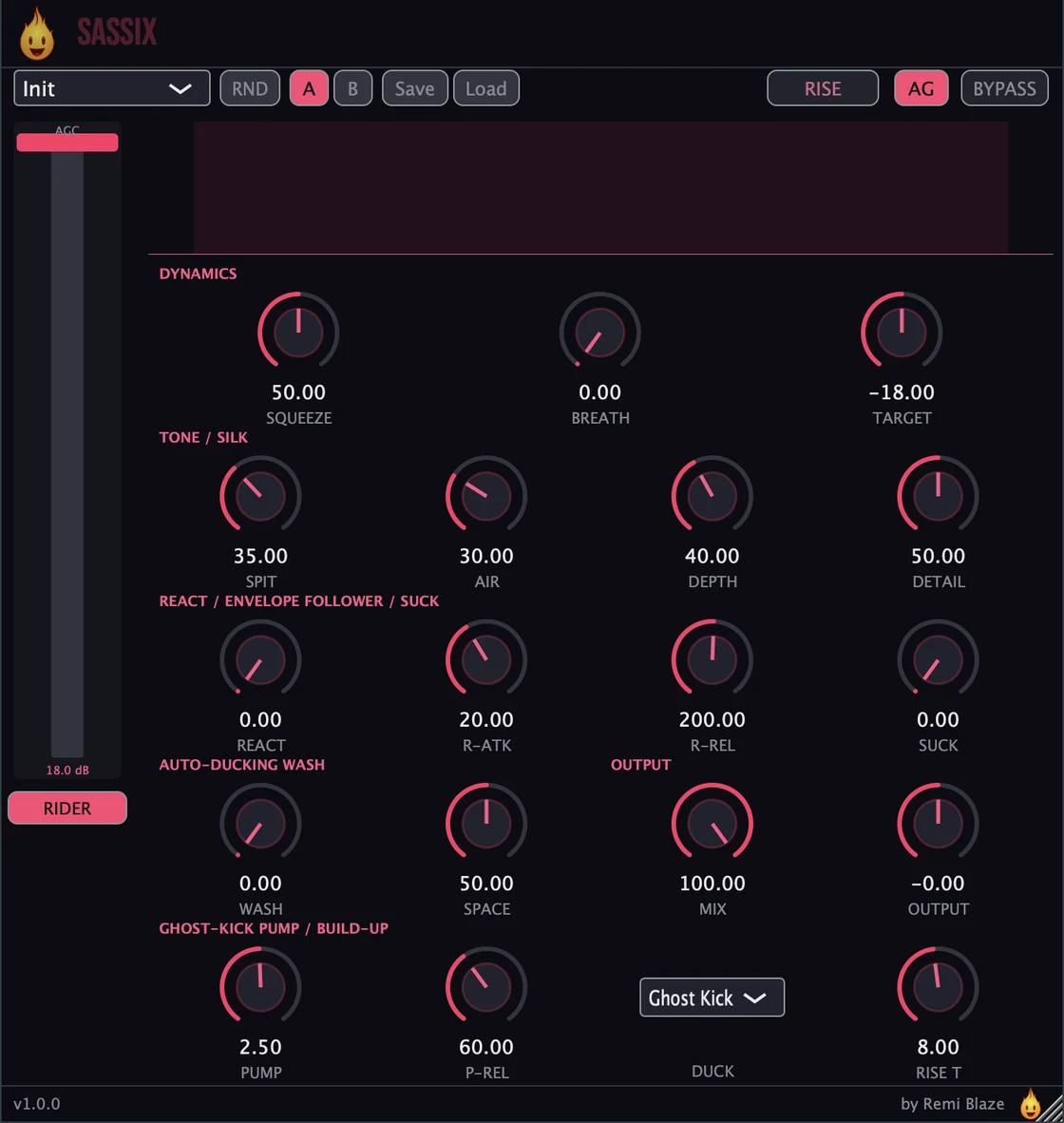
Sassix: Vocal Dynamics & Tone Maximizer: plugin interface for Mac and Windows
AU VST3 CLAP AAX Standalone macOS Windows

FEATURES

Dynamics

◆Squeeze: aggressive multiband upward compression that pulls quiet breaths and tails forward; the main density control, mapping threshold and ratio behind a single knob
◆Smart Breath-Duck: a pre-compressor detector that gently attenuates breath, lip-smack, and room noise before the rider, so the automatic leveler never violently amplifies it
◆AGC Rider: an invisible automatic leveler that flattens erratic source toward a target level before compression, with an auto-moving UI fader
◆Rider Target: adjustable -30 dB to -6 dB with an on/off toggle

React: The Self-Mixing Engine

◆React envelope follower: the input amplitude envelope dynamically modulates Spit and Silk depth so the vocal mixes itself
◆Louder input pulls saturation down and clamps the harsh band more; quieter input eases back to restore air and openness in the gaps
◆Control-rate, slew-limited modulation sampled once per block: no zipper noise, no added latency
◆React Attack (1-200 ms) and React Release (20-1000 ms) tune the modulator's responsiveness

Tone & Character

◆Spit: a transient designer focused on the 3-5 kHz presence band that adds consonant attack so vocals cut through, from neutral to aggressive presence punch
◆Silk: a phase-preserving FFT spectral de-harsher that scans only the 2-8 kHz ice-pick zone, with Depth and Detail controls and instant release so clean passages stay open
◆Air: an analog-modeled 10 kHz high shelf with a gentle resonant bump for clean exciter-replacement sheen up to +9 dB
◆Silk visualizer carves a darker notch out of the spectrum where harshness is suppressed: you see the de-harshing happen

Space, Ducking Wash

◆A lush parallel stadium space: a reverb fed with a short stereo feedback delay, blended at the Wash amount
◆Ducks itself out of the way under the vocal and blooms into the gaps: fully automatic with no host sidechain. Choose Ghost-Kick (tempo-locked 4/4 pump) or Vocal-envelope ducking, with adjustable pump shape and release
◆Wash Size drives room size, width, and delay time (90-270 ms) plus feedback: larger Size, bigger space
◆Fed from the latency-aligned dry so it stays phase-honest and never combs, and folded through the 0 dBFS ceiling so it can never clip

Performance FX

◆Suck: an inverse-envelope "gritty radio" effect that fills the gaps between phrases through a telephone bandpass and bitcrusher
◆Rise / Build-Up: a latching performance toggle that ramps into a tempo-synced wall of sound over an adjustable number of bars, then slams back to the dry vocal on release

Output & Workflow

◆Mix dry/wet blend (equal-power against the latency-aligned dry), Output trim (-12 dB to +12 dB), and Automatic Gain that matches output RMS to input so you hear shape, not just louder
◆2 ms look-ahead engine so the dynamics stages react before transients arrive, with constant statically-reported latency for hiccup-free playback
◆Randomize, A/B comparison, and preset save/load to XML; Bypass keeps every stage warm so toggling glitches nothing
◆0 dBFS true-peak ceiling and NaN/Inf protection: a maximizer that can never pass overs

FACTORY PRESETS

Init
Female Rap Front
Spoken Word Intimate
Ripped Vinyl Rescue
Bassline Cutter
Smooth De-Harsh
Bright & Airy
Aggressive Spit
Tape Vocal
Podcast Leveler
Remi Blaze Vocal

SYSTEM REQUIREMENTS

  • OS macOS 15.0+ · Windows 10/11 (64-bit)
  • Architecture Apple Silicon + Intel (Universal Binary) · x64 on Windows
  • Formats macOS: AU, VST3, CLAP, AAX, Standalone. Windows: VST3, CLAP, Standalone
  • DAW Any AU, VST3, CLAP or AAX compatible host
  • Access Paid plugin: one-time purchase

GET SASSIX

Sassix is a paid plugin: a one-time purchase, no subscription.

Also in the Vocal Bundle and the Producer Bundle: more plugins in one purchase, for less than buying them separately.

Licensed under the Commercial License.

FREQUENTLY ASKED QUESTIONS

How much does Sassix cost?

Sassix is $29, a one-time purchase. If you want to try the engine first, Sassix Raw gives you the essentials behind one knob.

Is there a manual for Sassix?

Yes. The Sassix manual walks through the controls with a numbered screenshot of the interface, plus a how-to and answers to common questions.

Does Sassix run on Apple Silicon and Windows?

Yes. Sassix is a Universal Binary that runs natively on Apple Silicon (M1/M2/M3/M4) and Intel Macs, and it also ships as a 64-bit build for Windows 10 and 11.

Which formats and systems does Sassix support?

AU, VST3, CLAP, AAX and a Standalone app on macOS 15.0 or later, as a Universal Binary for Apple Silicon and Intel Macs. VST3, CLAP and a Standalone app on Windows 10 and 11, 64-bit. AAX ships on macOS only.

How do I install Sassix?

On macOS, double-click the .pkg installer and follow the prompts; it installs every format at once. On Windows, run the .exe installer. The macOS build is code-signed and notarized by Apple and the Windows build is Authenticode signed, so neither needs a security override. No dongle and no extra account.

How is Sassix different from Sassix Raw?

Sassix Raw is the one-knob version: the same engine behind a single macro, with the detailed controls hidden. Sassix gives you the full control set.

Is Sassix part of a bundle?

Yes, in two. Sassix is in the Vocal Bundle, the vocal Pros with their one-knob Raws, and in the Producer Bundle, the paid Pro plugins. Each costs less than buying its plugins separately.

Where can I find more information about this plugin and who made it?

Inside the plugin. Click the Fire Head, the flame logo in the top bar, to open the About panel. It shows what the plugin is, who made it and its version, plus the trademark notices and a field worth exploring. Click anywhere in the panel to close it.