Morphix
Granular Vocal FX & Formant Morph
"Sculpt vocals into shimmering pads or glitchy textures: drop in a sample, drag across the XY formant pad, and morph."
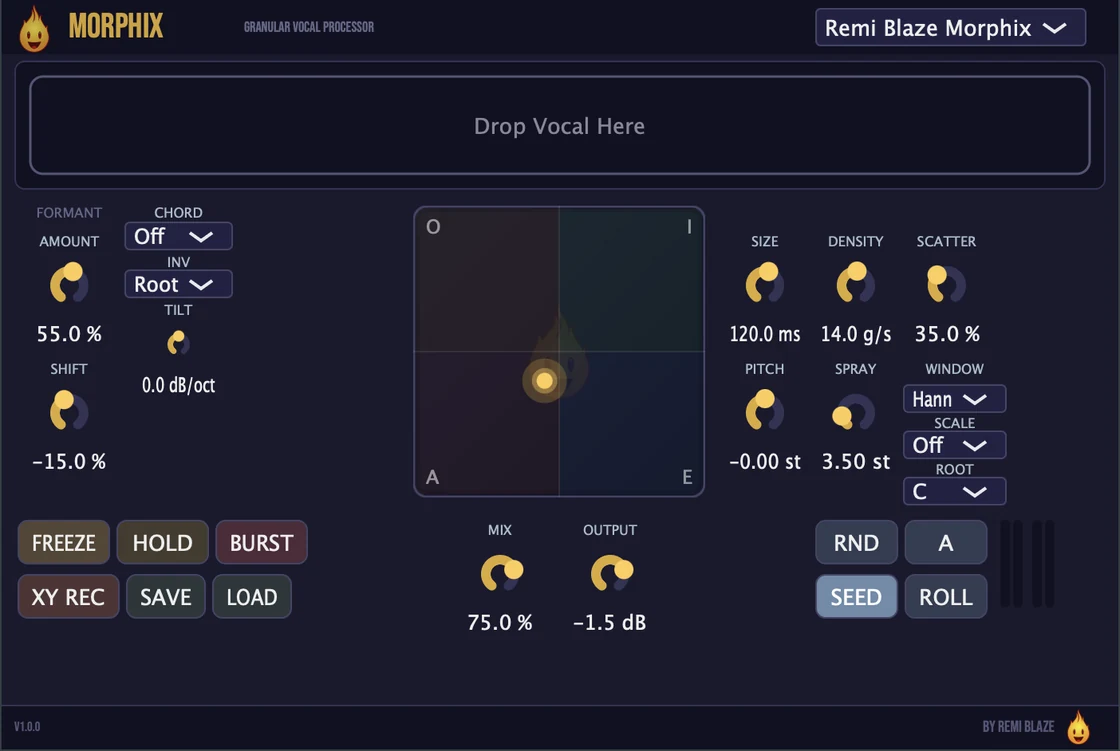
Morphix is a real-time granular processor for vocal manipulation and sound design. Drop in a sample, sculpt it with a full 64-voice grain engine, and morph its formants across an A/E/I/O vowel field on the XY pad. From a subtle natural doubler to frozen choral washes, glitchy stutters, and evolving ambient clouds: turn any vocal or sample into something entirely new.
Also in the Producer Bundle: the paid Pro plugins in one purchase, for less than buying them separately.
INSTALLATION
3 steps.
RUN THE INSTALLER
On macOS, double-click the Morphix_Installer.pkg and choose AU, VST3, CLAP, AAX or Standalone. On Windows, run the .exe installer and choose VST3, CLAP or Standalone.
CHOOSE YOUR FORMATS
On macOS you can install AU, VST3, CLAP, AAX and the Standalone app. On Windows: VST3, CLAP and the Standalone app. Pick the formats you want and that your DAWs support.
OPEN YOUR DAW
Restart your DAW and rescan plugins if needed. Find Morphix under Remi Blaze in your plugin list.
- Ableton: Plugins › Audio Effects › VST3
- Logic Pro: Audio Effects › Remi Blaze › Morphix
- Reaper: FX › VST3 › Morphix
FEATURES
Granular Engine
Formant XY Pad
Harmony & Pitch
Performance, Output & Presets
FACTORY PRESETS
SYSTEM REQUIREMENTS
- OS macOS 15.0 (Sequoia) or later · Windows 10 or 11 (64-bit)
- Architecture Apple Silicon + Intel (Universal Binary) · x64 on Windows
- Formats macOS: AU, VST3, CLAP, AAX, Standalone. Windows: VST3, CLAP, Standalone
- DAW Any AU, VST3, CLAP or AAX compatible host
FREQUENTLY ASKED QUESTIONS
No: Morphix is a paid plugin, yours with a one-time purchase and no subscription. If you want a free taste of the granular vocal engine first, grab Morphix Raw, the one-knob edition that's completely free.
Yes. The Morphix manual walks through the controls with a numbered screenshot of the interface, plus a how-to and answers to common questions.
Drop in a sample and Morphix rebuilds it from a 64-voice grain engine: from a subtle natural doubler to frozen choral washes, glitchy stutters, robotic formant voices, and evolving ambient clouds. You can granulate a loaded file or granulate live input in real time.
The XY pad morphs between A, E, I, and O vowel shapes, bilinearly interpolated across the pad corners. Three parallel band-pass formant filters (Q = 8) track the vowel field, and Formant Amount and Formant Shift let you blend and color the vowel character.
Chord Mode stacks harmonized grain voices: Power, Minor, Major, Octave, or the signature Blaze9 voicing, with a voicing spread that lifts the upper voices an octave and a spectral Harmonic Tilt. Scale Lock quantizes grain pitch to Off, Chromatic, Major, Minor, Pentatonic, or Blues in any root note from C through B, so everything stays in key.
Freeze locks the grain buffer to sustain a single moment indefinitely, and Freeze Hold latches that frozen state so it stays put. Seed Lock keeps the grain texture reproducible, so a saved project reloads sounding identical.
Yes. Morphix is a Universal Binary that runs natively on Apple Silicon (M1/M2/M3/M4) and Intel Macs, as AU, VST3, CLAP, AAX and Standalone. It also ships as a 64-bit build for Windows 10 and 11, as VST3, CLAP and Standalone.
Yes. Morphix is in the Producer Bundle, which has the paid Pro plugins in one purchase for less than buying them separately.
Inside the plugin. Click the Fire Head, the flame logo in the top bar, to open the About panel. It shows what the plugin is, who made it and its version, plus the trademark notices and a field worth exploring. Click anywhere in the panel to close it.
Installation guide is above. Need more help? Visit the support page.
TRY MORPHIX RAW FREE
Want the one-knob version?
Morphix Raw gives you the core granular vocal engine behind a single knob: completely free, part of the Blaze Essentials pack.
MORE PLUGINS
Morphix is part of a growing collection of tools designed by a producer, for producers. More plugins are on the way.
Licensed under the Commercial License.