Vaporate
Spectral Smear & Freeze
"FFT spectral blur that smears transients into lush cinematic textures: freeze any moment as an infinite ambient pad."
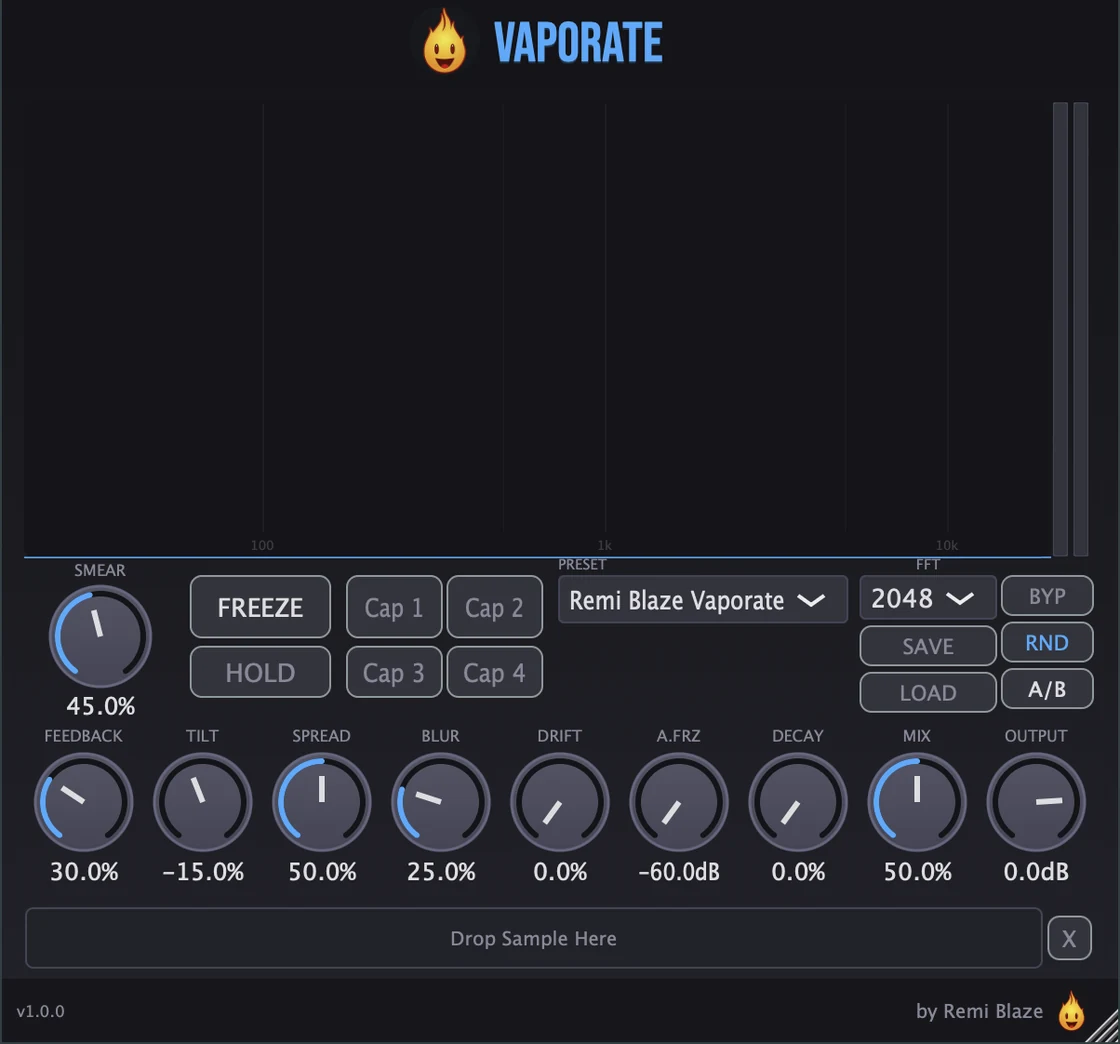
Vaporate is an FFT spectral processor that smears phase and freezes spectral magnitudes, turning vocals, drums, and synths into everything from subtle softening to endless ethereal atmosphere. Smear, freeze, drift, and feedback shape the texture in real time, while 4 capture slots and 22 factory presets keep inspiration flowing. Signed and notarized on macOS, code-signed on Windows. AU, VST3, CLAP, AAX and Standalone on macOS; VST3, CLAP and Standalone on Windows.
Also in the Producer Bundle: the paid Pro plugins in one purchase, for less than buying them separately.
INSTALLATION
3 steps.
RUN THE INSTALLER
On macOS, double-click the .pkg file and choose AU, VST3, CLAP, AAX or Standalone. On Windows, run the .exe installer and choose VST3, CLAP or Standalone.
CHOOSE YOUR FORMATS
On macOS you can install AU, VST3, CLAP, AAX and the Standalone app. On Windows: VST3, CLAP and the Standalone app. Pick the formats you want and that your DAWs support.
OPEN YOUR DAW
Restart your DAW and rescan plugins if needed. Find Vaporate under Remi Blaze in your plugin list.
- Ableton: Plugins › Audio Effects › VST3
- Logic Pro: Audio Effects › Remi Blaze › Vaporate
- Reaper: FX › VST3 › Vaporate
FEATURES
Spectral Engine
Freeze System
Captures & Under the Hood
Sources & Presets
See it in a session: How to freeze any sound into a pad with Vaporate
FACTORY PRESETS
SYSTEM REQUIREMENTS
- OS macOS 15.0 (Sequoia) or later · Windows 10 or 11 (64-bit)
- Architecture Apple Silicon + Intel (Universal Binary) · x64 on Windows
- Formats macOS: AU, VST3, CLAP, AAX, Standalone. Windows: VST3, CLAP, Standalone
- DAW Any AU, VST3, CLAP or AAX compatible host
IN THE PRESS
- RekkerdRemi Blaze releases Vaporate spectral smear & freeze effect plugin
October 12, 2026 · News - KVR AudioRemi Blaze updates Vaporate to v1.1 - Spectral Smear & Freeze Plugin for macOS & Windows (AU, VST3, CLAP & AAX)
October 11, 2026 · News
Articles describe Vaporate as it was on the day they were published. This page has the current formats and features. All coverage
HOW TO USE VAPORATE
How do I turn a vocal into a pad?
Press Freeze on the vowel you want and Vaporate holds that tone. Add Drift so it keeps moving and Decay if it should fade out.
How do I build a transition into a drop?
Push Feedback on the bar before the drop: the smear carries forward and gets blurrier, then pull it back as the drop lands.
How do I soften a harsh sound without adding reverb?
Use a little Smear. It blurs the attack by randomizing phase across frequency bands, and adds no room reflections.
FREQUENTLY ASKED QUESTIONS
Yes. Vaporate is a paid plugin: a one-time purchase with no subscription. Prefer to try before you buy? Vaporate Raw gives you the core spectral smear engine behind a single knob, completely free.
Yes. The Vaporate manual walks through the controls with a numbered screenshot of the interface, plus a how-to and answers to common questions.
Vaporate is an FFT spectral processor. It smears phase across frequency bins to blur transients into smooth texture, and it can freeze spectral magnitudes to hold any moment as an infinite ambient pad, turning vocals, drums, and synths into everything from subtle softening to endless atmosphere.
Freeze captures the current spectrum and holds it indefinitely as a sustained pad. There's a momentary Freeze Hold for live performance, plus an Auto-Freeze that engages automatically when the input drops below a threshold. Add Decay for controlled fade-outs and Drift so the frozen texture keeps evolving instead of sitting static.
Vaporate has 4 capture slots for saving spectral snapshots and recalling them on the fly. Switching between captures morphs smoothly between the stored magnitudes, so you can crossfade between textures without clicks.
Yes. Drag and drop WAV, AIFF, MP3, FLAC, or OGG files onto the waveform zone to run them through the FFT engine as source material, instead of live input. Vaporate ships with 22 factory presets, plus A/B comparison, Randomize, and save/load for your own presets.
Yes. Vaporate is a Universal Binary that runs natively on Apple Silicon (M1/M2/M3/M4) and Intel Macs, available as AU, VST3, CLAP, AAX and Standalone. It also ships as a 64-bit build for Windows 10 and 11, as VST3, CLAP and Standalone.
Yes. Vaporate is in the Producer Bundle, which has the paid Pro plugins in one purchase for less than buying them separately.
Inside the plugin. Click the Fire Head, the flame logo in the top bar, to open the About panel. It shows what the plugin is, who made it and its version, plus the trademark notices and a field worth exploring. Click anywhere in the panel to close it.
Installation guide is above. Need more help? Visit the support page.
TRY VAPORATE RAW FREE
Prefer a one-knob version?
Vaporate Raw gives you the core spectral smear engine behind a single knob: completely free, part of the Blaze Essentials pack.
MORE PLUGINS
Vaporate is part of a growing collection of tools designed by a producer, for producers. Explore the full lineup or stay in the loop for what's next.
Licensed under the Commercial License.