Pumpit
Volume Ducker
"Precision volume ducking with 10 curve shapes, three trigger modes, and a custom hand-drawn spline editor: from subtle groove pumping to aggressive sidechain crush."
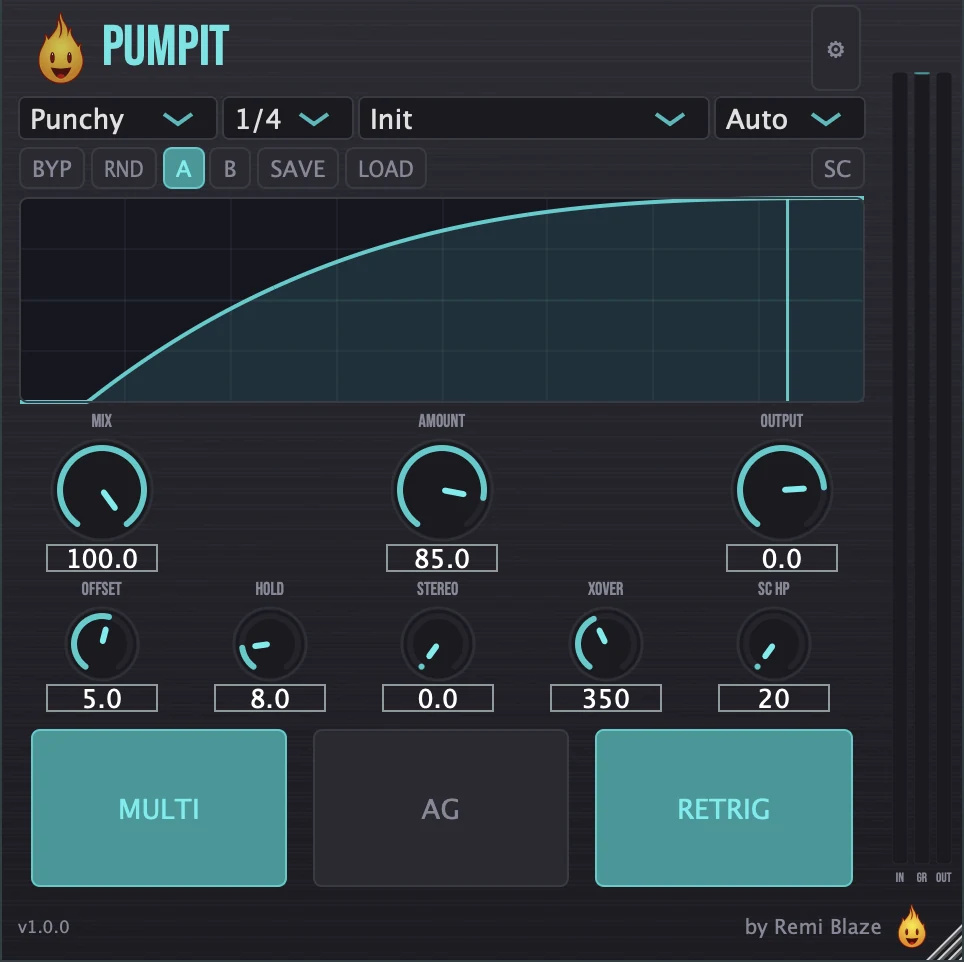
Get that pumping groove on any track. Pumpit is a tempo-synced sidechain ducker that shapes your signal with a volume-ducking envelope: sync it to tempo, trigger it from a sidechain input or MIDI notes, or draw the curve by hand. Ten curve shapes plus a custom spline editor and a Linkwitz-Riley multiband split give you everything from subtle movement to hard four-on-the-floor pumping. Free, Signed and notarized on macOS, code-signed on Windows. AU, VST3, CLAP, AAX and Standalone on macOS; VST3, CLAP and Standalone on Windows.
FEATURES
Ducking Engine
Three Trigger Modes
Multiband & Output
Monitoring & Workflow
FACTORY PRESETS
SYSTEM REQUIREMENTS
- OS macOS 15.0 (Sequoia) or later · Windows 10 or 11 (64-bit)
- Architecture Apple Silicon + Intel (Universal Binary) · x64 on Windows
- Formats macOS: AU, VST3, CLAP, AAX, Standalone. Windows: VST3, CLAP, Standalone
- DAW Any AU, VST3, CLAP or AAX compatible host
- Access Free: no account required
DOWNLOAD FREE
Pumpit is free: no account, no wallet, no strings. Get it from our store, which emails you the download link, then drop it in your DAW.
Licensed under the Freeware License.
HOW TO USE PUMPIT
How do I make the bass duck under the kick?
Set the trigger to Sidechain, send your kick to Pumpit's sidechain input, and raise Amount. Turn on multiband ducking to duck only the low band, so the top of the bass keeps playing. SC Listen lets you hear what the detector hears.
How do I get sidechain pumping without any routing?
Use the Auto trigger: Pumpit ducks on its own in time with your project at 1/1, 1/2, 1/4 or 1/8. Pick a curve such as Smooth, Punchy or Hard, or draw a Custom one.
How do I trigger the ducking from MIDI notes?
Set the trigger to MIDI and send notes to Pumpit, filtered to one note or Any. Useful when the rhythm you want to pump to is programmed rather than recorded.
FREQUENTLY ASKED QUESTIONS
Yes. Pumpit is completely free, with no account, no subscription and no trial period. Pumpit Raw is the one-knob version if you want something even simpler.
Yes. The Pumpit manual walks through the controls with a numbered screenshot of the interface, plus a how-to and answers to common questions.
Yes. Pumpit is a Universal Binary that runs natively on Apple Silicon (M1/M2/M3/M4) and Intel Macs, and it also ships as a 64-bit build for Windows 10 and 11.
AU, VST3, CLAP, AAX and a Standalone app on macOS 15.0 or later, as a Universal Binary for Apple Silicon and Intel Macs. VST3, CLAP and a Standalone app on Windows 10 and 11, 64-bit. AAX ships on macOS only.
On macOS, double-click the .pkg installer and follow the prompts; it installs every format at once. On Windows, run the .exe installer. The macOS build is code-signed and notarized by Apple and the Windows build is Authenticode signed, so neither needs a security override. No dongle and no extra account.
Pumpit Raw is the one-knob version: the same engine behind a single macro, with the detailed controls hidden. Pumpit gives you the full control set.
Inside the plugin. Click the Fire Head, the flame logo in the top bar, to open the About panel. It shows what the plugin is, who made it and its version, plus the trademark notices and a field worth exploring. Click anywhere in the panel to close it.